[Release] iTunes Skin Manager/Creator v0.0.0.1

At long last people, iTunes Skin Manager and iTunes Skin Creator have been released.

If you want more information, goto http://itunes.runasoft.net

edit: if the above link doesn't work or you get a domain cloaking error, please visit http://runasoft.net/iTunes/ instead..

please be sure to read the very first news post about refreshing the pages..

Thank you to nightcrawler1089 for the review and thanx to aqua-soft and everyone else who made this release possible :)

- Runasoft

#254464

Woohoo, first post! I'd like to say that the reviewer did a great job. And yeah, I guess the program was okay too. Whatever. Props to the reviewer!

-NC

#254466

YESSSSS Finally, runasoft, i love you :D

#254506

YESSSSS Finally, runasoft, i love you :D

hehe, No problem :) I know this release has been long awaited and I just hope it lives up to its expectations :)

- Runasoft

#254508

Woohoo !! First one to buy it :) . Now waiting to download.

#254509

Woohoo !! First one to buy it :) . Now waiting to download.

Actually your the second one :) but close :)

By the way.. Thank you to everyone who has already purchased iTunes Skin Manager. Remember if you have any problems with anything.. logging into your account, registration etc.. feel free to email me at problems@runasoft.net so we can get everything sorted out. So far everything has been going perfectly and registrations have been quick and painless :)

- Runasoft

#254510

Actually your the second one :) but close :)

- Runasoft

Damn it. :mad:

#254513

shure does take a long time to get it running.

Also i would have liked to see a release with at least a few skins :/ (i can whine cause i paid for it :P )

Why didnt you release the skinning program to some of the more well known skinners, and im shure they would have made skins for it. You could have even increased the price .25c and paid the skinners.

#254515

Why didnt you release the skinning program to some of the more well known skinners, and im shure they would have made skins for it. You could have even increased the price .25c and paid the skinners.

Said skinner (bzeitler) was busy. He'll release them eventually.

-NC

P.S: runasoft, do you mind if i speak for you on a small thing like that?

#254521

Said skinner (bzeitler) was busy. He'll release them eventually.

-NC

P.S: runasoft, do you mind if i speak for you on a small thing like that?

I don't mind at all. I couldn't release to a few skinners because I was using bzeitler as a beta tester as well as a skinner. More skins are sure to come in a the next few days you can be assured of that :) atleast you got all of the registration and things out of the way right ? :)

- Runasoft

#254524

I thought this was impossible, but then again, we all thought OS X on a PC was impossible until PearPC came out.

Great job!

EDIT: oh. you godda pay for it. I don't think it's worth paying for... a tool. I think it should be freeware. But good app anyway.

#254525

Awesome news...

#254531

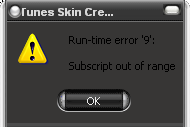
not to be rude or anything, but does the skin maker actualy work, every time i try to replace an image it just gives me a "run time error 9 script out of range" and crashes.

#254532

not to be rude or anything, but does the skin maker actualy work, every time i try to replace an image it just gives me a run time error and crashes.

The program does work and so far its worked for everyone who has tried it but you.

Can you please walk me through the exact process you are going through right when the error occurs.

Are you choosing an image and clicking replace and then it happens

or is it simply when you choose "replace element"

Please walk me through step by step because otherwise I can't help you.

- Runasoft

#254534

SS. It happens when i go to replace element in thr right click menu. Happens right after i left click on the right click menu. No dialog pops up, only the error. Export and edit work though.

its a firaly fresh install with little modding, up to date with SP2

edit: if i didnt say it already its a great program so far, with the default skin anyway :P

post-2197-1108262144_thumb.png

Untitled-2 copy.png
Untitled-2 copy.png

#254535

SS. It happens when i go to replace element in thr right click menu. Happens right after i left click on the right click menu. No dialog pops up, only the error. Export and edit work though.

its a firaly fresh install with little modding, up to date with SP2

edit: if i didnt say it already its a great program so far, with the default skin anyway :P

It's a little mind boggling that I didn't account for this kind of error since its such a complex function. I should have provided more error information or done some actual error checking.. Would you mind sending me a PM with your email so that we can get to the bottom of this error ?

- Runasoft

#254540

Thank You God For Putting Runasoft On Earth!

#254545

Great work runasoft :D :D

As nightcrawler mentioned.. I am working on several skins at this moment. I have been running out of time lately because I have been working on several projects as well as my "real" job.

That being said.. the itunes skin for Samui is complete and will be released with teh samui gui kit soon .

I am also about 50 percent done with Milk for itunes. I will also be completing a few more shortly so dont be too impatient.

This is a great program and is worth every penny.

#254553

nice app :) gonna try this

#254574

ok so i bought it and everything, and then i downloaded the registration key for the skin manager, but when i load the key, it says "invalid key file, exiting. error message 4"

i redownloaded everything already and it still doesnt work... i really want to try this thing out since i just payed for it, i hope theres a solution.

runasoft: my email is arnaud_crowther@hotmail.com if you want my user name and password info

#254578

Needless to say... I loaded the skin creator and WOW! iTunes has a lot of resources!

Now to go create my Siro and Milk skinnies... :D

#254580

Does the Skin creator come with a Preview window?

I'm not being a cheapskate, I will buy the Skin Manager eventually, I currently have no way of paying someone over the net as my bank is being so tight-arsed I have to get all my cash out over the counter in a manner that takes about 20 minutes to sort out my accoun so that I can actually withdraw any of the £500 in it.

Ok... thanks to my connection it has taken me an hour to post this reply...sorry if it makes multiple replies.

#254585

Does the Skin creator come with a Preview window?

I'm not being a cheapskate, I will buy the Skin Manager eventually, I currently have no way of paying someone over the net as my bank is being so tight-arsed I have to get all my cash out over the counter in a manner that takes about 20 minutes to sort out my accoun so that I can actually withdraw any of the £500 in it.

Ok... thanks to my connection it has taken me an hour to post this reply...sorry if it makes multiple replies.

Yes, the skin creator does come with a preview window. You are able to preview every resource before and after you replace them.

- Runasoft

#254586

Does this break or disable usage of the iTunes Multiplugin? And/Or can it skin the OSX-style Close/Maximize/Minimize buttons within (or without?) the Multiplugin? That's the only hangup for me right now because I've gotten so used to the bubbles in iTunes on the left side of the title bar. Other than that, it looks superb!

#254617

Does this break or disable usage of the iTunes Multiplugin? And/Or can it skin the OSX-style Close/Maximize/Minimize buttons within (or without?) the Multiplugin? That's the only hangup for me right now because I've gotten so used to the bubbles in iTunes on the left side of the title bar. Other than that, it looks superb!

it should not hinder the performance of Multi-Plugin but, I do see a problem when the skin has been changed completely.. because then u are dealing with the titlebar image of multi-plugin.. so it may look different

- Runasoft

#254623