 Aqua-Soft Forums
When I open Avedesk, it pops up a error message like the screenshot.
Also, the ObjectDock Plus have a same problem like this(0xc0000034). :slant:
Please help me!
P.S. Samurize have not that such problem on my system...
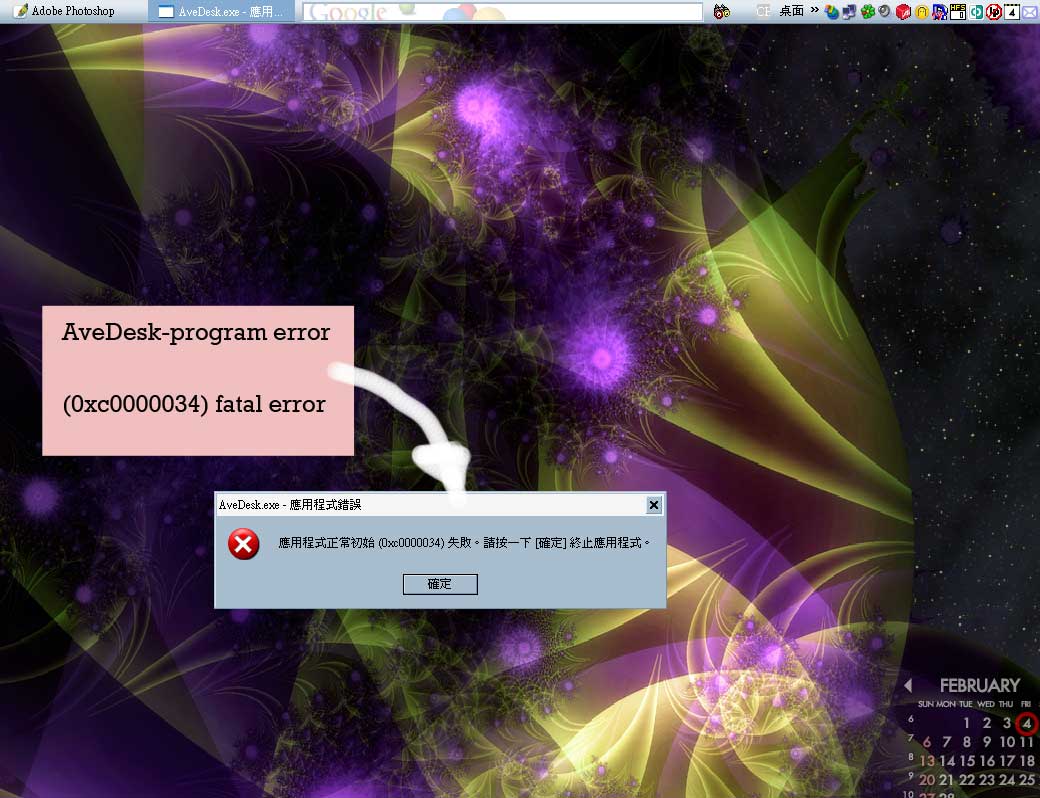
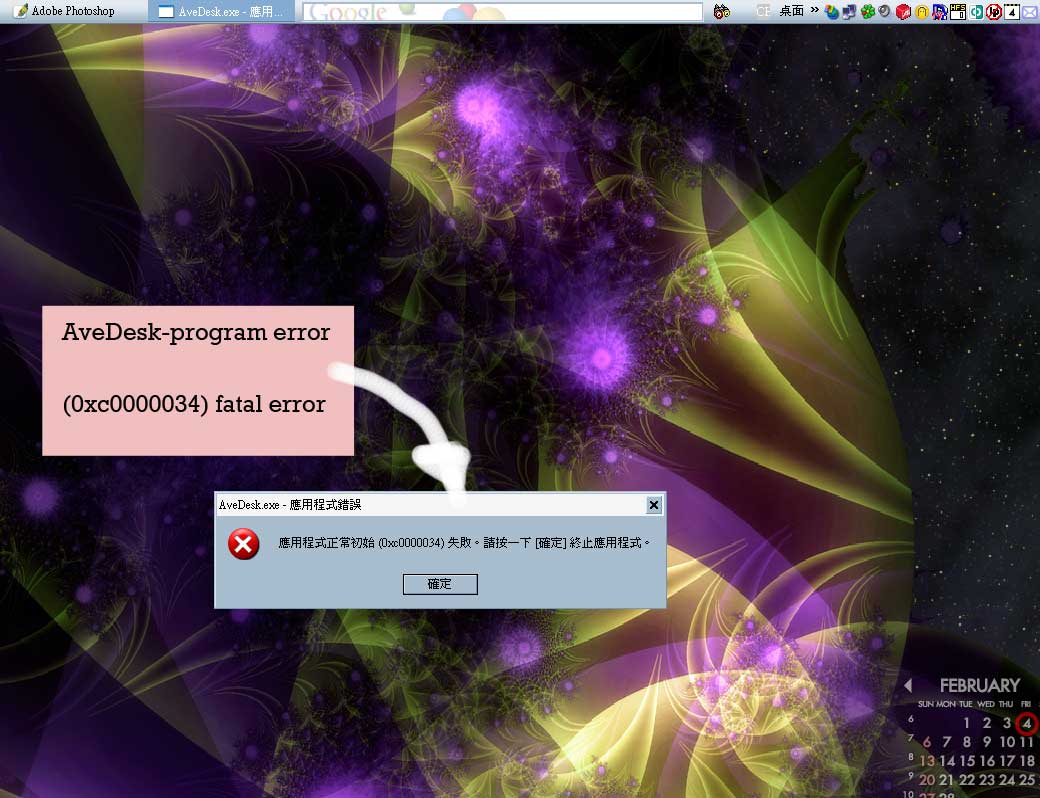
When I open Avedesk, it pops up a error message like the screenshot.
Also, the ObjectDock Plus have a same problem like this(0xc0000034). :slant:
Please help me!
P.S. Samurize have not that such problem on my system...
This is not one of the usual well known exceptions, however since its common to both AveDesk and ObjectDock, I have some ideas:
Ereignistyp: Informationen
Ereignisquelle: Application Popup
Ereigniskategorie: Keine
Ereigniskennung: 26
Datum: 02.02.2005
Zeit: 18:04:13
Benutzer: Nicht zutreffend
Computer: PUTZL
Beschreibung:
Anwendungspopup: AveDummyWindow: AveDesk.exe - Fehler in Anwendung: Die Ausnahme "unknown software exception" (0x80000003) ist in der Anwendung an der Stelle 0x0052ef9e aufgetreten.
Klicken Sie auf "OK", um das Programm zu beenden.
Given this number, we can locate the point where the error happened.
Ist that a bug in SysStats i allways get that error with avedesk and objectdock when i use SysStats. :slant:
Ps: it really does get annoying 
Yes..
My system have not GDIPLUSS.DLL.
So I downloaded it form Microsoft
But, Where should I put it to?
I have tried paste the DLL to C:windowssystem and system32 folder
It's useless. The error still appear.
Moreover, I can't find the Avedesk error log on the Event viewer
Yes..My system have not GDIPLUSS.DLL.
So I downloaded it form Microsoft
But, Where should I put it to?
I have tried paste the DLL to C:windowssystem and system32 folder
It's useless. The error still appear.
Moreover, I can't find the Avedesk error log on the Event viewer
To confirm if Sonics is right about SysStats, please do the following:
Open a command prompt at c:program filesAveDeskDeskletsSysStats (or wherever you put sysstats.dll in)
type ren sysstats.dll sysstats._dll
hit enter
start AveDesk. If it still crashes, the problem isn't related with SysStats.
Re. Event viewer:
Look again. Its there under the System protocol node.
Icon: (i) Type: Information Source: Application Popup. It doesn't have AveDesk written on it so you have to look into each I'm afraid, but you can click on the Source column and view them Application Popups pretty quickly.
I have found the error log. But it's "Application Error" type. And apologize that it's Chinese. I try to translate to English. Hope you can read it.
事件類型(Event Type): 錯誤(Error)
事件來源(Event Source): Application Error
事件類別目錄: 無
事件識別碼: 1000
日期: 3/2/2005
時間: 23:47:39
使用者: N/A
電腦: FISHIN
描述:
失敗的應用程式(Fail program) avedesk.exe,版本(Version) 1.1.0.0,失敗的模組(Fail Module) unknown,版本(version) 0.0.0.0,錯誤位址(error address) 0x0012a4c4。
請在 http://go.microsoft.com/fwlink/events.asp 查看說明及支援中心,以取得其他資訊。
資料:
0000: 41 70 70 6c 69 63 61 74 Applicat
0008: 69 6f 6e 20 46 61 69 6c ion Fail
0010: 75 72 65 20 20 61 76 65 ure ave
0018: 64 65 73 6b 2e 65 78 65 desk.exe
0020: 20 31 2e 31 2e 30 2e 30 1.1.0.0
0028: 20 69 6e 20 75 6e 6b 6e in unkn
0030: 6f 77 6e 20 30 2e 30 2e own 0.0.
0038: 30 2e 30 20 61 74 20 6f 0.0 at o
0040: 66 66 73 65 74 20 30 30 ffset 00
0048: 31 32 61 34 63 34 0d 0a 12a4c4..
Thanks herd,
I have fixed the problem and i can use the Avedesk and object dock now after i read this post: http://www.aqua-soft.org/board/showthread.php?t=17505
Using DependencyWalker to find the GDIPLUS.DLL
And I put the dll to right place (c:windowswinsxsx86_microsoft.windows.gdiplus_6595b64144ccf1df_1.0.2600.1360_x-ww_24a2ed47GDIPLUS.DLL)
Thanks herd,I have fixed the problem and i can use the Avedesk and object dock now after i read this post: http://www.aqua-soft.org/board/showthread.php?t=17505
Using DependencyWalker to find the GDIPLUS.DLL
And I put the dll to right place (c:windowswinsxsx86_microsoft.windows.gdiplus_6595b64144ccf1df_1.0.2600.1360_x-ww_24a2ed47GDIPLUS.DLL)
I'm glad I could help (without actually doing anything)
I take this as an invitation to incorporate some sanity checks into avedesks boot-up procedure.
It should at least complain if something as critical as its rendering engine goes amiss...
You are a Good Developer!
If I have not your post, I can't fix that anymore.
It's good for adding it into the program, I think.
Thanks again..