
[help] where to change these icons?

Im using iconpackager and i have never had any problems with it...

now i can change these icons though, i have no idea why they have this explorer-icon now.

I have tried to rebuild the iconcache, restore the original icons and then apply the theme again but these icons just wont change. I havent chaned anything with reshack or so, only iconpackager. Thanks.
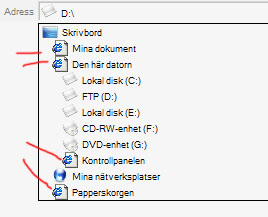
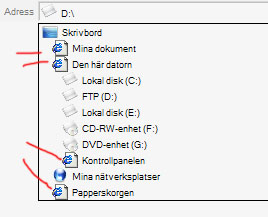
post-20354-1107045657_thumb.jpg

Namnlöst-1.jpg
Namnlöst-1.jpg

#250225

Download and install FlyakiteOSX v1.0. That changes all your icons and your cursors.

#250236

Control Panel-->Folder Options-->Filetypes-->htm-->Properties/Advanced-->Change Icon. Pick the one you want.

-NC

#250246

thanks for the advice majestic but i really like and want the SNOW.E 2 icons. Thanks nightcrawler, i tried that, couldnt find anything there to make it work though. It seems like if i doubleclick on the icon when its in the adress-field it changes temporary to the right one, but then it its the ugly explorer icon again.

Is there a way i can reshack and change all closed icons and the most common icons in an easy way so i could do that instead of using inconpackager?

#250307

IconPhile--google it. My way works for nearly all filetypes, but HTM occasionally gives it problems (especially if you have Firefox installed!).

Hope that helps,

-NC

#250395

IconPhile--google it. My way works for nearly all filetypes, but HTM occasionally gives it problems (especially if you have Firefox installed!).

Hope that helps,

-NC

I don't think that IconPhile will help. You should replace this icon in the system file.

Try to search for it in MSHTML.DLL, but I'm not sure. It was so long ago... :confused:

#250419

ResHack will do the trick IF you know what dll the icon is in. If you have Firefox installed and defaulted, just ResHack firefox.exe to change it.

#250424