
[Observation] Modifying msgina.dll

The other day I was looking for things to customize on my windows install. It occured to me that the shutdown dialog has been bugging me for a while, as it was very default-ugly if you will.

So I started looking for some nice looking msgina.dll files around many customization forums, but alas, I found none that suited my tastes. Being the person that I am, I could not tolerate failure. I decided to make my own custom shutdown dialog.

Earlier I had stubled across a nice tutorial by acedriver, so I read through his instuctions and created my aesthetically superior logoff/shutdown dialog boxes. Now, these dialogs looked great; at times I wanted to click shutdown just to stare at the beauty of the interface.

Anyhow, during this process I had to replace three files: shell32.dll, themeui.dll, and msgina.dll.

The first two files modified the appearance of the logoff and "changing visual style" dialogs. The last file, msgina.dll, took care of the shutdown window.

Everything seemed nice and dandy until I noticed that my computer would no longer hibernate! I'm not quite sure how many of you guys are using that feature but I find it very useful in reducing boot times.

After some investigation (and finding NO solutions through google and newsgroups) I noticed that I was getting alerts in the system event log. Under event ID 240, the event viewer told me that winlogon.exe was denying all my supend power requests?! So, I figured this must have had something to do with my recent modification of my system files. I eventually narrowed down the possibilities and found out that changing the contents of msgina.dll caused winlogon.exe to behave in this way.

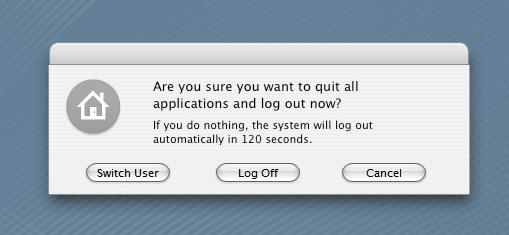
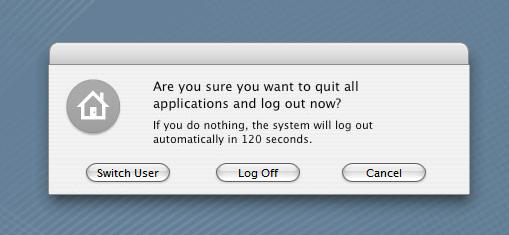
If anyone is interested in the details, in the msgina.dll I changed dialog #20100 to make the shutdown window look like the one in OSX. I also replaced some bitmap files, but those could not have caused the problem.

That was my observation, and it is bugging for now I can't use my nice looking shutdown dialog.

I'm wondering, if any of you aqua-softians who are using the hibernate/suspend feature of XP experience anything similar with a modded msgina.dll.

If not, I guess I'll leave this thread as an information post, in case anyone in the future runs into similar problems.
post-1571-1104359427_thumb.jpg

shell32.JPG
shell32.JPG

#241492

ah ha!! i miss my hibernate. now i know why: i'm using flyakitesp2, which in fact does mod the msgina.dll. ( i know it's totally immature, but i always snigger when i say, 'msgina.') LOL!!!

anyways, i now manually hibernate using herd's hibernate vbscript. (IF i remember!)

thx for doing the homework. think there's a solution?

edit: not a big deal, but it's not a vbscript. it's an exe.

#241494

Don't think there is a solution. My guess is winlogon.exe doesn't like the fact that you're changing the layout of the shutdown window. Because the modification involves replacing shutdown, logoff, restart button images (bmp files from the original dialog) with buttons that are actual buttons drawn by the themeing engine.

The best case scenario would be to leave out the dialog modification and just replace the bmp files to make the window look a little more tolerable. But, again, if you want to change the button layout and such you'll probably encounter problems.

Interestingly enough I never came across the hibernate script you mentioned.

Do you have a download link or a thread?

And I wonder if I can assing that script to the hibernate button on my keyboard.

#241495

link for script is in herd's signature. and if your keyboard buttons are programmable, it should work. funny, i just got home and checked my event log. nothing. (nothing relevant, that is.)

#241500

ah ha!! i miss my hibernate. now i know why: i'm using flyakitesp2, which in fact does mod the msgina.dll. ( i know it's totally immature, but i always snigger when i say, 'msgina.') LOL!!!

anyways, i now manually hibernate using herd's hibernate vbscript. (IF i remember!)

thx for doing the homework. think there's a solution?

Is Chris aware of this? Do you think he has fixed that problem with the upcoming FlyakiteOSX?

#241540

i don't think chris knows. but as voltaic has been saying, it looks like it's just the nature of the beast. if you modify msgina, winlogon ain't gonna dig it.

#241545

Do you mean an automatic hibernate is no longer allowed?

My laptop goes into hibernation after closing the lid, just as specified in the power settings, and I do have a modded msgina.dll. Button layout is changed along with background bitmap.

I also see nothing in my event viewer. Oh well.

#241547

well, i think voltaic is definitely more qualified to answer this, but, hell, that's not gonna stop me! ;)

yes, if i follow you, you are correct. in your case, closing the lid is the same as hitting a button. but if you adjust your power settings to hibernate after - oh, say - 30 minutes of inactivity, it should not work, if what voltaic is saying is correct. i can only speak for myself when i say, 'hey, my pc doesn't hibernate and hey! i've got a modded msgina! voltaic is right.'

i would think we'd need a larger sample group to confirm this. well, i'd need a larger sample group. one shmengie does not a fact make...

#241549

I just set my computer to hybernate when I press my power button :S

#241589

Thanks for the credit guys but I don't think I'm more qualified to say things than all of you are.

I was merely making an observation, and hence the tag.

Anyway, the point of the thread is to find out if the hibernation problem is true for everyone with a modded msgina.dll.

What sketching is saying is very interesting because it completely contradicts what I've experienced. Just to be on the same page I'm using XP SP2. And I must add, closing the lid is the same process as pressing the hibernate/sleep button on the keyboard; they both go through the same process to power down the system.

Now, if we're having an inconsistency in behavior, I think it would be best to post the relevant contents of the msgina.dll file here.

Dialog #20100 in my dll file looks like the following:

20100 DIALOGEX 0, 0, 240, 69
STYLE DS_SYSMODAL | DS_SETFOREGROUND | WS_POPUP | WS_VISIBLE | WS_CAPTION
CAPTION ""
LANGUAGE LANG_ENGLISH, SUBLANG_ENGLISH_US
FONT 8, "MS Reference Sans Serif"
{
CONTROL "Cancel", 2, BUTTON, BS_PUSHBUTTON | WS_CHILD | WS_VISIBLE | WS_TABSTOP, 184, 52, 50, 11
CONTROL "&Sleep", 20104, BUTTON, BS_PUSHBUTTON | BS_NOTIFY | WS_CHILD | WS_VISIBLE | WS_TABSTOP, 11, 52, 50, 11
CONTROL "ShutDown", 20103, BUTTON, BS_PUSHBUTTON | BS_NOTIFY | WS_CHILD | WS_VISIBLE | WS_TABSTOP, 69, 52, 50, 11
CONTROL "&Restart", 20105, BUTTON, BS_PUSHBUTTON | BS_NOTIFY | WS_CHILD | WS_VISIBLE | WS_TABSTOP, 127, 52, 50, 11
CONTROL "&Hibernate", 20106, BUTTON, BS_PUSHBUTTON | BS_NOTIFY | WS_CHILD | WS_VISIBLE, 30093, 30049, 22, 20
CONTROL 20141, 0, STATIC, SS_BITMAP | WS_CHILD | WS_VISIBLE | WS_GROUP, 20, 5, 41, 36
}

I'm curious if there is a "good" way of modifying the buttons where you don't disturb winlogon.exe.

Hopefully we'll be able to figure this out if you guys want to post what your msgina looks like (somehow that sentence sounds inappropriate :o )

#241628

hrmm, as i recall, my hibernate still works. just go to the shut down dialog, and press on the keyboard 'h'. should hibernate.

#241664

yes, but that's not what we're talking about. we're talking about auto-hibernate as defined in your power settings.

#241669

hrmm, as i recall, my hibernate still works. just go to the shut down dialog, and press on the keyboard 'h'. should hibernate.
Well, the issue is hibernate does not work at all, whether you like to select it from the shutdown dialog, or go with keyboard shortcuts.

So are you saying yours works even though you have a modified msgina.dll?

And can you verify that you have changed the arrangement of the buttons also?

(If you can you might want to post the contents of the dll file as I did earlier)

yes, but that's not what we're talking about. we're talking about auto-hibernate as defined in your power settings.
Again, I wasn't necessarily talking about automatic hibernation. In my case the computer refuses to go into hibernation no matter what I do. And my every attempt to hibernate gets documented in the event viewer under event ID 240 (sadly I found little to none information on this event).

#241732

oh, well, i sit corrected. my apologies to nomis...

@voltaic: yes, fer sure i got a modded msgina.

msgina.jpg

and while my auto-hibernate does not work, the exe i told you about does, as does 'h' at shutdown dialog. so...you musta messed up your system! maybe try fdisk...(j/k) have you check the mskb?

#241747

Hmm, this is not good.

I modded my dialog box to look exactly like yours shmengie, and I can't hibernate at all.

It must be an isolated problem then, or more than likely it is.

I've been doing a lot of modifications though, so I'm pretty sure something in there must be bothering XP. I mean it's not a big deal really, and I suppose a reformat is due sometime soon...

But thanks for all the input guys, especially shmengie :cool:

If anyone still wants to post relevant information I'd say it can't hurt; I would really like to know exactly what is bothering winlogon.exe.

And for your question shmengie, I'm pretty sure I'll check fdisk when I'm formatting the drive :)

Also, I did check the knowledge base along with newsgroups to no avail. I also went through simple troubleshooting like disabling/reenabling hibernation, cleaning up the drive, defragmenting etc. just to make sure I didn't have a corrupt hibernation file.

#241763

how's about this: run sfc. it would mean a reinstall all of your system mods, but would save you a reformat. i've had luck with that method in the past.

if you haven't used sfc before, let me know either here or pm and i'll help you out.

#241764

it's all good. i remember that i did read the whole thread so heh...

i too have the same dialog cuz i applied chris' pack. and yah, using kb shortcut works for me and my friend.

#241809

I can not hibernate my pc after installes FlyakiteOSX, either by Fn+F12 or close my lid.

sure, I set up the hibernate in power setting.

#244098

reinstall you laptop's keyboard driver. that should fix it.

#244104