 Aqua-Soft Forums
How does one get the buddy icon to show in the message window? (Their buddy icon)
What plugin does this? I cannot find a default setting for this in miranda.
How does one get the buddy icon to show in the message window? (Their buddy icon)
What plugin does this? I cannot find a default setting for this in miranda.
As far as I know, miranda can't display avatars with AIM protocol. The only supported protocol for displaying avatars is MSN...
damnit that sucks
I found a way around it. The great thing is that it also makes it look a little bit like programs like iChat (you'll see what I mean in a min).
You will need the SmileyAdd plugin to add smiley support to your copy of Miranda. You can also additionally use mToolTip and CustomUserData if you wish to show a popup with images in your contact list if you wish (also a good way of getting the buddy images that your friends are using - or you can assign your own).
Once you have your SmileyAdd plugin installed, you can use any bmp, gif, jpg or ico file to show in Miranda's message window. You'll have to find out which smiley set you're using and have a look at the code that's used to display a smiley.
For example, I use the IBSmileys. Open up one of the .msl files and you'll see lines such as;
Broken down, this means that the smiley uses an icon called smile.ico in the SAME folder. I've forgotten what the 0 represents but I think that if it's a 1 then it will show in the drop-down smiley box thing. Next are the triggers for the smiley, and then the friendly name for the smiley (which, if in the drop-down box will show as a mouse-over, but generally just makes going through large lists of smileys a heck of a lot easier).Smiley = ".smile.ico", 0, ":-)=) =-) :-] (: (-:", "Smile"
When you use an icon or image, it's best to leave a small border around the image. I tend to use .ico files that I've made using photos of people. The icons are 32x32, there is a 2 pixel white border on either side and a 1 pixel black border surrounding the picture.
So to use them, you put your image or icon in the same folder, and enter text such as mine below (using good ol' Flyakite as an example).
As you can see, Flyakite: is the trigger. Now it's important to have the : after the name, because then in your message window, the senders name is replaced with the image. You can also do this with your own name. The only drawback is that you will have to rename contacts on your contact list so that there are no spaces. The reason for using the colon is that that way, only the senders name is replaced and any other time that name is used, you see it as text.Smiley* = ".flyakite.ico", 0, "Flyakite:", "Chris Kite"
For example, if you have a contact called Liz, then when you chat you'll have an image followed by their message. But if you type in Lizzard, then there'll be the image of Liz followed by the word zard. So adding the colon avoids this from happening.
You will need to do this for every contact in your buddy list. Any you don't will just show as text as usual. I have included a 128x128 png (which is what I use for the icons before I resample them as a .ico) so that you can perhaps use it as a template. I find that if you go any bigger than 32x32, your message window will look a bit odd (smileys are generally 32x32 so best to keep it roughly the same size as them).
The attached PNG I use generally for random people who I haven't actually got a picture or buddy icon for. So for instance, that just goes down as Smiley* = ".user.ico", 0, "Dan:", "Dan Masterson".
This method will work for any protocol so you can set it up for msn, aim, yahoo, etc...
Hope that helps

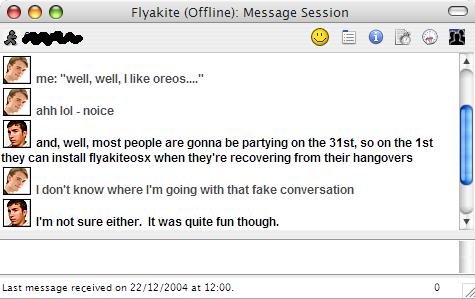

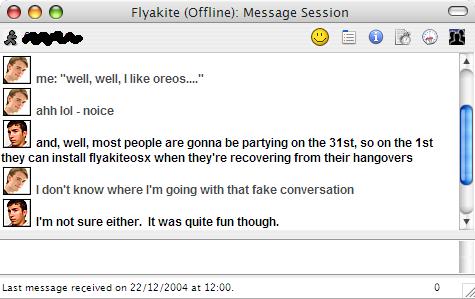
wow... I just got totally lost there.. lol... 
It worked wonderfully, thank you for the info.
Can you break it down step by step on how to do it? I am really confused!
To begin:
1. Make sure you have the smileyadd plugin in your "Mirandaplugins" folder
2. Pick an smiley set and put into the "Mirandasmileys" folder
3. Along with the smiley .DLL file, there should be a .MSL file
- open the file in Notepad
4. You should see lines that look similar to this:
Smiley = ".Proteus.dll", -100, ":) :-) =)"
Add an icon to use as an avatar (using the above code as an example):
Let's say you have a contact named "Bubba2" that you want an avatar for
1. make an icon that is 32x32 pixels and put into the "Mirandasmileys" folder
- Let's call the icon "bubba2.ico"
2. Open your smiley pack's .MSL file again in Notepad
3. Copy the last line that looks like the above code and paste it on the next line
3. change the Proteus.dll to the icon filename
- Proteus.dll > bubba2.ico
4. change the number to 0
-100 > 0
5. after the number is the text that will be converted to the smiley
- you will use the name shown in the message box followed by a colon
- if you contact is shown as "Bubba2" then put in "Bubba2:"
The finished example should then look like this:
Smiley = ".bubba2.ico", 0, "Bubba2"
Everytime "Bubba2:" is typed, it will be replaced by the avatar icon, which is how it will show up in the mesage window everytime a reply is made.
excellent.... thanks!