My Firefox --> Netscape Tutorial?

I wonder are there some hardcore Netscape fans like me want to modify Firefox into a Netscape 7.2 now (not that silly browser prototype!)?

If you like I will write a tutorial and share some of my mod files. And right now I have a problem with ResHacker.Every time after replacing the FF icon my FF completely crashed. Des some friend here know why?

Here is my screenshot of my FF.

Screenshot

#240930

good nostalgic skin ;)

#240931

Ah, you ruined it! Haha, nice skinning.

You don't need to use ResHacker to replace firefox's icon. The following is copied and pasted from mozilla.org 's tips and tricks page.

"Change the window icon

You can change Firefox's default window icon to any icon you want, by following these steps:

1. Go to the folder you installed Firefox in (e.g. C:Program FilesMozilla Firefox) and then go to the subfolder chrome.

2. While in chrome, create a new subfolder called icons, then go to that folder and create yet another subfolder called default. The full path to this folder could be C:Program FilesMozilla Firefoxchromeiconsdefault.

3. Choose the icon you want to use (on Windows use .ico files, on Linux use .xpm files) and then place it in this folder and rename it to main-window.[ext], e.g. main-window.ico on Windows and main-window.xpm on Linux.

In addition to the main window, you can also change the icon on the Bookmark Manager and JavaScript Console. The icon names are bookmark-window.[ext] and jsconsoleWindow.[ext], respectively.

After this is done, restart Firefox and you should be able to see your chosen icon in the title of the browser windows."

Hope this helps!

-NC

#240946

looks neat ;)

what visual style is that in the screenshot?

#240948

Thank nightcrawler1089 for your kindly help.

I hope after new year I could write a complete tutorial.

looks neat ;)

what visual style is that in the screenshot?

It's KOL's Sustenance Visual Style

#241097

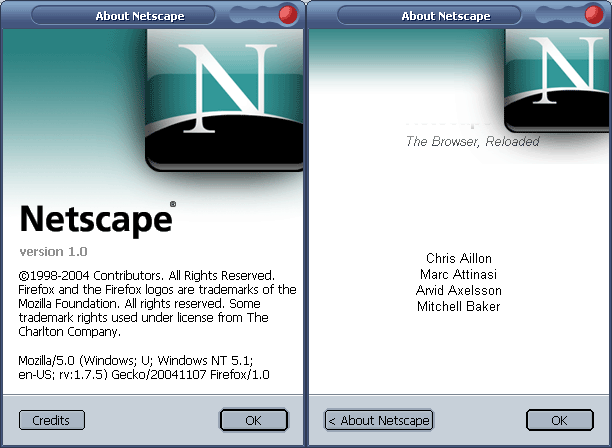
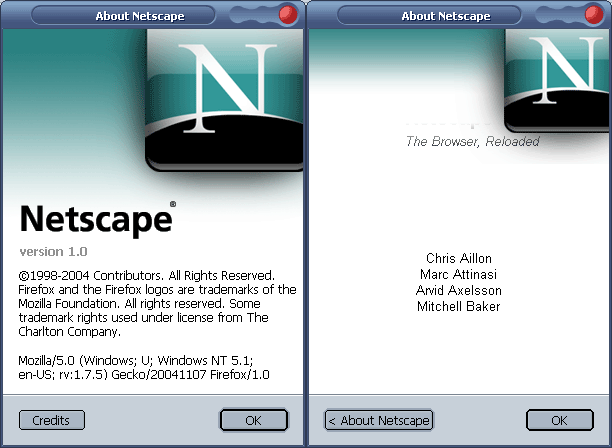
Just finished the mod of About.:cool:

But where are credits message stored???

post-12820-1104226891_thumb.png

1.png
1.png

#241148

Why don't you look at firefox->safari mod and find out the files to edit/modify yourself. :)

#241149

Why don't you look at firefox->safari mod and find out the files to edit/modify yourself. :)
Oh, I found that dtd file. Thank you for your inspiration.

Now I have another problem. I can't change the themes manager and extensions window icon.

I have tried to use themewindow.ico, theme-window.ico, themeswindow.ico and themes-window.ico, all failed.

Mr. nightcrawler1089, do you have any good idea?;)

#241409

I also wonder that whether people here like to add a splash screen to my Netscaped FF.:)

And the Credit now become this:

Copyright 2000-2004 Netscape and the Netscape logos are trademarks of the Netscape Communications Corporation. Portions of this code are copyrighted by Contributors to the Mozilla codebase under the Mozilla Public License and Netscape Public License. All Rights Reserved. Modified from Mozilla Firefox by ME.

Any copyright problems?

#241413

@robintease-- You can use the edit button to add to your original post. This way, you won't have to create a new post eevery time.

As much as I like the pandering (:)), a little searching (ok, a lot) would have found you the following info, at mozillazine.org.

Here's the link: http://forums.mozillazine.org/viewtopic.php?p=697810

And here's the info:

main-window.ico

bookmark-window.ico

downloadManager.ico

jsconsoleWindow.ico

extensionsManager.ico

themesManager.ico

metadata.ico < for "Element Properties" window.

Hope this helps, and good luck with the skin!

-NC

#241426

Thank you very much. nightcrawler1089.

We have electricity power problem here in my city.

So I can't use my PC very often. :(

Update --

Finished, will be released soon once I have an account on deviantart.:)

Thanks everyone who helped me during past several days.

Update 2 --

It's released finally.

http://www.aqua-soft.org/board/showthread.php?p=242106

#241583