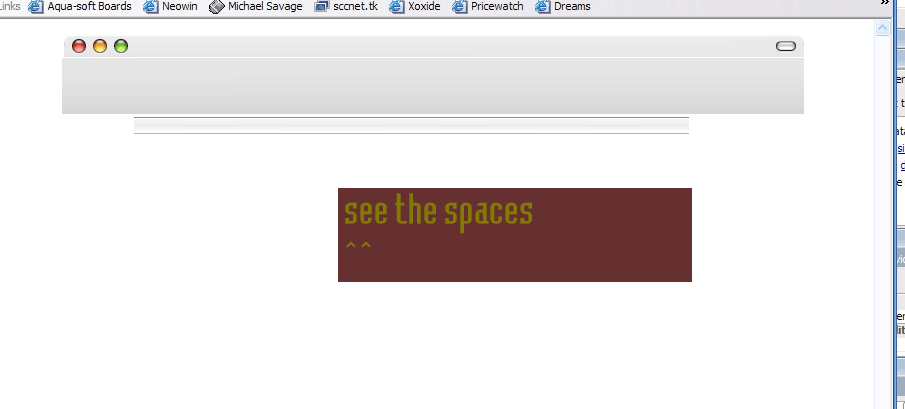
[help] spacing with tables and pictures

HI, im having a problem with my mail.app inspired site. you see when i put pictures in the tables and get them all made out to what i want (setting all the tables borders to 0 or none) i get what happens in the picture below. do i have to use CSS for pictures? or is there a way to fix this table problem so everything fits togetther snugly. Also, how would i put other images over those pictures?

thanks,pops

post-2281-1103505575_thumb.png

ScreenShot001 copy.gif

#238510

y'know stevie's gonna smack you for using tables ;)

anyways, are you sure your margins are set to 0 and it is not centered or sutin?

#238513

what is sutin? lol, and also whay are tables bad?

#238515

Oh, don't ask. :) Most (Stevie being most) say that tables should not be used for layout, and that CSS is the future.

Putting other images over the pictures: A crude way is to set one picture as a table/div background, and then insert the other picture into the table/div itself.

-NC

#238551

Make sure there are no space characters in the code between your table tags (i.e:

ahkaghdadg - might leave gaps in IE

ahkaghdadg - should be fine

#238596

it seems that i am already using CSS, or at least it says that in Dreamweaver. yeah i looked at the code and looked for any and douldnt find any

#238852

It seems you are already using CSS? It's kinda hard to accidentally use something like that...

Also, can you clarify your problem a little more? What exactly is wrong with the spacing (maybe I'm an idiot? :-P)

-NC

#238889

well i just updated it, and if you are using Firefox, you can see my problem. (you can even see the problem with IE i just now noticed!) if you can modify the page or anything feel free to, i just need it to be able to work properly with no little spaces,and make it so it will stretch without breaking. if you want to access the site, you can click on the banner in my sig.

thanks

#238890

sorry, looks fine in Safari

#238921

hmm still looks crappy with safari, now even the fonts are messed up! it looked so good in dreamweaver

#239157

umm no...it looks good in safari >_>

#239211

can you post a screenshot please? it will better help me troubleshoot. lol from this end on any browsrer it has weird spaces where tables were i dreamweaver

#239226

hmm thats what i saw to lol, what i meant by spaces are those grey lines where the inbox should be and also under the white gradient onthe lefthand side there is more grey. It looks good when i like view it with firefox and IE but when i UPLOAD it to the ftp it gets all frig-fragged up and all the fonts are changed and stuff

thanks for the pic!

#239282

try putting a border attribute for each cell so that you can see if there is a rogue cell to fix ;). and if you are gonna use tables, you might as well make one in photoshop and slice it in imageready to save you the trouble..., but beware. imageready html is horrible >_

#239286

will imageready make it so the page is stretchable?

(wont lose its figure or have gaps)

#239539