[BETA] FlyakiteOSX v1.0

Union Jack, everything is working right then for you.

That's just how it is with WindowBlinds loaded, and nothing I do can change that. The thing is WindowBlinds is looking to swap a certain bitmap ID out of the dialog. That image ID has been changed in the log off though, and so the log off points to a different bitmap ID. WindowBlinds can't check that, so it doesn't find any image to swap out, and you still see my log off window.

The reason the logoff background bitmap ID has been changed, is the normal background is the same one seen when switching visual styles. So... I replaced the normal one with the "Updating Appearance" bitmap, and made a new one and pointed the moddified log off to the new one instead.

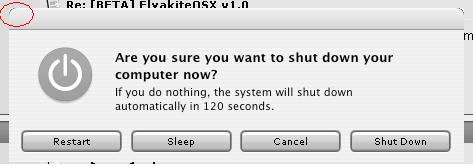
As for the shutdown. Normal XP has the three buttons in the middle that are images. In my dialogs, those have been removed and replaced with push buttons, the same type of button the Submit Reply button is in a webpage. Therefore, WB sees no buttons to swap out, and can only swap out the background.

So that's just how it has to be, sorry. You still get a decent effect, you just don't get the correct WB effect when it's loaded.

#234241

Hi Flyakite!

I ve just ran the installer in order to install the modifications for Office and nothing has changed. Everything is like before I ran the installer.

I have the Version OFFICE 11, so I don t understand, do you have any idea?

Thanx

#234248

Hi Chris,

I have been using my computer with your beta installed over the weekend, nothing to report so far. Very smooth installation process, nothing unforseen. The only thing i can say is that the WMP filetype icon looks cut off on the bottom, I had a screenshot and will post it when i return home tonight. Aside from that I have read through this thread and I have nothing yet to report that has not already been addressed.

Regards,

~fc

#234427

The Office11 (2003) icons are not actualy stored in the C:Program FilesMicrosoft OfficeOFFICE11.

You can edit the icons in the actual app exe's, but the file types and shortcut icons in the start menu all get their icons from the installer directories.

They are located here.

C:WINDOWSInstaller{90110409-6000-11D3-8CFE-0150048383C9} = Office 2003

C:WINDOWSInstaller{90170409-6000-11D3-8CFE-0150048383C9} = FrontPage

C:WINDOWSInstaller{90510409-6000-11D3-8CFE-0150048383C9} = Visio

C:WINDOWSInstaller{903B0409-6000-11D3-8CFE-0150048383C9} = Project

C:WINDOWSInstaller{90A10409-6000-11D3-8CFE-0150048383C9} = One Note

#234428

Interesting... I hadn't really looked into it. I noticed the start menu shortcuts weren't changing (same things happens with MSN Messenger, must be the same solution), so I was having the installer delete the shortcut and make a new one pointing to the app folder. But now I'll just change the icons in that folder.

Thanks!

EDIT: While we're talking about that, if anybody could send me the FrontPage or Visio exe files from those directories listed by rjohnstone (ZIP or RAR them individually) and send them to me via IM or to (flyakite19 @hotmail) so that I can hack the icons for those files as well.

#234430

I just ran the installer and everything looks awesome....but for one thing: I can't apply any visual styles anymore. It's on classic style and there is no option for XP style to apply visual styles. I was using them prior to the install with no problems. :(

#234580

Hi Chris! I successfully install FlyakiteOSX v1.0 beta in Windows 2003 Server Standard Edition. Very nice installation time only 204 sec. Everything work fine but I found something you could improve.

1. Bootscreen/Splash Screen - no progressbar

2. Welcome/Logon Screen - didn't change

3. Shutdown Screen - didn't change

4. Control Panel shortcut in start menu didn't change to System

Preferences but when you open it. System Preferences appear in

the title bar.

5. Conversion window in MSN Messenger has a black bar at the top

and at the bottom.

Suggestions:

- Can change the icons of the following:

a. Lincensing in Control Panel

b. Stored User Name and Passwords in Control Panel

c. All icons in Administrative Tools.

d. can you delete the name outlook express in its splash screen?

I will still evaluate this in win 2003 standard today. and tomorrow i will try to

install flyakiteosx in other machine using the enterprise edition. but sorry for the web edition i don't have that.

Chris i hope you can finish all the dialogs and icons. like the right click in sp2 pack.

thanks man, community all love you for this.

Good luck..... :D

#234584

I have installed the pack on a WinXP MCE 2005. I haven't had any issues except sporadic IE error messages.

Like ataleser, there's no progress bar on the bootscreen. The Office icons didn't change; maybe because it's installation in D:. Replacing the icons manually in C:WINDOWSInstaller{90110409-6000-11D3-8CFE-0150048383C9} solved this problem.

Thanks a million for the fabulous job, Chris!

Kajouma

#234587

@Ymeara

Try running the installer again and just selecting the uxtheme.dll patch. If that doesn't work contact me via PM.

This is a good example though of why you don't just blindly select to install everything. If your Visual Styles were working, there was no reason to select the uxtheme patch in the "System Files" section to begin with.

@ataleser

1) Boot screen there is no progress bar. That's how it has to be, don't ask why, I don't want to explain it, it just is.

2) The welcome screen, where it says "Welcome" that doesn't change, it never has in any release, and nowhere have I ever said it does. The "logon" screen will change but you have to enable Fast User Switching

3) The shut down screen only changes if you tell it to modify the shut down screen when installing dll files. It pops up asking you. If it didn't pop-up, it wasn't included in that build.

4) Shortcut in start menu will not change to System Preferences. Like I have said repeatedly, this does not change text strings. The registry tweak "System Preferences" only changes it at the TOP of the actual Control Panel window.

5) MSN skin had a problem which has been fixed in the new beta of FlyakiteOSX.

And as for the right-click stuff and dialogs, like I've said before, those are going to be in a SEPERATE pack that comes out at the time of release.

@kajouma

The office icons mod was messed up in the beta you had. It has been fixed in beta 2.

#234604

What a fabulous job! I was more impressed today when the power went off for a few seconds at school. I was using a G5 running Panther. I was very delighted to see how the new bootscreen 'mimics' the Panther bootscreen. Thanks a lot Chris for an outstanding job and for the time and effort you have put into it.

Kajouma

#234635

Chirs, i already tried it to win 2003 enterprise edition. everything work as it should be. aside from the previous known bug. i found no additional.

so keep up the good works.

thanks man. :D

#235181

Hello Chris

I'm using it for 2 days now and it works well, except these little problems mentioned here earlier(about updating appearance, negative time on instalation and boot screen).

Only I was wondering if is possible to make use of that "search" sign from task bar (you know, besides the clock)? It would be grat to access the search from there.

Also I would have a suggestion about the instalation: is it possible to choose the language of instalation (like you do when uninstall)?

You do a brilliant job!

You're the King!!

belgrano

#235182

Hello Chris

I'm using it for 2 days now and it works well, except these little problems mentioned here earlier(about updating appearance, negative time on instalation and boot screen).

Only I was wondering if is possible to make use of that "search" sign from task bar (you know, besides the clock)? It would be grat to access the search from there.

Also I would have a suggestion about the instalation: is it possible to choose the language of instalation (like you do when uninstall)?

You do a brilliant job!

You're the King!!

belgrano

Man, try to use tiger theme for objectbar by peteros. there you can use spotlight. I think chrish don't do that stuff. (if i am not wrong)

http://www.aqua-soft.org/board/showthread.php?t=16220

You can also try avedesk 1.1

#235186

I hope this isn't too finicky...

The only thing i can say is that the WMP filetype icon looks cut off on the bottom, I had a screenshot and will post it when i return home tonight.

attachment.php?attachmentid=4356&stc=1

and the corners of the shutdown dialogue as below:

attachment.php?attachmentid=4357&stc=1

thanks flyakite.

post-20869-1102561787_thumb.jpg

post-24-1102561787_thumb.jpg

flyakite's review icon issue.JPG
dark corner edges.JPG

#235226

Okay the WMP icon has now been fixed for BETA2 and on, and the shut down dialog I'll clean up.

What's interesting, is the WMP icon I got off of my Mac. The icons on a mac generally just come in 128x128, 32x32, and 16x16 and I fill in the other sizes. What's weird though is that the 128x128 icon looked good, but the icon for the 32x32 version was cut off. Someone at MS did some sloppy iconing or something. So I just took the 128x128 and created a 32x32 from it to fix it.

#235236

hey chris,

just a few things I came up with that you should look at/take a note of:

- there's a new MSN Messenger out. It's Messenger 7 BETA, so I don't know if skins are available for it. It's perfectly usable as it is right now, and I don't see them progressing it much out of beta. It's easy to search for on the web or the microsoft website.

- I was wondering if you were able to change the Control Panel icons for Intel PROSet and SigmaTel Audio that I sent you at the time of release of FlyakiteSP2

- Was also wondering if you could add a System Preferences mod for Tweak-XP Pro v4. I'm pretty sure quite a few people here use it, and it's incredibly useful.

- Don't know if this is possible, but is it possible to change the animated dog in the Search window? (Start --> Search). It's just that he doesn't seem to flow with the OSX Theme.

- I talked to you before about a problem that appeared with the Available Wireless Connections when FlyakiteSP2 was installed with WindowBlinds, and you said that you would look into it. It was the one where it was all black on the side and everything just looked completely out of place. I was wondering if you were able to find a solution for it...

- Would it be possible to change/modify the Thumbnail Folder icon? Nothing big, but with FlyaSP2 and SP1, the gradient was kind of poor, so the folder didn't look smooth, but instead had lines visible from where the gradient changed to darker.

- For FlyaSP2, the battery system tray icon had pink showing on all four edges, so it looks kinda poor especially with darker themes

- If you'd like to be a sticklet, for a more accurate OSX look, the volume systray icon actually has three waves (not two) coming out of the speaker. The accurate one is available for download on Iceman's website with his systray icon pack.

- iTunes 4.7 (as downloaded from apple's website) has a pixelated icon. Would it be possible to exchange it with a higher res version?

- Would it be possible to include the real dock background used in OSX (for Yz Dock and/or Objectdock)? I can't seem to find the real one around...

That's all I can think of right now. I am being a stickler with some of these, but if you do change them, I'm sure they'd make for an all around better pack. Keep up the good work, and if you need any help, I'd be glad to help! Take care :)

-UNI0N Jack

#235253

Okay my thoughts on what you've just said:

Actually there is a skin out for MSN Messenger 7 Beta and I might see about including it. The problem is whether or not it's gonna require any hex editing or not, because the hex changes in each build.

As for SigmaTel and Intel ProAudio, send me those files again because I lost them and I'll come up with something.

System Preferences mod for TweakXP 4 how? What kind of mod are we speaking of? A replacement icon?

The animated dog is not changeable by me. Why do you even have that on? Turn that stupid dog off :P

I'll check the available wireless thing and see what's going on.

The thumbnail folder icon HAS lines in it, it's not just a gradient. I'ts supposed to match the style of the normal OS X blue folders, just as a thumbnail folder. I created it but Photoshop isn't my forte, so if someone can do better go for it and send it on over.

No I do NOT want to turn the volume icon back into 3 lines. On OS X, the Finder Bar icons do not have to be square, meaning on an actual Mac they can make their Finder Bar icons nicer. On XP, they have to be 16x16. With 3 bars at 16x16 the volume icon looks like crap, trust me, that's how it used to be in old versions. I cleaned it up and removed a bar so the icon could be slightly bigger and look nicer. I won't change it even if the whole community wanted me too, because it looks like crap at 16x16. To give you an example, this is what the volume tray icon looked like when it had 3 lines:

http://screenshots.haque.net/screenshots/view/11060/ (OLD)

http://osx.portraitofakite.com/flyakitesp2...stem%20Tray.jpg (NEW)

The battery system tray icon has been fixed as of BETA2.

iTunes 4.7 technically does not have a pixelated icon. It just doesn't have support for any sizes between 48x48 and 128x128, so if you run your icons at a size in between there it's gonna resize one of the others, and yes then look pixelated. I'll include a mod for that as well.

I'll include some type of dock background. I'll talk to some people and see what they recommend.

#235259

Okay my thoughts on what you've just said:

Actually there is a skin out for MSN Messenger 7 Beta and I might see about including it. The problem is whether or not it's gonna require any hex editing or not, because the hex changes in each build.

As for SigmaTel and Intel ProAudio, send me those files again because I lost them and I'll come up with something.

System Preferences mod for TweakXP 4 how? What kind of mod are we speaking of? A replacement icon?

The animated dog is not changeable by me. Why do you even have that on? Turn that stupid dog off

I'll check the available wireless thing and see what's going on.

The thumbnail folder icon HAS lines in it, it's not just a gradient. I'ts supposed to match the style of the normal OS X blue folders, just as a thumbnail folder. I created it but Photoshop isn't my forte, so if someone can do better go for it and send it on over.

No I do NOT want to turn the volume icon back into 3 lines. On OS X, the Finder Bar icons do not have to be square, meaning on an actual Mac they can make their Finder Bar icons nicer. On XP, they have to be 16x16. With 3 bars at 16x16 the volume icon looks like crap, trust me, that's how it used to be in old versions. I cleaned it up and removed a bar so the icon could be slightly bigger and look nicer. I won't change it even if the whole community wanted me too, because it looks like crap at 16x16. To give you an example, this is what the volume tray icon looked like when it had 3 lines:

http://screenshots.haque.net/screenshots/view/11060/ (OLD)

http://osx.portraitofakite.com/flyakitesp2...stem%20Tray.jpg (NEW)

The battery system tray icon has been fixed as of BETA2.

iTunes 4.7 technically does not have a pixelated icon. It just doesn't have support for any sizes between 48x48 and 128x128, so if you run your icons at a size in between there it's gonna resize one of the others, and yes then look pixelated. I'll include a mod for that as well.

I'll include some type of dock background. I'll talk to some people and see what they recommend.

Great!

Thanks :D

- In terms of the two .cpl files, sure, i'll resend those on friday.

- yeah, sorry, i meant icon replacement, not mod, for tweak xp.

- lmao! i didnt know the dog could be turned off :P. it's been done though :P

- if you need a pic of whats going on for the wireless thing, i can include a shot when i send the .cpl files over

- I'll create a folder icon on friday as well, and I'll send it over.

- No I agree, the 2 lines look nice, and I see where you're coming from.

- thanks for the battery update :), the itunes update, and the dock backgrounds :)

- BTW, I don't think the version of Tweak-UI you included in SP2 was the latest. I could be wrong though. I just remember downloading it off the site, and then having to ask you over msn for the modded version. Maybe including a link or something in the installer, or updating the version might help others who had trouble?

- Also, the Wireless/connection systray icon (the airport one) has white lines in between the black ones, which makes it look bad on black themes. a change might also work, tho it's not too necessary since it looks just fine on white themes.

- Maybe a system tray icon change for WindowBlinds 4.4 could be nice? I have mine changed to the mac display system tray icon

- Anything I can think of later, I'll talk about :)

#235263

i just noticed that the cursor mod for the drag-&-drop state (when a green orb with a white plus sign appears to the lower right corner of the cursor) ..the cursor seems to be mapped slightly off... afew pixels from the original curor's position. I'm sorry i can't take a screenshot of it as the cursor isn't captured and my computer doesn't have any screen capture apps on it right now. (is there any way in windows to enable cursors to be captured?) But can anyone else confirm this behavior?

regards,

~fc

« Previous Thread | Next Thread

#235558

Yeah I know about the offset problem. There's a fix for it, I'll implement it. The thing is I don't think it happens on all computers.

Anyway it's been noted and I'll see what I can do.

EDIT: And apparently, according to someone on my AIM list, my software is going to be mentioned on The Screensavers on TechTV tomorrow night. I won't be around to watch it but I'm going to try and tape it. Should be interesting if it really happens.

#235560

Ooh, offtopic, but that's very exciting!!!

Congrats, if it happens. If it doesn't, oh well :)

-NC

#235730

This message is addressed at Hobbes since I can't send it via PM to him because he needs to clean out his inbox! Come on Hobbes clean that inbox up!

Well like I've said a couple times about the new versions, the moddified strings (right-click menus etc.) and the moddified dialogs will be available in a seperate, stand alone pack that doesn't have all the extra stuff like skins etc. My guess is it'll be a few megabytes at most. That pack will be available for testing when it is finished and available for release with FlyakiteOSX.

I'm not sure what mirrors if any still exist for 6.0 and even if there were any I would highly, highly recommend not using it. There were many issues with it. You are MUCH better off using the latest beta of FlyakiteOSX and waiting for the standalone pack for the other stuff which should be available for testing before next weekend.

The only thing is with moddified strings and dialogs, they are ALWAYS going to be in English. that's why they aren't included in FlyakiteOSX, since it's meant to work for any language. The moddified strings and dialogs will INSTALL on any language, but of course they'll appear in English. There is no way for me to make the moddified strings and dialogs appear in the users native language without having access to every possible os language files to modify them and make seperate packs, so it's not worth it.

Hope this clears things up,

Chris Kite

#235787

Hi Chris, I have a request/suggestion and one thing to report.

I believe you have mentioned add-on packs which would inroduce greater customization so perhaps this has already been considered but I was wondering if you could provide a way for users to specify their system animations such as the "copy" or "transfer" animations. Maybe like a directory into which a user could drop a custom animation and then your update app could check to see if one is present in the specified directory, if one exists, it would be applied instead of the default modification as currently supplied. Please see the picture i have attached. Vjay has made a remarkable program which overlays the progress animation and is incredibly stable (here). However, a copy dialogue with two progress bars looks a bit overkill. What do you think?

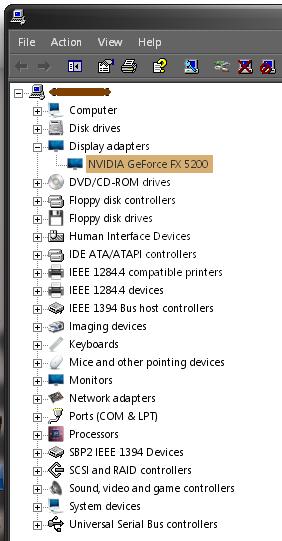
I have also included a screenshot of the "device manager" window. Many of the icons have changed and look great, however, some still are the default windows ones. I suspect this would be something you would like testers to catch?

Best regards,

Leon

post-20869-1103607592_thumb.jpg

post-24-1103607592_thumb.jpg

dual progress.JPG
dual progress.JPG
hardware.JPG
hardware.JPG

#238988

Hey has anyone seen chris (flyakite) online at all? i'd like to get in touch with him to hook him up with some files he wanted before he releases flyaOSX

#239363

Hey I'm on MSN right now :P

#239364