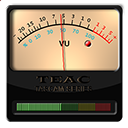
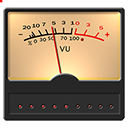
[Release] vuMeter for AveDesk / ObjectDock

@akr:

You'll need to unpack the zip so that the folder structure remains intact.

The most recent download has an excess forzip folder with it, just shift the tree one up.

You'll need to have the following:

C:Program FilesAveDeskDeskletsvuMeterSkinsDefault

or wherever you installed AveDesk.

@heinzolinger

sorry I can't reproduce your and unbelievers problem (he bluescreens) - I'll recode the thing from window messages to events so that your message queue won't overthrow...

#232323

Haha, this thing is cool! I likes it. Thanks for the wurk!

#232324

Let me start off by saying that this is one of my favorite desklets. I've been having one problem with it, however. I'm running Avedesk 1.1, and everytime I load the vuMeter it shows the original skin (the black square with four screws). I have to right click on it and select start/stop and only then does it revert to the skin I normally use. Any suggestions? Thanks in advance!

#232631

Let me start off by saying that this is one of my favorite desklets. I've been having one problem with it, however. I'm running Avedesk 1.1, and everytime I load the vuMeter it shows the original skin (the black square with four screws). I have to right click on it and select start/stop and only then does it revert to the skin I normally use. Any suggestions? Thanks in advance!
That was intentional - the black square is not a skin (yet) - but I'll add an autostart option soon. I hardly ever restart AveDesk or alter its config, and thanks to "hibernate" my PC reboots only once a month or so. See my post 5 days ago.

Thank you for the suggestion.

Edit:

I myself have a small request: since I don't have an US version of Windows, can someone on an english PC please reproduce the screenshots in the readme and PM them to me, so that absolute beginners won't get distracted by german screenshots? TIA

#232694

Hmm. Doesn't work at all on my Dell laptop at work. Not tried it at home yet.

*EDIT* Sorry, should be more explicit. Having been on the receiving end of this sort of comment for over twenty years you'd think I would've learnt by now.

Anyhow - The meter appears on my desktop but there is no activity. I select start/stop but nothing happens (which means I also can't tell whether it is started or stopped). I was running iTunes at the time. When I add vuMeter to my list of desklets the sound misses a beat, so I guess vuMeter has done something. The display just never actually changes (its all black with pe8ers skin, i.e. no bars visible). With the skin that's selected when you first add it to the desktop, the needle is in the red but never moves).

Hey Judge,

You'll need to select an input source from your sounds control panel item and turn the recorders volume up for something to be seen - since not all sound card models provide an overall volume meter, this widget tries to record sound like any audio authoring application would - and it sticks to the system default. It'll block any other recoders if your card and its driver isn't capable of multisourcing.

I am not happy with it atm. Actually, sound will drop, iTunes will crickle, mostly if your soundcard can't do full-duplex sound output and input at the same time - on some boards, moving the record source selector from "Stereo downmix" to "Wave Out" or vice versa will remedy, others won't play. Ill coded sound drivers that can't provide sample data to a secondary thread will go bluescreen and so on. I'll recode the b*stard to be Dell-proof and turn it into a multithreaded SysStats meter if there is interest. Where it works, there it shines at its best, I am said.

Having this in working condition on my desktop is totally reminiscent of lone cassette recording sessions during my spotty teenage years... Imagine they are reanimating live aid '84 these days... Poor Bob Geldof.

#232794

The only input device on the laptop is 'microphone' - unless I'm missing something.

Well. There's interest from me naturally. One could whip up an iTunes remote that actually shows sound levels then.

You should also have the software devices "Stereo (Down-)Mix", "Auxiliary", "CD-Audio" etc. to be picked from the control panel dialog (inside readme.wri). If you see "MIDI" and "Wave", these are output only. Maybe you can add them in "properties" to be displayed?

edit - I have uploaded a new version with american english screenshots which show what is to be tweaked where. I hope this zip will also solve AKRs problem since its now correctly packed.

#232820

It would be awesome if intergrated into Avetunes.

#233709

There is a new update. This time, it's a full release.

Get it at www.Dockex.com!

New features:

  • Autohide feature for AveDesk.
  • Autostart feature.
  • Miscellanous tweaking settings to pick the right sound source and improve performance
  • AveDesk 1.1 style tab settings. Almost ready for AveDesk 1.2!
  • Context menu and HTML Help.

#250370

Awesome! Awesome! It's soo much smoother now :)

Can't seem to get the auto-hide monitoring list to work btw, it always reverts to "iTunes.exe" when I reopen the propertysheet.

#250385

Incredible work.. Smooth as butter on my sys. Thanx much for your hard work

#250450

excellent work herd!

but then, i never expect anything less from you ;)

#250459

Oooh yess :D It's a lot smoother and faster, thanks a lot!
#250478

There's a bug in vuMeter regarding the preview.png image: the file is still locked, even if the desklet is closed. Closing the host application unlocks the file - looks like a missing delete previewBmp; :)

#336609

There's a bug in vuMeter regarding the preview.png image: the file is still locked, even if the desklet is closed. Closing the host application unlocks the file - looks like a missing delete previewBmp; :)

OK I'll look to it.

#336621

HERD, this is a great docklet!!!

One question for you. How to enable Meter Type to Average on system start? Every time when i turn on computer that option is reset to Peak.

I have OD 1.9 Plus Build 535u, Vista Ultimate SP1 32Bit.

#500267

I'm sorry the sources are locked within a crashed hard drive - I can't do anything to make it work on Vista at the moment and don't have the time to recreate it from scratch.

#500279

Been looking for something similar for mac... anyone?

#500303

Hello Herd,

First of all I would say thank you for the beautiful docklet vuMeter 1.0. I like it very much and after a few hours using it, I tried to produce it by myself.... It's running well

But suddenly (I didn't know why or what is missing now) it does display as usual, but NO MOVEMENT at all.

I can still change among the docklets but no movement.

I did delete the docklet and copy it again into the ObjectDock's docklet, but it remains the same..

By the way I can send you my creation if you interrested in my images...

I really need your hints how to overcome this issue..

Note:

If I'm not mistaken, you're German? Because I can speak German :-)

Thank you for your attention

Andy Hartono

Jakarta, Indonesia

#525749

Hello Andy,

well as said before I can no longer fix it, I can only guess at a queue problem:

The docklet works as a recorder and digitizes audio.

I have done my best to discard audio samples that I can't render, but maybe buffers

holding audio data stay allocated, so that several hours of recording leaks enough

memory to destabilize a faulty driver - who knows?

If the audio stack crashed, a move/delete of the docklet won't help but a reboot will.

Try to use a smaller sample rate (e.g. 8 kHz) in the settings.

Of course I'm interested, show us the skin...

hth,

herd

At the note: We both can but this board doesn't really encourage it.

#525763

Thanks Herd... I didn't know what happened exactly, why this happens. I just re-copy the anishortcut.dll, sysStatsCOM.dll and Hook.dll to the Object Dock folder. I dont know wether those dlls have something to do with your docklets or not but in sudden it works again as normal.. :-)

Before I did re-copy all that dlls, what I have done was:

- rebooting my PC

- change the setting of vuMeter, not the sampling but the buffer to 512 (I set usually to 2048)

and nothing happened

Well Herd anyhow.. I get it done yet and my next question is how can I upload my (updated your docklet) to you?

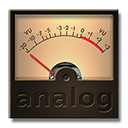
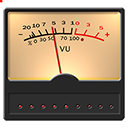
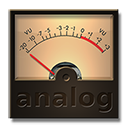
Preview 1: I touched up your docklet "Peter"

Preview 2: I created it from scratch, with some LED bellow, and a peak LED on display panel (small), with medium scale movement

Preview 3: I created it from scratch, with LOTS of LED bellow, and a peak LED on display panel (big) with accurate movement (60 images)

Well, may this attract the other user to use it..

Warmest regards

Andy H

I get it

I try to upload those files to you

Note:

I do it all in mono.. because your dll doesn't sense from output that can diferrenciate the channel, it displays almost the same level for both channel.. :-)

That's why I combined those "LED's" to that panel

It seems I can't upload my creation. I tried couple of times but no result. Maybe better I upload directly to your email?

Thanks

post-98338-1238201894.png

post-98338-1238201922.png

post-98338-1238201942.png

Preview.png
Preview.png
Preview.png
Preview.png
Preview.png
Preview.png

#525769

Hey Andy,

they look excellent. Mail them to me (see your inbox at this board).

best regards,

herd

#525939