[Release] bz Cream Metal Milk

(Cream) Metal Milk

Mac OSX original by Max Rudberg, Mod by Justin P, Ported by Bzeitler

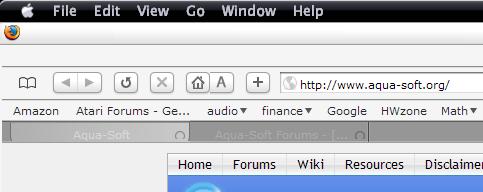
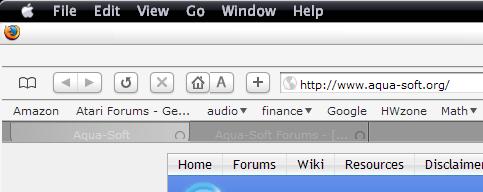
Here is my port of Cream Metal Milk. Includes 4 substyles for use with Looca/Explorer, Safari Firefox

Regular Winwdows and Prefs windows. Check the other threads here at aqua-soft.org for more information

on setting up windowblinds to use per application settings.

The buttons in the prefs screen do work... please extract the CPL folder to c:program filesstardock

in order to make all buttons in the prefs skin functional.

Thanks for downloading and let me know of any bugs you may find.

bzeitler

Preview

Download

#228194

How Did You Get Your Display Properties To Look Like That I Am Useing Windows ME

#228204

I don't think you can with ME, anyways, looks like I got Windowblinds just in time, nice port bz ;)

#228206

i've downloaded the firefox theme and i'm having a little problem with the tabs - namely the text color (which is light gray on dark gray and kinda hard to read) and the close button, which seems to appear a bit too low. any way to solve these ?

post-21166-1100283407_thumb.jpg

metalmilk.JPG
metalmilk.JPG

#228219

great work again bz! :D

looking forward to fear platinum too! ;)

#228232

Great work, bzeitler, as always. Thanks.

#228242

Fantastic skin.

#228247

Sorry about being repititive ... but how do you get the sysprefs to look like that. I am using winxp sp1. What is the explorer susbstitue that you got there?

#228288

I believe Bz is using Looca

#228290

I think that's the one on the back. He's managed to change the control panel totally. From some reason systemx does not want to install on my system and the other sysprefs clone I got was notthing close to what bz's got. So was wondering how he got that. Flyakite's v7 for sp1 doesn't do the trick either

#228294

There are only 2 things that you need to have your system prefs look like bz: modded system files (.cpl, .dll, hint- FLYAKITE) and you need to apply the "prefs subskin from this beautiful port" via per App Settings in WB to "rundll32.exe"

#228299

Thanks topshotta ;)

Yeah thats basically it. Apply the included "prefs" skin to rundll32.exe in per application settings in windowblinds (this puts the buttons at the top of the window)

The dialog window size is from flyakites system files for sp1 6.0

Thats it :)

As long as you copy the included cpl folder to c:program filesstardock

all the buttons will work ;)

#228340

I was waiting for you to port this to WB. Awesome.

#228342

Cool, a skin for Looca :)

Nice port, btw

#228414

bzeitler,

Another great skin, well done. I wish I had the knowledge to do that sort of thing. I don't know if this is the right place for this question, but here it goes....

I really enjoy the Apple mac style, however I am proud to own a windows PC. All of your styles out there all include the apple logo on the start button, but no windows flag option. Is there any chance of getting the windows flag on any? I'm using Kols tiger ATM because of this.

Your skins are really good though, I just can't bring myself to keep the apple logo.

Just remember go easy on me, I'm New ;)

#228493