 Aqua-Soft Forums
after continuously insaling and uninstaling the program objectdock 1.6 enhanced, i was still feed up at the fact that i can't see the system tray icons. what do i do? i resetted my computer 5 times each time i instaled the program and uninstaled it, and setted the autostart on computer turn on, and set disable tray server from starting up, and revert the settings, i just can't fix this dang thing!
[help] can't see system tray icons
i just found out that setting disable trayserver from starting up will solve this problem. just create your own shortcut to place in startup folder. but now, my problem is that i can't display all my icons. sometimes, one appears and dissapears randomly. so, i only can see half of my icons at a time.
I have the same problem, my icons all of a sudden dissapeared. I have no idea whats wrong  They are there, but just don't show anything. A screenshot is attached.
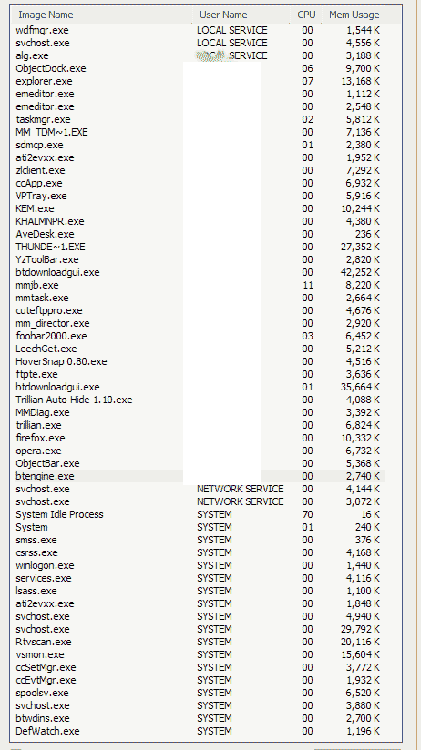
I took a screenshot of the problem and also my processes, just in case identifying those might help at all.
I also tried to install and reinstall objectbar, but to no avail it didn't seem to help at all. this once worked, so I wonder if it has to do with some beta/alpha software I could be using. steelfist, are you using an alpha of trillian 3 like I am?
Here is my system configuration if that would also help:
Microsoft Windows XP Pro Service Pack 2 with latest updates from windows update
Intel Pentium 4 3.0 GHz
1024 MB Kingston Value Ram
2 36.7 GB Western Digital Raptor Hard Drives @ Raid 0
1 160 GB Western Digital Caviar Special Edition IDE HD with 8 MB of Cache
ATI All-In-Wonder 128 MB with latest drivers...all drivers are installed (including MultiMedia Center and Remote Wonder drivers)
Creative Sound Blaster Audigy 2 ZS with latest drivers
NetGear 54Mbps PCI Card
NEC 2500A DVD-RW
Sony DVD/CD-RW
Floppy
Antec Power Supply
And I'm currently running the programs:
Foobar 0.83
BitTornado 0.37
BitTornado Engine 4.0 (Build 721) (it was a problem before this was installed)
Object Dock Plus 1.05
CuteFTP Pro 6.0 (Build 4) (also was a problem before I loaded this)
Trillian 3.0 (Build 948) Alpha (I have a big hunch this may be a culprit)
Zone Alarm 5.50 (Build 62)
Logitech Setpoint 2.11 (Build 459) Wireless Mouse and Keyboard Drivers
AveDesk 1.10
Norton AntiVirus 9.02 (Build 1000) [Corporate Edition]
Opera 7.60 Preview 3, FireFox 1.0 Final, Mozilla Thunderbird 0.80 MusicMatch Jukebox 9 (don't contribute any problems I don't think)
I also use LeechGet 1.1 (Build 1520) as a download manager and ObjectDock...both have been acting oddly. OD always has acted oddly on my machine (I will post a separate post for this), even after a complete format. LeechGet I think behaves oddly because of OD, but this is only a guess. Some program seems to be stealing menus focus, so I can't click on them. For instance, I no longer can click on Configure Filtering and Customize/Replace icons in my system tray in ObjectBar properties. The buttons respond (they are pushed) but nothing comes up.
Does anyone have any ideas? I'd be very grateful as this is something that has caused a problem for me for a long time!



^ YUP same thing that's happening to me 
im on xp home sp2 w/ all updates n 3ghz P4ht w/......... (i think its not really needed for total ssytem data....)
well anyways, Trillian 3 Pro is on my currently running list  ....
....
.... but the odd thing is.... OB used to run PERFECTLY w/ trillian still running... soooo... yeah..... im guessing its one of these krzy things ur pc does to u for kicks >_>