 Aqua-Soft Forums
Attachment is Windows Picture and Fax Viewer.
In StyleBuilder, Where is the color in red box?
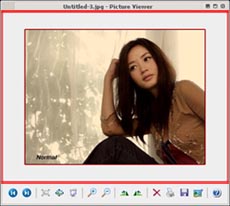

Attachment is Windows Picture and Fax Viewer.
In StyleBuilder, Where is the color in red box?
well, i can control that color by changing the "window" color in display properties. i have a feeling you'll be changing lots of windows if you add it into the visual style.
who's the cute girl? 
But I have been tried 'window' color in StyleBuilder. and It's Not..
She is Kim Hye Su, Korean Actress.
But I have been tried 'window' color in StyleBuilder. and It's Not..
She is Kim Hye Su, Korean Actress.
lol, thanks.
it might not be called "window" in stylebuilder, but try the "window" option in the display properties. it seems to change the color for me.
but still, i don't think you should change it unless you want to change the color throughout the whole system.. it looks like that value will affect all windows.
hahaha...
I tried it in the display properies. but in my case, Not changes...
Anyway.. thankx dreamz =)
are you sure? i just did it now and it worked.
hmm....
Display Properties - Appearance - Advanced - Item (select 'window') - color1(select the color that I want)
As you see above.. I did..
but I can't see changed color...
My way is wrong?
hmm....Display Properties - Appearance - Advanced - Item (select 'window') - color1(select the color that I want)
As you see above.. I did..
but I can't see changed color...
My way is wrong?
there are two colors. the top one is the background color, and the bottom one is the text color. make sure you're changing the right one.
well, that's what i did. see my before and after?
OK!! I did =)
but All window is changed....
this is my Sshot.
I modified that buttons.
but inactive button's btnshadow and btnhilight color is not
matched with background color.
Best Fit button, the third button, is it.
I am satisfied..

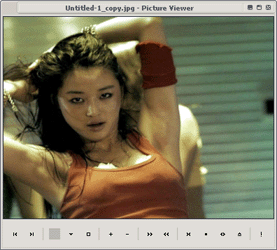
not sure why the button looks funny, but it looks good. 

