Aqua-Soft Forums
I have a windows pulled DVD drive, will it work if i put it in my powermac g3. if so, how would i go about setting it up?
pops
I have a windows pulled DVD drive, will it work if i put it in my powermac g3. if so, how would i go about setting it up?
pops
It should work fine. You should set it up with a IDE/SATA To USB Adapter.
You can get lots on http://www.ebay.com.au
Yes it will work... in a fashion...well maybe
It all depends on the DVD Drive...
Personally I wouldn't go for the IDE/SATA to USB route, chances are a) your Mac is only running USB 1.1 and  that would rely more on drivers for incompatible drives.
The Other option is to get a Firewire Caddy and insert the drive into that, but in all honesty its more work and probably more expensive!
Go for internal fitting!
What make is the DVD Drive?
The problem is some DVD Drives are not natively supported on a Mac.
Things like iTunes and other iLife and OSX native apps won't recognise all drives they have to be whats known as "Apple Supported Drives"
There is a program called Patch Burn that will overcome most none supported drives, but it isn't 100%
PatchBurn Website Have a read here
Also
XLR8 Your Mac.com lists compatability of drives
Give me a shout if you need any info, I recently did this to a friends.
Is it a Tower G3 PowerMac (the coloured ones not the beige?)
Furthermore, DO NOT GET RID OF YOUR BOOT CD DRIVE!!! I cannot stress this enough. Even if you get your DVD drive working, it probably will not be "bootable".
It will be if its an apple supported drive.
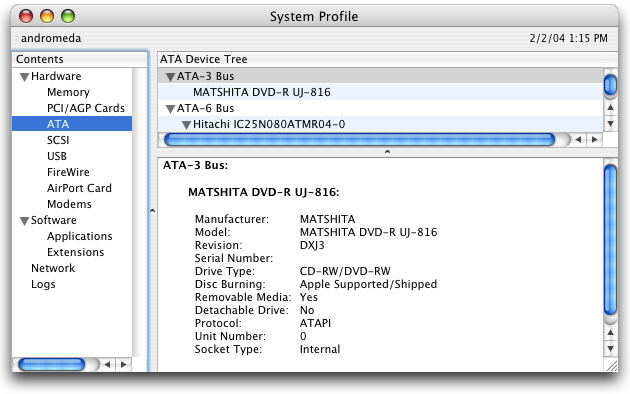
If you open system profiler and look at your hardware (DVD/CD Optical) you will see it says 'Apple Supported/Shipped' or something to that effect.
If you install a supported drive this will say the same thing and OSX will recognise this as a natively shipped Drive.