
[help] textbox problem in firefox

hello I use the safari skin for firefox made by aquarius2003 and all works fine except the extra long text boxes. I know this issue can be fixed trough a css mod but I don't know wich one is it!

I've attached a screenshot with the problem I'm experiencing.

post-12119-1098553877_thumb.png

textbox.png
textbox.png

#223116

hello I use the safari skin for firefox made by aquarius2003 and all works fine except the extra long text boxes. I know this issue can be fixed trough a css mod but I don't know wich one is it!

I've attached a screenshot with the problem I'm experiencing.
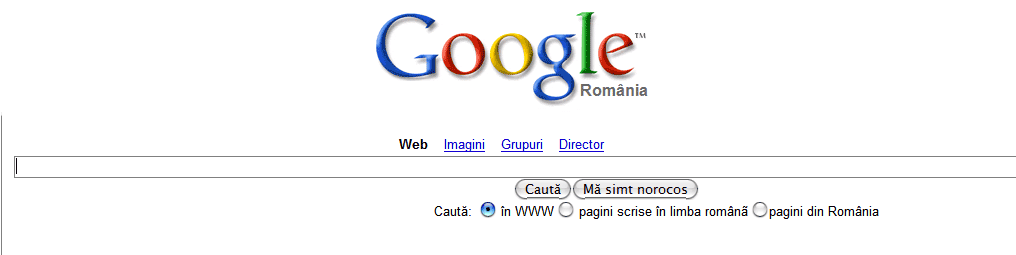
I am having the same problem.

http://www.dchoe.net/images/firefox.jpg

TIA

-----------------------

Image linked. Please use images not bigger than 500x375px

Pe8er

#223351

and this doesn't happend only to google! anyone any ideeas? please...

#223368

I have the same problem under opera and Ive figured out what it is.

Change the font that goes in the textbox and try again.

#223380

the font that goes in the textbox and try again.

could you be more specific, please? :)

#223475

oh man, i'm having the same problem!

someone help!

#224012

yeah, me too

right after i installed sp2

hmmm.....

#224256

perhaps you've all installed flyakite's sp2 mod?

here, the solution is outlined in this thread, with the fix, by me:

http://www.aqua-soft.org/board/showpost.ph...113&postcount=5

moglenstar

#224270

moglenstar you don't have to change back to ms sans serif and tahoma.

I've figured this out today; you can fix the problem by just editing those values and add a ",238" (no quotes) this way adjusting the size of the font.

paste the following text into notepad and save as "whatever.reg" (no quotes) then double click the file.

Windows Registry Editor Version 5.00


[HKEY_LOCAL_MACHINESOFTWAREMicrosoftWindows NTCurrentVersionFontSubstitutes]

"MS Shell Dlg"="Lucida Grande,238"

"MS Shell Dlg 2"="Lucida Grande,238"

...or use this: http://gangboy.ro/fisiere/msshelldlg_fix.reg

#224367

i used your registry edit, and also did it myself, and it still didn't fix the problem.

The weird thing is that i installed flyakite with no problems, but when i tried out windowblinds after that it showed up. After uninstalling window blinds it went back to normal. But last night i decided a clean install of windows would do my comp some good and now I have the problem again. Also, before I installed flyakite i had manually changed the shell fonts.

SOOOO i don't think that is the problem. The other reason i believe this is because when google is opened in internet explorer, i have no problems.

**EDIT** - I dont mean its not teh font being used, i mean that there is probably another way to fix it other than shell font. IE uses arial in the google textbox, so there is probably a way to change it in firefox.

#225157

Found the problem.

It's the font itself from flyakite (i think), which explains the IE and windowblinds thing.

I had originally used a lucida grande that I ported from one of my roomate's mac.

When i installed windowblinds, i guess the skin used it's own font which messed things up. After reinstalling windows i used a different lucida grande(i think flyakites) and now i have the problem.

Easy solution: Go to tools>options>fonts and colors. Change the "Serif" font from "Lucida Grande" to any other font. I suggest lucida sans unicode, very hard to notice a difference. That should do it.

**EDIT** - Now my brain hurts. In order for the above to work you have to edit your registry.... With the registry, and lucida grande it doesnt work, without the registry and without lucida grande it doesnt work.. weird.

#225161