 Aqua-Soft Forums
Anyone know how to change the default ugly yellow thumbnail folder to something more radical?
Reshacking shell32.dll? if so do you know what number that is then...
Thanks 
Anyone know how to change the default ugly yellow thumbnail folder to something more radical?
Reshacking shell32.dll? if so do you know what number that is then...
Thanks
While I'm at it.. I might as well ask if anyone knows how to remove the grey outlined square in "thumbnail view" in XP
Anyone know how to change the default ugly yellow thumbnail folder to something more radical?Reshacking shell32.dll? if so do you know what number that is then...
Thanks
Icon #17 in shell32.dll.
Just an answer for others, who'd like to know that... 
Unfortunately, ResHacker will not let you replace a single Icon.
So, the offending item is Icon Group #4, you will need to make an icon with the 96x96 size format as the one you wish to use for thumbnail view, if you're using default settings.
Unfortunately, ResHacker will not let you replace a single Icon.So, the offending item is Icon Group #4, you will need to make an icon with the 96x96 size format as the one you wish to use for thumbnail view, if you're using default settings.
Ah thanks for the help... so if I understand you correctly I have to replace every single icon in icon group #4 if I only want to change the thumbnail folder icon? (see this image where I circled in them: http://hem.bredband.net/b247083/temp/reshack.jpg)
I'm switching over to the Equal icons so I figured it would be nice to have the black thumbnail folder as well instead of the ugly yellow windows one...
Ah thanks for the help... so if I understand you correctly I have to replace every single icon in icon group #4 if I only want to change the thumbnail folder icon? (see this image where I circled in them: http://hem.bredband.net/b247083/temp/reshack.jpg)I'm switching over to the Equal icons so I figured it would be nice to have the black thumbnail folder as well instead of the ugly yellow windows one...
Here is the example of icon you should make - look attached screenshot.
Once you'll make it, replace icon group #4 with ResHacker.
Or use another app, which can replace single icons.
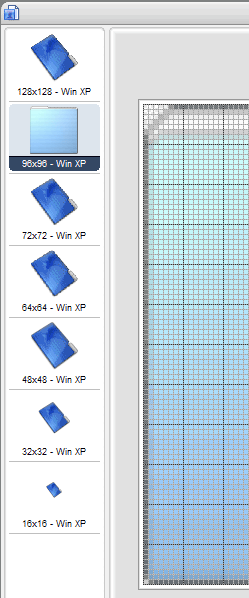
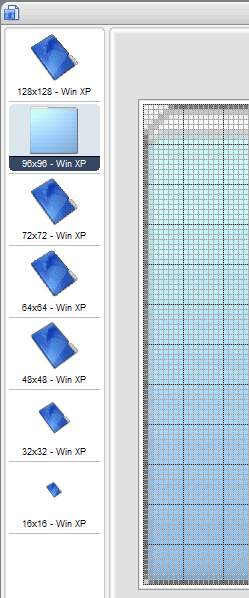
']Here is the example of icon you should make - look attached screenshot.Once you'll make it, replace icon group #4 with ResHacker.
Or use another app, which can replace single icons.
Thanks Does there exist though an app that can change the thumbnail folder icon? I've tried Iconpackager but kinda think it sucks so I'm back to Iconphile which is working really great except a few bugs now and then... but I can't find any option to change thumbnail folder icon...
Just a note here...from experience...that thumb icon can be any size...the important thing is that it should be the biggest one...seems that xp uses the the biggest one for this purpose...so if you for example use 128 size icons make an icon with all sizes you want 16...128, plus make one bigger for the thumbs..personally I made it exactly the size of my custom size thumbs (it's 142x142) (I know, most ppl know this, but... use TweakUI to change thumb size)
whatever.....
