 Aqua-Soft Forums
[preview] Longhorn Skin For Avetxt
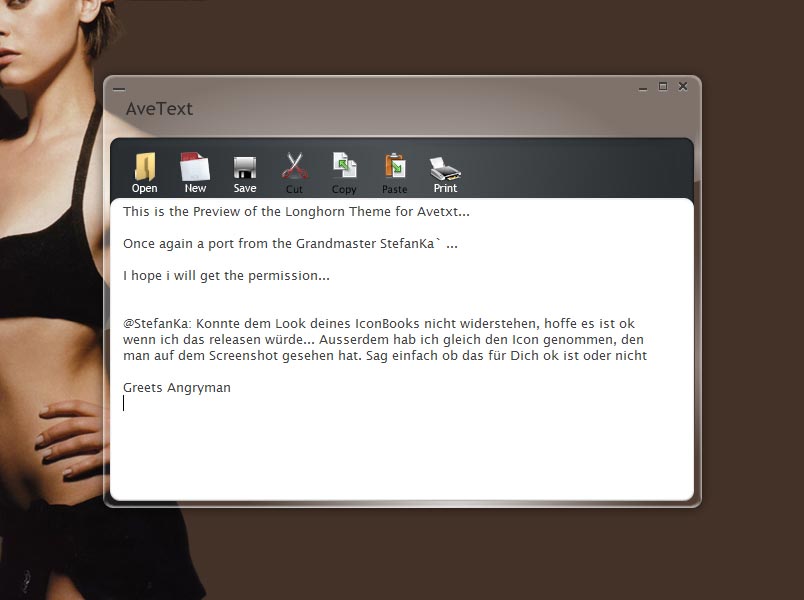
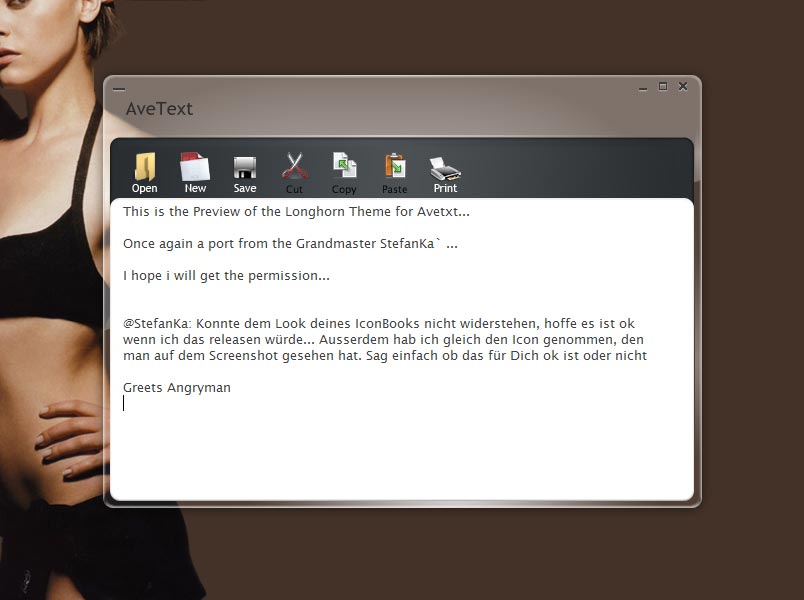
looks very cool (Y)
AS i wrote in the screenshot... I couldn`t resist after i saw the IconBook skin
Looks great Angryman cant wait
Looking forward to this - Aero Glass is very nice
Originally posted by deadzombie@Aug 31 2004, 09:31 PMAero Glass is very nice
<{POST_SNAPBACK}>
FOR ME TO POOP ON!
hehe
just kidding
Duckie, have you forgotten to take your pills again?! 
great skin man!
let's move this thread to Aero-Soft.com when it's up :hide:
Very nicely done Angryman. I can really appretiate the work you put into this. LH isn't 'my style' ... but you deserve kudos for doing this for all the folks who love it.
Originally posted by Menge@Sep 1 2004, 06:07 AMDuckie, have you forgotten to take your pills again?!

btw: Great skin!
I want this - without Duckies excrement.
ewww...no kidding!
No need for this type of comment. Angryman stated he was waiting for permission. If you cannot contribute something positive to the community, dont post.
deadzombie
Wow, can't wait for it! Looks great!
Awesome, I only recently got into this Longhorn Ispririat stuff, anyone making an AvePreview skin ? 
Mmm great
Very cool
Originally posted by starforge@Sep 1 2004, 03:43 AMAwesome, I only recently got into this Longhorn Ispririat stuff, anyone making an AvePreview skin ?
<{POST_SNAPBACK}>
I haven't tried it on avepreview yet, but the original aero skin by stefanka works with only a little modification with almost all the aveapps. I just put the longhorn folder into the skin directory of the app and try it out. Usually it only needs a few fixes, like to change the title or small components.
However Angryman has made extra parts that make it work even better. I tried using the original skin on avetext, and the bar behind the icons is still the regular one. This is the stuff Angryman is doing. :canadian:
Good work Angryman, can't wait until you release!
farty >.<

Duke: Did you modify the icons from avetext to have white text?. All you have to do is move the bg.bmp from the skin folder to the button folder and it works; all I need to do now is change the icons to have white text.
Yes i modded the icons. Its easy, invert the color of the text.
And you must not move the bg.bmp. Delete the bg.bmp in the button folder and it works too.
deleting the bg.bmp works "sometimes" i had it working earlier, but all of a sudden it stopped working and would grab whatever was behind the program window. don't know what that happened.
Here is the deal with bg.bmp:
Each of the AveApps are using 2 different skins per application:
- the "window" skin, which is located in the skins folder
- the "toolbar" skin, which is located in the buttons folder.
IF, there is a bg.bmp in the toolbar skin, then, that one will be used. Otherwise, the one in the window skin will be used.
Some of the apps however, use a fixed buttons skin, or don't use it at all for various reasons.
Keep it up, Angryman :rock:
Hi I'm new, has this skin been releashed yet?
nope, not yet.
Hey Ave, I was wondering, since the skins are so similar for all the aveapps, what if you made it so they all looked for the skins in one place, sorta like:
C:\Program Files\AveApps\Skins\ <- where you put the skins
C:\Program Files\AveApps\Programs\ <- where you put the actual programs
I'm guessing that maybe when you make all of them, you will have an installer or something of the sort.
just throwing out ideas.
farty >.<