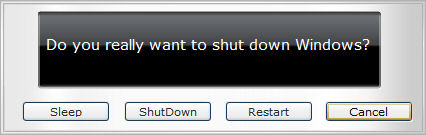
Aqua-Soft Forums
Original thread: http://www.neowin.net/forum/index.php?showtopic=203210
Permission: http://www.neowin.net/forum/index.php?act=...ost&p=584403491
Download: http://www.deviantart.com/deviation/9966519/
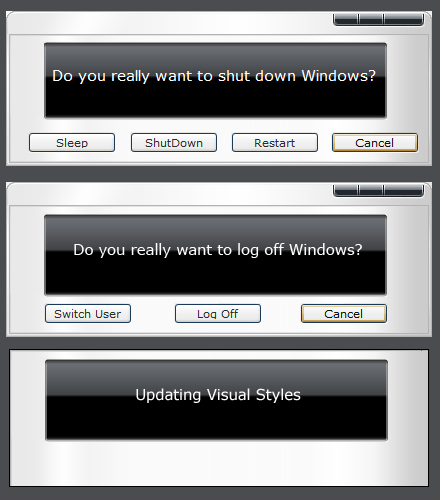
Original thread: http://www.neowin.net/forum/index.php?showtopic=203210
Permission: http://www.neowin.net/forum/index.php?act=...ost&p=584403491
Download: http://www.deviantart.com/deviation/9966519/
Originally posted by franziose@Aug 23 2004, 09:25 PMReally nice,
would it be Ok, if I implement it to the StefanKa systemfiles?
<{POST_SNAPBACK}>
sure.. that would be awesome..
Thank you.
But I still have a question. Would it be possible that you make a version of it which has no border?
So that on the two first dialogs, there is only one metal between the black and the border?
to make it like that, use this script instead:
for shell32.dll
dialog 1089
1089 DIALOGEX 0, 0, 240, 69
STYLE DS_SYSMODAL | DS_SETFOREGROUND | WS_POPUP | WS_VISIBLE | WS_DLGFRAME
CAPTION ""
LANGUAGE LANG_ENGLISH, SUBLANG_ENGLISH_US
FONT 8, "MS Reference Sans Serif"
{
   CONTROL "&Cancel", 2, BUTTON, BS_PUSHBUTTON | WS_CHILD | WS_VISIBLE | WS_TABSTOP, 166, 52, 50, 11
   CONTROL "&Switch User", 14338, BUTTON, BS_PUSHBUTTON | BS_NOTIFY | WS_CHILD | WS_VISIBLE | WS_TABSTOP, 20, 52, 50, 11
   CONTROL "&Log Off", 14339, BUTTON, BS_PUSHBUTTON | BS_NOTIFY | WS_CHILD | WS_VISIBLE | WS_TABSTOP, 94, 52, 50, 11
   CONTROL 14351, 0, STATIC, SS_BITMAP | WS_CHILD | WS_VISIBLE | WS_GROUP, 0, 0, 240, 93
}
for msgina.dll
dialog 20100
20100 DIALOGEX 0, 0, 240, 69
STYLE DS_SYSMODAL | DS_SETFOREGROUND | WS_POPUP | WS_VISIBLE | WS_DLGFRAME
CAPTION ""
LANGUAGE LANG_ENGLISH, SUBLANG_ENGLISH_US
FONT 8, "MS Reference Sans Serif"
{
   CONTROL "Cancel", 2, BUTTON, BS_PUSHBUTTON | WS_CHILD | WS_VISIBLE | WS_TABSTOP, 184, 52, 50, 11
   CONTROL "&Sleep", 20104, BUTTON, BS_PUSHBUTTON | BS_NOTIFY | WS_CHILD | WS_VISIBLE | WS_TABSTOP, 11, 52, 50, 11
   CONTROL "ShutDown", 20103, BUTTON, BS_PUSHBUTTON | BS_NOTIFY | WS_CHILD | WS_VISIBLE | WS_TABSTOP, 69, 52, 50, 11
   CONTROL "&Restart", 20105, BUTTON, BS_PUSHBUTTON | BS_NOTIFY | WS_CHILD | WS_VISIBLE | WS_TABSTOP, 127, 52, 50, 11
   CONTROL "&Hibernate", 20106, BUTTON, BS_PUSHBUTTON | BS_NOTIFY | WS_CHILD | WS_VISIBLE, 30093, 30049, 22, 20
   CONTROL 20141, 0, STATIC, SS_BITMAP | WS_CHILD | WS_VISIBLE | WS_GROUP, 20, 5, 41, 36
}
Thank you 
Nice work
And BTW, I never found how to modify the text "Updating Visual Style", could you tell me how you've done this ?
Originally posted by kemenaran@Aug 28 2004, 05:59 PMNice work
And BTW, I never found how to modify the text "Updating Visual Style", could you tell me how you've done this ?
<{POST_SNAPBACK}>
it's a bitmap, shell32.dll, bitmap #14354
acedriver,
Excellent work on these mods! I was using a Grayhouse 8270 VS-styled msgina mod but with SP1 only...
Now that I've installed SP2, this Inspiriat styled msgina for SP2 with the modded 'dialog changes' for a 'no border effect is very good!
Thanks for sharing this, and also your keen knowledge on assisting me on locating certain SP2 files!
Absolutely brilliant mod, looks fantastic :moon: