
[help] Having Some Problems With Sysstats Options

I know that I've gotten more than enough help with Avedesk since becoming a new user with the release of Avedesk 1.1. I also know that when you guys give me directions or help of any kind I always follow it all the way through b/c it's all of you who know what you're doing with this app........but after however long it's been I'm so freakin' sick and tired of nothing like weather, cpu, even the flippy clock doesn't work! There is no option when I go to the control panel > add.........to add a config of Sysstats. In fact I'll leave a picture of what the damn thing looks like.......I just want this thing to work and also for people to believe me that I do listen but something here just isn't right.......

Nate Dogg

:rant:

----------------------------

Since when is "wtf?" a decent thread title? Try to be at the very Least informative...

The Topic Title Has Been Edited

// Seph
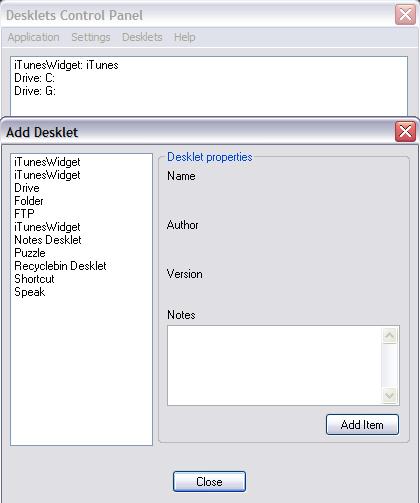
post-3199-1092732422_thumb.jpg

deskletsCP.jpg
deskletsCP.jpg

#203346

Hi natedogg.

I have a question ..

How have you installed SysStats?

The SysStatsCOM.dll goes in your /program files/avedesk/ folder

The docklet folder goes in the same dir. They do NOT go in your /program files/avedesk/desklets/ folder

Have your tried with a clean install of AveDesk?

Good luck :) Hope you get it to work.

#203350

It takes some time to get completely "friendly" with sysstats, but once you know how it works, then it gets easier to play around with.

The reason why you cant ad a sysstat, is most like because you installed it wrongly.

You have to install it like this:

snap1.jpg

Notice that you will both have a desklets and docklets folder. When you have installed a sysstat item, I sometimes find it is easier to edit the items ini-file directly in a text editor to get it to work proberly.

#203353

So... did you get it to work, or not!?!

#203781

Sorry Tobz I just now checked this thread and for one thing have to say thank you very much for your patience and help. I feel sometimes like if I ask for help too much people here aren't going to offer it after a certain point but the thing is as I have posted in previous posts.........this is my first time using Avedesk so it takes me a little while to figure things out but once someone points me in the right direction I usually have no problems after that. I've been busy working all night and haven't had a chance to reinstall Avedesk according to your folder structure but plan to after I get off of work. One thing that I think I am missing (and I know this may sound crazy) is the .dll file for Sysstats. Don't ask how or why b/c I truely don't know but it definitely doesn't look familiar and usually I am aware of an important file like such. Thanks again......I hope you don't mind if I look for help from you once in awhile since you've been very kind!!

Nate Dogg (Y)

#203786

Natedog, please use the search feature and read the pinned articles before

asking a question X that has been answered Y times already.

(No offence meant)

#203866

Originally posted by herd@Aug 18 2004, 06:58 AM

Natedog, please use the search feature and read the pinned articles before

asking a question X that has been answered Y times already.

(No offence meant)

<{POST_SNAPBACK}>

Herd............no offense (spelling) is taken from your suggestion. The only problem is I will continue to ask rather than read some of the "clear as mud" pinned articles mainly b/c I seem to consistently get a wide variety of answers or opinions when I ask some of the questions that I ask. For such thing as folder structure I have received at least three or four if not more different replies as to what the definitive structure of an Avedesk Folder breakdown should be. But I do appreciate your trying to offer a helpful suggestion!!!

Nate Dogg

Seph - sorry about the topic description......I thought that everyone knew WTF meant, "What The ****" but then I remembered that we are a multicultural site with members from all around the globe.....Sorry, won't be so vague next time!!!

#203882