Aqua-Soft Forums
[release] Minicpu Vol2

very nice Guido!
Just noticed a problem with the OrangeJuice config. The background numbers read 40 instead of 88. You can see it in the preview. You'll need to change that. Sorry.
awesome guido, thanks! 
Sweet thank u Guido :woot:
Love the Konfab look Guido......LOVE IT but I'm an asshole and don't know what to do in order to get these CPU widgets of yours to work. I don't know what I have to link them to in the config file..........Please help!!!
Thanks,
Nate Dogg
OOooOO Thanks! Time to add more to my news post.
You need to edit minicpu*.ini files with the correct paths to where you store the image files and the utility you wish to use for clearning the memory.
Originally posted by natedogg@Aug 16 2004, 10:33 AMLove the Konfab look Guido......LOVE IT but I'm an asshole and don't know what to do in order to get these CPU widgets of yours to work. I don't know what I have to link them to in the config file..........Please help!!!
Thanks,
Nate Dogg
<{POST_SNAPBACK}>
I think SysStats is supposed to fix the image paths automatically, but for some reason it's not. All you should have to do is remove the
D:\Graphics\AveDesk11\Docklets\SysStats
from the image path and it should work just fine. Or you might need to remove the whole path from before the image name. Hope that makes sense.
As for the shortcut that the widget runs, you can either remove that or point it to whatever you want the widget to point to. Since it displays memory as well, I just set mine up to point to a program called ClearMem.
Weeeeeeeeeeeeeeird!!! Maybe I'm not that inept when it comes to trying to get my Avedesk 1.1 to work correctly. That was EXACTLY what the problem was that I was having Guido! Although it probably wasn't as clear in my question it is precisely what was wrong with my config file. Now one last question......you say you have to point it towards a particular program that one has running. What does it mean if I don't think that I have some type of application running that concerns my CPU??? If need be I will simply d/l whatever someone would recommend that is light weight......
Thanks again,
Nate Dogg
Excellente stuff... thank you for sharing
Originally posted by natedogg@Aug 16 2004, 05:07 PMWeeeeeeeeeeeeeeird!!! Maybe I'm not that inept when it comes to trying to get my Avedesk 1.1 to work correctly. That was EXACTLY what the problem was that I was having Guido! Although it probably wasn't as clear in my question it is precisely what was wrong with my config file. Now one last question......you say you have to point it towards a particular program that one has running. What does it mean if I don't think that I have some type of application running that concerns my CPU??? If need be I will simply d/l whatever someone would recommend that is light weight......
Thanks again,
Nate Dogg
<{POST_SNAPBACK}>
Naw, you could point it to whatever you want it to point to. Say for example, Doom 3 or to your graphics program. Just whatever you want. The only reason I have mine pointing to ClearMem (which is pretty good) is because the label displays free memory. And it's not that it's an always running program, it acts just like a shortcut. Hope that makes sense.
I installed the widget. Fixed the image paths in the ini files. When I run it, all I get is "-1" displayed where the main digits are.
Anyone know what I'm missing here?
TIA!
EDIT: Looks like someone else had the same prob in the original forum post. Sorry to be redundant. Doesn't look like they got it fixed either though...
@marsmayhem: maybe a little trick:
simply translate these words into your language:
Processor, Time, User, Privileged
now open your .ini file, search these 3 lines :
Counters-0=\Processor(_Total)\% Processor Time
Counters-0=\Processor(_Total)\% User Time
Counters-0=\Processor(_Total)\% Privileged Time
and replace the words!

-->Hey Guido very beautiful work! Thanks :rock:
Thanks! This is just my 2nd and 3rd released graphics that I've ever done, so I'm glad yall like'em.
I thought that I was the only one that has the same prob. the -1 issue and I give up because I thought that was just me... But seems is not (btw I have configured (by default) everything in english, so thats no the prob)
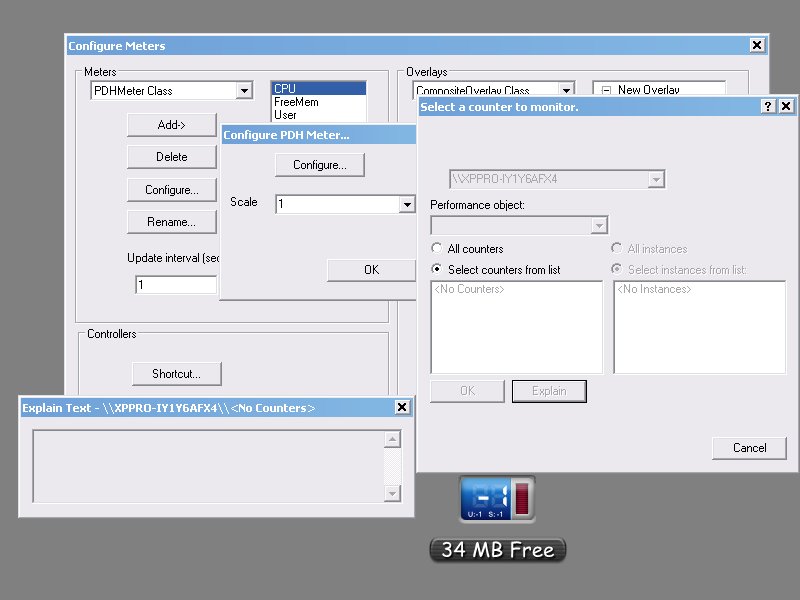
here is a screenshot about judge said and as you can see there are no counters and nothing to configure...
Originally posted by judge@Aug 24 2004, 11:48 PMHmmm. What service pack are you using?
SP1
Do Samurize performance counters work?
I dont use Samurize
Is there a pdh.dll anywhere on your system?
Of course, in system32 (5.1.2600.1106 (xpsp1.020828-1920))
There is also an article on the Samurize forums that might help.
Thanks I had check that and I have the Performance Counters Enabled. I dont know what is wrong :/
good widget.
but i have problem with Digital font... it doesn't work...
when i choose Digital as meter font than i can not see anything...
XP, SP2
In Word i can type with digital font.
Originally posted by NilColor@Sep 1 2004, 06:08 PMgood widget.
but i have problem with Digital font... it doesn't work...
when i choose Digital as meter font than i can not see anything...
XP, SP2
In Word i can type with digital font.
<{POST_SNAPBACK}>
try closing/exiting avedesk or whatever is using sysstat and extract minicpu once again.. that's how i fixed it..
Originally posted by NilColor@Sep 1 2004, 05:08 AMgood widget.
but i have problem with Digital font... it doesn't work...
when i choose Digital as meter font than i can not see anything...
XP, SP2
In Word i can type with digital font.
<{POST_SNAPBACK}>
Or try rebooting.
I can't change the title under the widget so it shows only the digital font. The numbers showing how much mem i got is Digital. The "Free Mem" bit is Arial. How can i change so it shows only digital.
Great widget btw.
Originally posted by Exon™@Sep 1 2004, 06:50 PMI can't change the title under the widget so it shows only the digital font. The numbers showing how much mem i got is Digital. The "Free Mem" bit is Arial. How can i change so it shows only digital.
Great widget btw.
<{POST_SNAPBACK}>
You need to have a digital font that has letters. (hope that makes sense.) Not all of my digital fonts have letters, just numbers, so that might be the problem. Open that font in your font folder and see if there are letters. If so, go into AD's Control Panel and double-click this docklet. Select the label tab and then click the Font button under caption. From there select your font.
it doesn't work for some reason.. It says -1 while taskmanger say's 52% 
see screenshot:
Does anyone know what to do about this?