[help] Running Any Sysstats In Avedesk 1.1

I'm sure there is another thread where this post could have been added to rather than start a new topic but at this point I don't really care! I'm so frustrated with this Sysstats problem I'm having........I don't even see Sysstats as an option to add from when I'm in the Desklets Control Panel > Application??? How do I get this thing up and running???

Thanks

Nate Dogg

:(

#200396

Have you checked if you properly installed the (super) docklet? You can either have the sysstats folder in the desklets or docklets folder in Avedesk and you also need SysStatsCOM.dll in AveDesk's root folder (where the AD executable is).

#200411

Thanks first of all for the help!!! Okay.....I don't find that folder anywhere in Avedesk so obviously something is f*cked up. Also, what is the super docklet? Tell me if this is correct - I have both of these

C:\Program Files\Avedesk\Desklets\Systats

Then I also have this............

C:\Program Files\Avedesk\Desklets\Sysstats\Docklets\Sysstats

Any help is greatly appreciated as I am losing years off of my life expectancy here trying to get this thing working....

Nate Dogg

#200420

Forget about the super docklet. I just don't feel comfortable calling SysStats as just a docklet. :D

All you need is either AveDesk\Desklets\SysStats or AveDesk\Docklets\SysStats. You have to create the Docklets folder, btw. How about the SysStatsCOM.dll? Do you have that in the root folder of AD?

#200422

Originally posted by judge@Aug 9 2004, 08:05 AM

Quit AveDesk.

Delete your existing AveDesk\Desklets\SysStats folder.

Then refer to this topic.

<{POST_SNAPBACK}>

Thanks Judge for the help man......So you're saying that I should delete the Sysstats folder under Desklets completely? Then is it true that I need to make my own Docklets folder or should I just extract them the way you say....??? So now do I redownload Sysstats and unzip as you describe in your picture.....And lastly, which Sysstats is the most recent, updated whatever b/c that is also confusing for me to find now that I've deleted that folder???

Thanks,

Nate Dogg

#200472

Hmm, I didn't think you needed to delete the folder, only move it.

Anyway, if you have the most recent version of SysStats (2.0.3), you needn't redownload it.

Basically, just have one SysStats folder within AveDesk\Docklets. So your path to SysStats should read as follows:

C:\Program Files\Avedesk\Docklets\SysStats

and that's it. If you don't have the Docklets folder, just create it first then extract the contents of the SysStats zip so it matches the image in that thread.

#200517

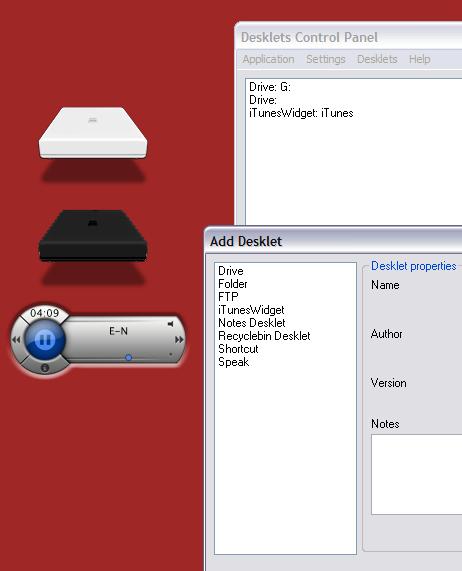
Okay cool! I got that part right now.....just extracted it to look like Judge's picture and BOOM it's working now. But the part that I don't get is how to add a damn config from Sysstats. When I go to Add it doesn't show Sysstats as an option even......I'll attach a screenie just so you see what I'm talking about but hey I really, really appreciate your help! I'm almost there.....

Nate Dogg

post-3199-1092072397_thumb.jpg

Untitled2.jpg
Untitled2.jpg

#200521

Judge thanks for your patience although I'm sure you would like to rip my head off right about now. I followed your directions and it looks correct to me. Should I be seeing a Sysstats option when I am trying to add a new desklet??? Man I'm sorry to ask for so much help. It's just that I'm so close to having everything work that it's killing me..........

Thanks again man,

Nate Dogg

#200524

I'm thinkin' that file SysStatsCOM.dll is definitely a problem for me now as I read more of tutorials b/c I can't even see this file anywhere..........someone put a loaded gun to my head PLEASE!!!

Nate Dogg

:rant:

#200542

Originally posted by natedogg@Aug 9 2004, 02:06 PM

I'm thinkin' that file SysStatsCOM.dll is definitely a problem for me now as I read more of tutorials b/c I can't even see this file anywhere..........someone put a loaded gun to my head PLEASE!!!

Nate Dogg

:rant:

<{POST_SNAPBACK}>

It is included in the SysStats download from DockEx.com Are you sure it isn't in the zip? Also, if you have SysStats installed in the proper place and you're missing that file, AD would complain about the missing file when you go to "Add Desklet"

#200667

Unless it's a hidden file (which I can't imagine it being) I'll guarantee that file is nowhere to be seen in my Avedesk folder anywhere.........In fact when I do try to "add" a desklet......I don't see anything related to Sysstats as an option even.......why is this happening to me???

Thanks for the help by the way to all of you guys......I really appreciate it...!!

Nate Dogg

#200710

@Nate: I had the same problem initially but found out that I did not unzip SysStatsCOM.dll into my AveDesk folder. And that's probably what happened to you too. So:-

Look inside your Systats zip file again. You will see SysStatsCOM.dll and a Systats folder.

Extract SysStatsCOM.dll into your Avedesk folder i.e. C:\Program Files\Avedesk\

Once you've done that, RESTART AveDesk and you should be able to see Systats as an option to add.

#200738