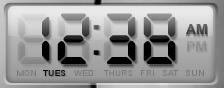
[request] Conversion Of This Digital Clock

I have searched this clock everywhere.

I know this is from Susumu for SystemMeter.

I have emailed him but an answer, after more than a week,

is not arrived.

So I think that if someone knows personally Susumu and

has some skinning ability could ask him and realize this clock that I

find very "realistic" and could enrich AveDesk collection.

Any impression is appreciated.
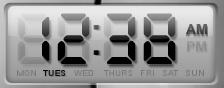
post-3132-1091391092_thumb.jpg

stunningdigitalclock.JPG

#197101

OK, I've managed to recreate this almost.

It's not 100% exact to the image you posted, but, this way we don't have to wait for anyone's permission, as I've created the images myself.

Just gotta figure out how to do the days of the week now in SysStats.

#197181

ManykDigitalScreen.png

Posting it here because I can't post in the AveDesk Releases.

This is for SysStats running under AveDesk 1.1+

The zip is recursive, so just unzip to your SysStats directory and it should extract the files into the proper directories.

The zip contains the font "digital.ttf". If you do not have this font make SURE you install it into your fonts folder before trying to load the config. If you don't then SysStats will default to Arial and that will not look right at all!

The 'face' of the clock has color because with AveDesk we can "Colorize" desklets and making it grey would make that function moot. So, If you want the grey, simply turn down the saturation all the way to the left.

This config and the images contained within are provided AS-IS. I did this for fun so if anyone wants to adjust and reconfigure the config or change the days to French/German/Italian/etc .... feel free to do so!!

Have fun kiddies ;-)

ManykDigital_SysStats_Ave.zip

Attachment: ManykDigital_SysStats_Ave.zip

#197209

Wow, good work thanks :)

#197229

Guess what thats right same problem seems anything with the % wont work on my box windows xp service pac 1 with flaykytes installer, starting to think its something on my end . location is in indiana so the am pm should be right.Man this is getting to be a real bummer missing out on some great widgets.

#197240

Originally posted by Ghostwalker@Aug 2 2004, 02:38 AM

Guess what thats right same problem seems anything with the % wont work on my box windows xp service pac 1 with flaykytes installer, starting to think its something on my end . location is in indiana so the am pm should be right.Man this is getting to be a real bummer missing out on some great widgets.

<{POST_SNAPBACK}>

hmmm ... I don't know what to say. I personally don't have any modded files like flaykytes installer, but I would THINK that his modded files wouldn't mess with the 'functions of time'. These are just switches or arguments that the OS uses for displaying data afterall.

Suggestion for ya ... make a new config with just a solid color png file or even transparent. Then add a time measure to it and a text string. configure the time string following any of THESE variables.

Do ANY of them work?? Cause if they work with text output they will for images as well.

#197350

Thanks Manyk for your Digital Clock.

It's very good for me, thanks again.

I note that the font used is not the same.

The original is more "rounded" in some part

of digits. Someone knows which is the right font?

#197351

Originally posted by lupner@Aug 2 2004, 10:29 AM

Thanks Manyk for your Digital Clock.

It's very good for me, thanks again.

I note that the font used is not the same.

The original is more "rounded" in some part

of digits. Somone knows which is the right font?

<{POST_SNAPBACK}>

Heh, I noticed that too ... I looked for a similar font online that would draw properly and be more rounded. But with no luck. I too would be very interested in obtaining 'the right font'.

#197353

Good work Manyk.

thanks.

/aviel

#197355