 Aqua-Soft Forums
i don't know if anyone's pointed this out yet, but i found answeres to a lot of the problems i've come accross in this thread at http://beverlyhills.web.infoseek.co.jp/safarifox/tips.html, including how to make the search bar longer.
[link] Safari For Firefox 0.9
Originally Posted by vercesI've got everything sorted out except for a few minor irriating details...
1. The fonts Firefox is using is still this ugly courier thing....I managed to change the address other than Lucida MAC, (I just have no idea how to make it go Lucida Mac, if I put Lucida Mac in userChrome.css, it just goes back to the default courier font....) The Tab fonts are all in courier.....someone? change fonts? Even the dialogue boxes are still in courier...
go into your display properties, appearance, advanced, and change the 'Message Box' font to LucidaMAC. that's what worked for me.
I'm sorry for whining, but someone PLeASE help with my messed up search bar.... It won't even search...
...if I put Lucida Mac in userChrome.css, it just goes back to the default courier font....
because it isnt called Lucida Mac
it's called LucidaMAC
in case anyone was interested, i found a way to change the google search icon to the magnifying glass. simply copy this 'google.gif' to 'C:Program FilesMozilla Firefoxsearchplugins' and overwrite the default 'google'.


Thanks for the Google.gif, I lost mine a few updates ago!
in case anyone was interested, i found a way to change the google search icon to the magnifying glass. simply copy this 'google.gif' to 'C:Program FilesMozilla Firefoxsearchplugins' and overwrite the default 'google'.
didn't realize it could be that easy.
thx buddy
now since the search engine image is fixed. i have another question (never stop to make it perfect  )
is it possible to initialize the search box to contain the text "Google" everytime i start the program. i know there are search box/engine images that contains the label, but i don't really want to use them since they either shift my input to the right or overlap it. however, initializing it with the text "Google" seems like a better solution cuz once i want to use the box, i can just click it, and then the initial text will be automatically highlighted so i can simply type over it.
any ideas?
now since the search engine image is fixed. i have another question (never stop to make it perfectis it possible to initialize the search box to contain the text "Google" everytime i start the program. i know there are search box/engine images that contains the label, but i don't really want to use them since they either shift my input to the right or overlap it. however, initializing it with the text "Google" seems like a better solution cuz once i want to use the box, i can just click it, and then the initial text will be automatically highlighted so i can simply type over it.
any ideas?
found this thread
if you want a search box that has 'google' in it, and want 'google' to disappear when you activate it (click on it/type in it) plus you don't like the right shift involved in using the other style... put the linked file(you'll want to rename it to search.png) into the jar files browser folder. you'll probably want to crop the 'find in this page' png to take out the word google too, or you can just search the old safari theme threads for the appropriate 'clean' image.deviantart scrap link
edit: when you go to that link, the image looks screwed... it isn't, just fullview it and rightclick save.
PLEASE help me with my searchbar!!
EDIT: Oh, and the directions for the Google thing aren't very specific. I'm an idiot, so please help with that.
@deathmunky
i've tried that one. the goole label only hides when u active the search box, but after u type something into the box and hit enter to search, the label will show again and overlap with ur search string since it only hides when the box is active, but u can't keep it active all the time, u have to click somewhere else to surf rite?
i just noticed that. i turned mine back to the 192px version.
I'm going crazy here!!! My search bar won't work!! *cries*
--------------
Post edited.
Please don't use large caps, ie don't scream. If noone seems to want to help you, maybe they just don't know how?
Why isn't this just made as a .jar file? Can't it be compiled into one?
everythign works great, except for the top right corner. it appears that the title bar isn't stretching to blend with the rest of the firefox skin.
I'm using WB 4.4, and the safari.wba that wa smeant for firefox. When i scale the window smaller it aligns perfect, but if i go any smaller or larger than that perfect setting teh titlebar no longer aligns.
Also, i have ugly gray buttons in websites instead of the nice aqua ones.
perhaps there is a better version of the safari WB theme? Or any other brushed theme that fits with hills firefox?
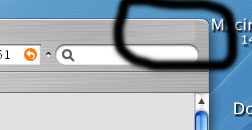

PLEASE help me with my searchbar!!EDIT: Oh, and the directions for the Google thing aren't very specific. I'm an idiot, so please help with that.
hey, you're so funny  , you never can tell !!
i don't know if anyone's pointed this out yet, but i found answeres to a lot of the problems i've come accross in this thread at http://beverlyhills.web.infoseek.co.jp/safarifox/tips.html, including how to make the search bar longer.
unfortunately, no working tips on getting those tabs to work is they were ment to :slant:...
sithan you are posting in a wrong thread and your post doesn`t make sense.
this could also be considered bumping and this is not the first occasion u did something like that :/