 Aqua-Soft Forums
As today i roam arond the web,a 3D FX App from Japan caught my eyes:woot: !It's really so cool,let me ask ya ,every seen the longhorn 3D FX?Yes,the app called Madotate can also give ya guys a longhorn-like 3D FX!!!
Here goes the sreenshot,seeing it believin'!!!
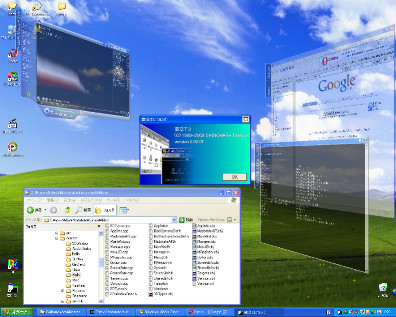
Cool?
How it works?
It adds a little control bar on top of your titlebar,just like the screenie below
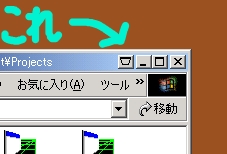
Download:http://www.ksky.ne.jp/~seahorse/mtate2/file/mtate20105.exe(Opps!It's a Japanese Version,but there was a English Translated version ,but the website is down,But don' worry,if you like it and wanna give it a try,i will help thru' it)
Original webpage:http://www.ksky.ne.jp/~seahorse/mtate2/
Ways to configure the Madotate
Download it and extract it to any folder you think it right to place,You can see tow major app in the folder.One is Madotate,and mtatecfg,as it indicates,the madotate is the app to add 3dfx to windows and the mtatecfg is a config file for the app to work as you like!
Okay now let's do it,click on the Madotate,it will add a cool control bar on top of the titlebar(see the 2nd pic i posted above for more info)
Okay,you got it,and give the controlbar a try ,see?the windows is now 3D effected right?And you can make all you windows this way by clickin' on the controlbar.
Now let me tell you some control keys that we use to control how the 3D FX displays.
#1:Left Click,when you left click on the 3d effected windows ,and hole on your mouse,move around,see?you can move it around anywhere you like.
#2:Right Click,also right click on it,move it around,the windows can be changed in angle by this action .
#3:Page Up and Down,press the Page Up and Down can zoom in,out the windows(make sure the windows is active on)
Ways to configure the mtatecfg
Opps maybe you cannot see the Janpanese properly unless you have a JP verision windows or software that can support you to display it.
But for us,there only few options need to configure if you just want make a simple 3d effect
Now click on the mtatecfg or just also right click on the system tray icon of it,choose the 3nd option of it.
Now you're seein' the option dialog right?
Here i tell you how to make the windows tranparent.
#1:Go the first tab we need to check the 2nd checkbox and slide the slider from left to right to choose the tranparent depth!
#2:The 6th tab can exlude any window that you don't want it to 3d Effected,
it has two columns ,the first one displays the windows are now active,the 2nd allow you to add and del the app you don't want to 3D effected or delete it
there have two buttons,add and del.
Okay now,some simple funtions of this cool app are explained ,if you have any question feel free to ask,and if you are chinese you can grab it from http://www.skycn.com for a chinese version.Many thanks goes to the author of this cool app.


