 Aqua-Soft Forums
[release] Miranda Im Aqua Mod
 miranda isnt looking anything like that on this computer :cry:
Seph, what exactly don't wanna look like that ? I've tried to describe all necessary options in Readme.txt
Cool update homie :rock: Some nick's in contact seem familiar to me 

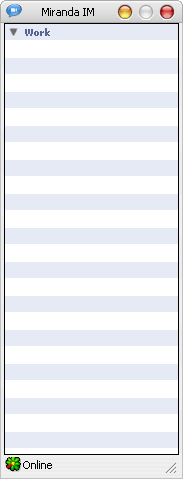
i get that same problem with inner black border
Edit: I figured it out.
Right click on the "My Contacts" bar on the Miranda-IM client then uncheck the border option.
Right click on the Miranda icon on your taskbar -> Main Menu -> Frames -> Show All Titlebars.
"My Contact" should now appear on your Miranda (contact list) window. Right click on it.
Uncheck "Border". Right click on "My Contacts" again and uncheck "Show titlebar".
Now the black border should be gone. Remember, DON'T uncheck the line that says "Visible".
how do get the "speech bubble" icons next to the names and not the stupid msn butterflies on the contacts list?
thank`s
Originally posted by gone2far@Jul 21 2004, 05:36 AMhow do get the "speech bubble" icons next to the names and not the stupid msn butterflies on the contacts list?
<{POST_SNAPBACK}>
get this icon set: http://www.miranda-im.org/download/details...viewfile&id=792
Originally posted by dreamz@Jul 21 2004, 02:08 PMget this icon set: http://www.miranda-im.org/download/details...viewfile&id=792
<{POST_SNAPBACK}>
? I thought it's already integrated in my Miranda.exe..
@gone2far: Options-> Contact List -> Icons -> Global & other protocols icons change path to Miranda.exe
I'm sorry but what kind of message plug in are you using? is it moded srmm.dll?
I don't think that's nCovers...looks different.....
From your full screen shot, on message window top right side tool bar which I believe mac kinda icons is not
showing on my miranda mod pack from yours...
Did you reshack the dll file yourself? or is there another file to download to enhance a view?
Thank you in advance... 
just a great skin!
thx alot! loving and using miranda anyway and now that skin.... oh whewww 
Originally posted by True@Jul 22 2004, 08:44 AMI'm sorry but what kind of message plug in are you using? is it moded srmm.dll?
I don't think that's nCovers...looks different.....
It's sram.dll 1.0.1.9. nCovers.dll doesn't contain any useful resources afaik.
From your full screen shot, on message window top right side tool bar which I believe mac kinda icons is not showing on my miranda mod pack from yours...Did you reshack the dll file yourself? or is there another file to download to enhance a view?
 What "message window top right side tool bar" icons do you mean ? Anyway there're only my mods (from 1-st page single archive ) on the screenshot, of course. Except Tiger theme by KoL.
Never mind only,....I was talking about top right tool bar on chatting window...
I guess default sram.dll version is more mackind....
I was using different one...
Thank you for the information which plug-in you were using...
I appreciate it.... 
Thanks for your hard work, On1y
I will be your slave forever if you manage to modify icons in nConvers.dll 
Originally posted by Pe8er@Jul 24 2004, 04:48 PMThanks for your hard work, On1y
I will be your slave forever if you manage to modify icons in nConvers.dll
<{POST_SNAPBACK}>
Thanx Pe8er =) I've tried to modify that plugin, but could't find any icons inside nCovers.dll, after unpacking it from UPX, just a couple of useless bitmaps.. However I've made something even better =) It's new Aqua modded Tab plugin based on the latest SRMM code (07/01) featuring "tabbed messaging". All message dialog windows are now opened within a "container" window like this:
Classic version -

And OS X.* version -


0n1y Раскажи как замутить Tab-ы ? 
by the way - is there any way to have bigger icons in the contact list at 1600x1200 they´re hard to "read".
Please, this is an international board. Either use russian and english in your posts or take it to PM.
// Seph
Originally posted by Pe8er@Jul 25 2004, 11:46 PMEdit: I modded miranda32.exe a bit. Just replace icon group>136 with attached icon
Edit 2: is it possible to make borders in this plugin smaller? It looks a bit rough now :S
<{POST_SNAPBACK}>
Cool chat bubble ! =) Btw how did you remove "Sent" button ? As to resize of borders - I guess it's possible somehow, but I don't know how yet.
Important for right working Tab Plugin:
[ Download msvcr71.dll ] (this dll must be in your system directory %/WINROOT%/System32/)
2 Orez: Contact list icon has 16х16 format only afaik.
You can remove the "Send" button by going to OPTIONS > MESSAGING > and unchecking "show send button"
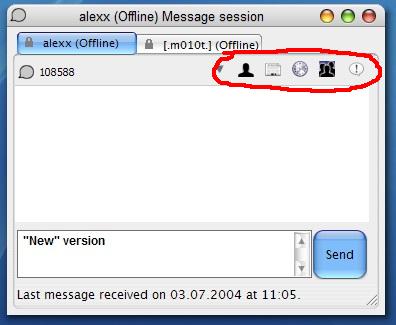
On another note, what do I have to reshack to get those icons circled in red? The icon resources would also be appreciated if somebody could send them to me. PM for my email.

cool mod! thanks!
btw, each time i restart miranda, the contact list won;t stay at the last opened position, instead, it always end up in the uppper left corner of my screen, all shrivelled up, anyone else having this problem?
and the aquatab mod d/l link is down.......any new link for that? thks
Originally posted by hmai18@Jul 28 2004, 08:50 PMYou can remove the "Send" button by going to OPTIONS > MESSAGING > and unchecking "show send button"
On another note, what do I have to reshack to get those icons circled in red? The icon resources would also be appreciated if somebody could send them to me. PM for my email.
<{POST_SNAPBACK}>
have you tried reshacking the message plugin? it should be srmm, sramm, or srmm mod. at least that's what i did to mod mine.