[help] How Can I Make This Option Availible?

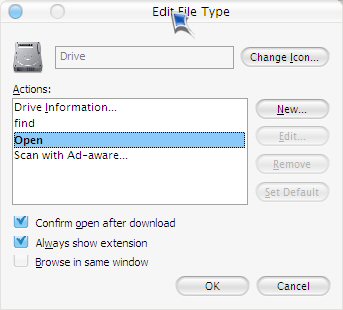
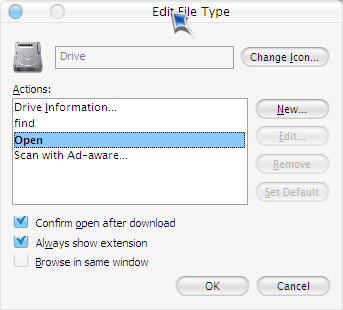
for some reason when i go into my computer and open my c drive, a new window opens with the contents of the c drive. it used to open in the same window, but now it doesn't. So i looked at the file types dialog for drives and the option to browse in the same window is unchecked, and i can't recheck it. is there any way to fix this??

here's a screenie
post-6393-1086130006_thumb.jpg

screenie.jpg
screenie.jpg

#171093

I dunno what you're doing with the types diolog for drives but I have "Open each folder in the same window" selected in Control Panel>Folder Options...works for me ;)

Unless, of course, you already had that selected-- which is why you're wondering c:\ opens in its own window while other folders don't :blink:

#171098

yup, i have that option checked in folder options

#171113

Check to see if any of the keys on your keyboard are stuck. I don't know if there is a shortcut to open that dialog (CTRL opens in a new window, SHIFT opens in new window with explorer on left, ALT open properties). It's a longshot, but maybe that can help.

#171126

OT: What theme is that?

#171129

Originally posted by hax0r_foX@Jun 1 2004, 07:54 PM

OT: What theme is that?

Ice by Xero...can't find any working linkage though...

#171135

There is also an option in the lines of "browse each folder in its own process".

This will have the strange effect that the first doubleclick on a drive will open a new explorer and double clicking on a folder there won't.

#171314

I know that no keys are stuck on my keyboard, it's fairly new

OT: keith and fox if ya want the ice wb theme PM me withur e-mail and i'll send it to ya

#173092