Tryin To Verify This Tweak

i saw this tweak on winguides.com, it is a tweak that can rebuild ur icon cache,

Repair the Icon Cache (All Windows)

Use this setting if Windows is displaying incorrect or corrupted icons for your programs and shortcuts.

Windows maintains a cached copy of all the icons on the system to avoid having to reload the icons every time they are displayed. If this icon cache becomes corrupt then the wrong icons may be shown.

To clear the icons cache make sure you can view hidden files and then open your Windows directory in Explorer and delete the file called "ShellIconCache".

When you restart Windows the icon cache file will be automatically recreated.

I just wanna know if this is tru before I delete it. even though i don't see a file called "ShellIconCache" I just see one called "IconCache" Are they the same file?? It's located in "C:\Documents and Settings\USERNAME\Local Settings\Application Data" You must be able to see hidden files and protected system files also. Thanx for any help..

I'm using Win XP Home Edition SP1

#165140

i haven't tried it, but just use tweakui to repair the icon cache. it's much easier (and i'm sure it's exactly the same procedure anyways).

#165142

i've used tweak ui to repair the icon cache, and it hasn't worked.

#165332

Try Iconpackager's rebuild

#165375

did that too numerous times and nothing...

#165454

well what's the actual problem you're having? maybe something else is wrong, because those 2 apps should repair the cache.

#165555

Try IconPhile, yet another app that can rebuild the icon cache. Click on the hammer/tools icon, to the right of the drop-down list.

IconPhile is here: http://www.virtualplastic.net/scrow/iphile.html

Hope this one works,

nightcrawler1089

#165571

Originally posted by dreamz@May 21 2004, 09:44 AM

well what's the actual problem you're having?  maybe something else is wrong, because those 2 apps should repair the cache.

basically most of my icons are displaying the wrong image...I know i probably gotta reinstall xp but i can't do that until i get my dvd drive because my cd-rw drive is retarded

@nightcrawler: thanx i'll give it a shot.

#165750

i don't see shelliconcache either, but i'm guessing it's iconcache.db. you could create a restore point and simply move the file (don't delete). see if that helps. i'm guessing it won't, though.

did you replace shell32.dll or anything like that? you might try to restore a good copy of shell32.dll and then repair the cache again.

#165751

nah i didn't mess with the shell32.dll file at all. I'll give ur tip a try and see what happens

#165761

if that's the case, the icons shouldn't be messed up.

which icons are problematic?

#165764

ummmmmm program exe's, office documents, .rar files i'm sure there are others, but i can't remember them right now.

#165767

how did you change your icons in the first place? i know iconpackager can cause similar problems.

try to re-associate the icon with an app, and also try manually changing the icons by going through folder options.

also, if the exe icons for certain apps are wrong, check this:

HKEY_CLASSES_ROOT\exefile\DefaultIcon

the value should be %1.

#165787

i tried the move the iconcache.db thing and they are still messed up :(

ya i use icon packager, i checked that registry key and it is %1

i've looked that the file types in folder options and there are alot that havve wrong icons...hope i can find the correct icons for them.

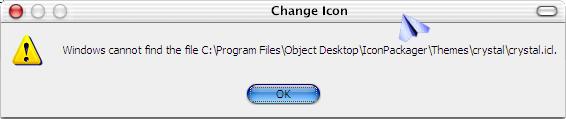
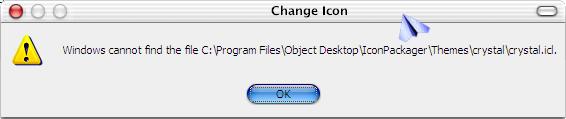
i just tried to change the icon for microsoft word and this error came up...

could it possible mean that for whatever reason i need the crystal icon package??

post-6393-1085189218_thumb.jpg

untitled.JPG
untitled.JPG

#165811

look for icons here: C:\WINDOWS\Installer\{90280409-6000-11D3-8CFE-0050048383C9}\wordicon.exe

that's what mine says.

it also looks like you're trying to load a particular icon library. you don't need to.

#165815

i'm not tryin to load any library, that just came up when i went to change the icon

for some reason i don't have

C:\WINDOWS\Installer\{90280409-6000-11D3-8CFE-0050048383C9}\wordicon.exe either...oy this is really becoming very frustated

if only i had that dam dvd drive i can fix this POS!

#165817

click ok, then manually browse for the icons.

#165819

Soniku- It looks like IconPackager is trying to load icons from a file which doesn't exist. Redownload the file (the crystal.icl), and place it in the location where the error message says it can't find (C:\Program Files\Object Desktop\IconPackager\Themes\Crystal\crystal.icl. Open IconPackager, and select the crystal.icl theme as your default theme (or however you use IconPackager; I don't have it so I wouldn't know). Once you've selected that as a theme, select another theme. Then unload all themes- stop using IconPackager for the moment. Restart your computer and see if that fixes it.

I had a similar problem with VOSBL, where I uninstalled it without first turning the service off. Windows Explorer wouldn't work. It's basically the same problem I think (I hope).

Hope this helps.

nightcrawler1089

P.S: In your error screenshot, what did you use for the title bar skinning? WindowsBlinds, ShellWM, or something else?

#165821

it's gonna take a nice bit of time to get all this messed up icons back the way it should be...thank you dreamz, for all ur help

@nightcrawler i was just on wincustomize.com lookin for the one tha i had but i can't find it and i don't know who did it :(:(

i use windowblinds, it's the mac osx 10.2 Jaguar skin

#165823

the only time i've seen "shelliconcache.db" is after using guireplacer, before flushing the system of old files... i think it's one of those "on the fly" type files that happens after dlls and other system files have been changed... and i don't mean just "modded" files... windows updates can cause it too...

#165826

I guess you should post a request for the theme. Either here, or start a new topic in the Stardock forum.

Also, check your recycle bin for the file. Lastly, download a file-recovery tool, to see if you can remove it "from the void" (beyond the Trash Can). I think Norton SystemWorks has one, if you own that.

-nightcrawler1089

#165827

you might be able to just get another icon package (or maybe any other file), rename it to crystal.icl and put it in that exact location. that might let you undo it, allowing you to remove iconpackager.

about fixing all the icons, it could be a lot of work. i don't know how iconpackager works, but next time you might consider using iconphile (free) or reshacking shell32.dll.

#165829

Yeah dreamz, renaming any .icl does sound possible. However, you would probably have to make sure it has the same number of icons that the original crystal.icl had.

@Soniku- Considering you've already paid for IconPackager, there's no reason to completely stop using it. However, in the future, I also reccommend IconPhile, and if you're cautious, manually renaming dll's.

Also, you might want to contact Stardock and see if they can help you with this problem.

#166069