
[help] With Desktop Icons

hi to all;

I have problem with my disktop icons, as you can see my attach image the text of the icon have background color I believe the problem is the wallpaper its biger more than 1024 because when I change the wallpaper to 1024 wallpaper the background color despair . So any one have idea how to make it work?
#164166

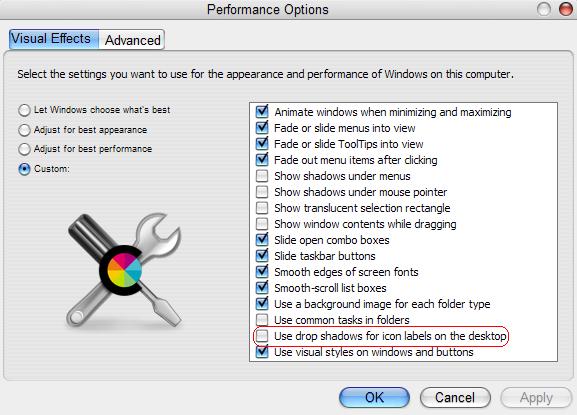
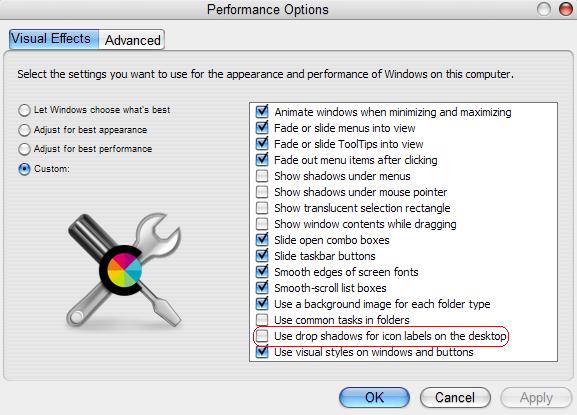
right click my computer > properties > advanced > performance settings > "use drop shadows for icon labels on the desktop."

#164221

@dreamz thanks for your reply, I know about "my computer > properties > advanced > performance settings > "use drop shadows for icon labels on the desktop." it doesn't work <_<

post-15859-1084937211_thumb.jpg

4.JPG
4.JPG

#164227

I try this way and still no louk

"desktop properties, then the appearance tab, then click on Effects, make sure Cleartype is checked and change it from Standard to Cleartype. "

#164230

ok, 2 more questions.

1. are you using active desktop? right click and uncheck "lock web items."

2. are you using a different file type for the background (e.g. png)? if so, stick to bitmaps.

#164248

Originally posted by dreamz@May 19 2004, 04:16 AM

ok, 2 more questions.

1. are you using active desktop?  right click and uncheck "lock web items."

2. are you using a different file type for the background (e.g. png)?  if so, stick to bitmaps.

1. yes, its uncheck "lock web items"

2. its PNG and then I change it to bitmap and still no louk! :blink:

#164257

ok, the only thing good right now is empty disktop :6

#164499