 Aqua-Soft Forums
[release] Avepreview 2.3
Then I pity you, f00. 
Ok, time to move the Offtopicness to the KDX server or somewhere else (i really dont care where  )
)
// Seph
It's indeed a goat news to see this goat in goating. Goatings! 
Originally posted by Pe7er@May 11 2004, 07:45 PMIt's indeed a goat news to see this goat in goating. Goatings!
The Goater Himself has goated!
stop goating around and goat to business
Originally posted by Pe7er@May 11 2004, 07:45 PMIt's indeed a goat news to see this goat in goating. Goatings!
You and your one-track mind! :6
Very nice Ave, keep up the awesome work, as always 
Hey AV, you rule! :rule:
Your skinning engine is perfect! I hope I will be able to use your skinning engine in my Nexplorer soon 
By the way, I made my own crappy skinning engine based on your skinning scheme for the time being. Is it ok with you? Also, can I release the next version of NeXplorer with Pe7er's default brushed skin for AvePreview? I already got permission from Pe7er.
( I don't really get the goat jokes by the way)
Hey vneumann, you goat...ehrm... rock too!
By the way, I made my own crappy skinning engine based on your skinning scheme for the time being. Is it ok with you? Also, can I release the next version of NeXplorer with Pe7er's default brushed skin for AvePreview? I already got permission from Pe7er.
Ofcourse, ofcourse :woot:
Maybe I can help you with your skinning engine?
Let me explain how it works.
I am creating 4 layered windows (WS_EX_LAYERED) that I will refer to as borders. Each of these borders is attached to the "main" window. That means, they are positioned so that the left border looks like it is a part of the window, the right border is positioned at the right of the main-form et cetera.
Your main window must have no captionbar or normal window-borders. No,w to make the window being able to be resized/moved, you must implement it all yourself.
Ofcourse you can just send a WM_SYSCOMMAND and HT_CAPTION, but we want to have all the 5 windows (main window + border) to move at the same time.
When moving or resizing, use timers (windows does use timers, WM_SYSTIMER, too for this) and use DeferWindowPos() to move all the 5 windows at the same time.
If you need some code parts, send me a PM,e-mail or IM, and I happily convert them from Delphi to C++ for you.
( I don't really get the goat jokes by the way)
That's a positive point for you, hehe
Originally posted by AndreasV@May 11 2004, 07:39 PM
I am creating 4 layered windows (WS_EX_LAYERED) that I will refer to as borders. Each of these borders is attached to the "main" window. That means, they are positioned so that the left border looks like it is a part of the window, the right border is positioned at the right of the main-form et cetera.
Your main window must have no captionbar or normal window-borders. No,w to make the window being able to be resized/moved, you must implement it all yourself.
Ofcourse you can just send a WM_SYSCOMMAND and HT_CAPTION, but we want to have all the 5 windows (main window + border) to move at the same time.
When moving or resizing, use timers (windows does use timers, WM_SYSTIMER, too for this) and use DeferWindowPos() to move all the 5 windows at the same time.
If you need some code parts, send me a PM,e-mail or IM, and I happily convert them from Delphi to C++ for you.
At least I was headed in the rigit direction
I also used WS_EX_LAYERED style though I have 8 layered windows( 4 borders and 4 corners , too many ) and processed WM_SIZE and WM_MOVE of the main window.
I tried using DeferWindowPos() but somehow it didn't work . Maybe I should give it another try cause responding to WM_SIZE and WM_MOVE seem a little slow and I sometimes see a small gap appear and disappear while draggin the window.
I don't know how windows uses timers while reszing or moving . Can you perhaps send me a code snippet of resizing and moving ? I think you know my email address.
Thanks
I also used WS_EX_LAYERED style though I have 8 layered windows( 4 borders and 4 corners , too many ) and processed WM_SIZE and WM_MOVE of the main window.I tried using DeferWindowPos() but somehow it didn't work . Maybe I should give it another try cause responding to WM_SIZE and WM_MOVE seem a little slow and I sometimes see a small gap appear and disappear while draggin the window.
I don't know how windows uses timers while reszing or moving . Can you perhaps send me a code snippet of resizing and moving ? I think you know my email address.
8 layered windows is a bit too much I think. I tried that, and I got noticable slow-downs.
DeferWindowPos-code-snippet:
void onMoveTimer()
{
	// grab the current mouse position
                // begPoint is some static/global variable
	POINT curPos = {0};
	GetCursorPos(&curPos);

	if(curPos.x == begPoint.x && curPos.y == begPoint.y)
  return; // no action necessary, because the mouse was not
    // moved

	// calculate the new position of the mainWindow, all
	// the positions of the borders will be relative to
	// this window
	int xDiff(begPoint.x - curPos.x);
	int yDiff(begPoint.y - curPos.y);

	int newWidth(mainWindow.getWidth() );
	int newHeight(mainWindow.getHeight() );
	int newLeft(mainWindow.getLeft() - xDiff);
	int newTop(mainWindow.getTop()   - yDiff);

	// update the begPoint-poosition
	begPoint = curPos;

	// get the sizes of the borders
	int leftBorderWidth(mainWindow.getLeftBorder().getWidth() );
	int rightBorderWidth(mainWindow.getRightBorder().getWidth() );
	int topBorderHeight(mainWindow.getTopBorder().getHeight() );
	int bottomBorderHeight(mainWindow.getBottomBorder().getHeight() );

	// begin DWP

	HDWP def( BeginDeferWindowPos(5) );

	DeferWindowPos(def,mainWindow.getHWND(),	newLeft,	newTop,	newWidth,	newHeight,	SWP_NOZORDER);
	// calculate positions of other borders
	// etc...
	// etc...

	// this actually make the windows move
	EndDeferWindowPos(def);

	// end DWP
}
Ofcourse, you need to capture the mouse too. Also, I tried to do it using the WM_MOUSEMOVE, but this was too slow for me.
Again, If you need the painting routines from me, just say so :-D
Again, If you need the painting routines from me, just say so :-D
Again, If you need the painting routines from me, just say so :-D
Thanks a lot :woot:
I'll use the code in my app.
I think it will take some time till I will be able to make a skinning engine that's completely compatible with yours. I got kinda busier.
By the way,, why do you use two background files , bg.bmp and bg. png ?
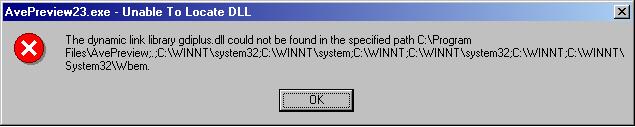
I love AvePreview! Hmm... I got this error msg with this current one though... anybody help enlighten me? :canadian:
Originally posted by AndreasV@May 11 2004, 10:42 PM
I will rewrite the main-drawing routines to C++ for you
That would be perfect.
Thanks a lot
Originally posted by asianLove@May 11 2004, 11:50 PMI love AvePreview! Hmm... I got this error msg with this current one though... anybody help enlighten me? :canadian:
I guess your OS doesn't have gdi+ .
Try this link to get gdi+ dll.
Sorry i missed the [offtopic] fun earlier... i was in VA beach picking up a car for a friend... Great app andreas, as usual
thanks, this is a great app, i'm using it as my default viewer, as its just so much faster..
but i was wondering if you could add support to view animated gifs in the next version?
thanks again! :rock:
Man this is so great!
But I think the only thing missing is that it should resize the picture to the current size of the previewer window like XP's default picture viewer does (only if picture is larger than window). Instead of showing all pictures at there default size.
But I don't know this was is cool too.
But I love it regardless.
The download link is broken. (((
Please can someone upload 2.3.
Hi,alang is this really 2.3 ver?,have you checked ?,thank's
Hi,alang is this really 2.3 ver?,have you checked ?,thank's
well its the same file that I have downloaded from the link on first page. Could you please do me a favor download the file and check what is the version.