[release] @zscreen R.1.01

Hello @zSurfers ...

I just finished the first release of @zScreen App.

As your request :

- @zScreen in the Systray (no icon on the Desktop).

- Left click on the Tray Icon show @zScreen.

- Left double click on the Tray Icon minimize all the windows.

- Right click on the Tray Icon open the menu to acces to "Configuration" and "Exit" options.

- New Configuration Dialog with new options.

- "Always on Top" parameter to keep @zSCreen always visible.

- "Delay" parameter for automatic hide.

- "Exclusion List" parameter.

- "Fade In/Out effect" parameter to activate or not the fade effect.

- "Hide TaskBar on Startup" to hide the TaskBar when @zScreen is launching.

- "Hide only App" to hide only the applications list in the TaskBar.

- Taking screenshot optimization.

- Speed optimization.

- Memory optimization.

The SysTray Icon :

SysTrayIcon.jpg

The SysTray Menu :

SysTrayMenu.jpg

The new Configuration Dialog :

NewConfigSmall.jpg

Bigger :

New @zScreen Config Dialog

And the Web Site to download ....

@zTeck - Just say easy ...

Don't forget to send comment ...

@zTeck Staff - LeFOOL

#159246

OooooOooooOoo this is tight! I love this! Thanks!

:naughty:

#159282

what i does? :blink:

#159291

Hi static ...

This is a very good question :cry:

I forget the screenshot ...

And this is :

ShotScreenMini.jpg

Bigger :

ScreenShot

:moon:

#159295

:woot: :woot: :woot:

thank you very much for the update. i really love this proggie

(look at my screenie to see another skin applied: Screenshot)

greets,

08/15

the exclusion list is a very needed feature - great. Can anyone confirm problems with multiple instances of Firefox? It only lists one of my windows... No big problem, cause I usually use tabs and have it all in one window - but still a bug, isn't it?

#159302

:moon:

right back at ya

#159314

cool :woot:

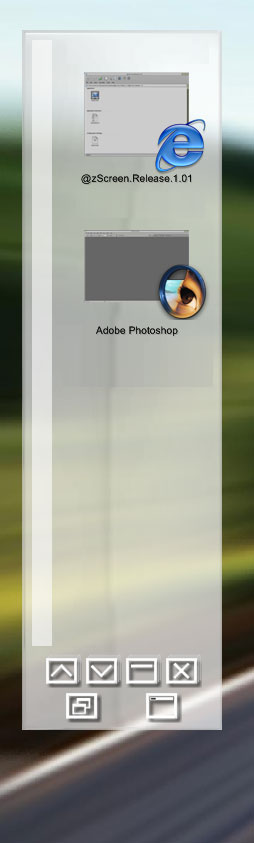
don't know this is mention before or not...

display the application's Icon instead of showing the name of the application...

(like the image below)

can this be done???

btw....great work :naughty: :naughty:

post-1070-1084159109_thumb.jpg

d.jpg
d.jpg

#159344

Originally posted by thy@May 9 2004, 10:18 PM

cool :woot:

don't know this is mention before or not...

display the application's Icon instead of showing the name of the application...

(like the image below)

can this be done???

btw....great work :naughty:  :naughty:

I like that idea a lot

also maybe give us the ability to set an image to put next to the program, in case we want to customize the image that appears :)

#159398

looks cool !

is there a chance it can be linked-to via a shortcut from objectdock or as a docklet ? that way we can use it instead of the dock's taskbar...I just don't like the way the dock's items shift to the side when another task appears on the dock, making it zoom sideways...

#159411

it makes my firefox really slow.... :(

#159427

That is a great app.

Thanks cda007, Aviel.

#159433

Hy,

I really like your app, but i would have 1 suggestion,

in the Config dialog give the ability to set how many applications are shown at once, i need this since i use quite a big resolution (1280x1024), and there's some free space left to show 2 or maybe even 3 apps.

Again, i can't thank you enough for such a great app. :P

#159445

:woot: thnx :woot:

really cool app dude

great job

#159486

cool :canadian:

#159489

Hello @zFan ;)

Some answers :

don't know this is mention before or not...

display the application's Icon instead of showing the name of the application...

(like the image below)

can this be done???

Yes but in my new App called @eDesk.

Go in this thread for more details :

[preview] @zDesk

I really like your app, but i would have 1 suggestion,

in the Config dialog give the ability to set how many applications are shown at once, i need this since i use quite a big resolution (1280x1024), and there's some free space left to show 2 or maybe even 3 apps.

It is yet possible by skinning @zScreen ... But nobody try to skin it actually :(

But i hope to release some skin this WE.

Some other questions or suggestions ?

@+

CDA (LeFOOL) ...

#161332

What is the theme that is in the explorer like favorites buttons..

Looks so nice... :canadian:

#166456