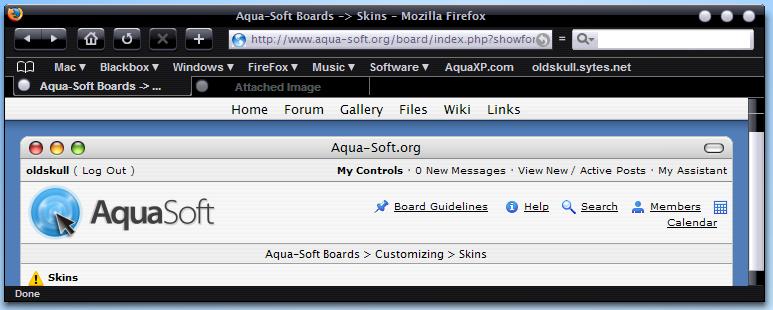
[release] Blackfox (jetblack) Theme For Firefox

This is still beta version. I would like to finish it soon. Anyway I would like to say that I release it because the progress to finish this theme are going slow now so I dont want people here waiting for long for complete his JetBlack guikit.

I really hope nobody have a problem with my How To.txt, I would like to say that I never learn English at school so please consider it. thanks

* Enjoy it and if anyone here want to modify or change it please do and share on this board! I would like people share it and show me your modify version :)

Thanks

Download here: http://oldskull.sytes.net/BlackFox_Beta_010504.rar

- mirror are welcome

*added mirror: http://seph.ws/BlackFox_Beta_010504.rar (Thanks Seph)

* mirror 2: http://www.stylesuites.com/modules.php?mod...ion=show&id=260 (StyleSuites.com)

post-4428-1083448861_thumb.jpg

blackfox.jpg
blackfox.jpg

#154221

It's supercool ^_^ Thanks for going through the hell of firefox skinning lol

Topic moved.

It's a release :)

-Pe7er

#154234

Very nice.

#154242

ok, well first of all its a cool theme. But on the negative side of this, I don't like what is needed to do - to actually install the theme. Surely there is a way of installing this as a theme without touching the default skin files of FireFox ?

Done that twice already before, and to be honest, its not nice, these are all great themes for Firefox, but having to over write the settings of each theme kind of sucks. I have a brushed metal style Firefox theme and one based on smooth stripes I think its called. Either way I can't easily swap between them. That's my only gripe about this kind of skinning or theme's.

Great theme though thanks for sharing it with us,. (yep I downloaded it too) Just in case I decide to over write my brushed metal skin ;)

#154247

Pe7er: thanks for move it to release area.

thecat2000: I know what u mean, I have been in this situations when first time installed aquarius2000 safari theme. I know the pain when u dont get it or when u want to change to other firefox theme. Anyway to install this theme u dont need to place your classic.jar. The files need to replace only compact.jar (because of the icon) if u dicied to use original compact icon menu that is fine too so dont need to replace with mine. About tabextensions.jar, this because I love aquarius2000 tabextension. I used the tabclose icon on the left so with this tabextension will be beter. Perfs.jar u can try without mine. I never try it before but I can make sure this theme still work :)

I will try make one without replace any of your old settings. But I am sure that will be ugly.

#154265

Yes...there seems no easy way to swap themes with Firefox...except their way.

Maybe you could add this theme to Mozilla's theme page...I'm not sure how these themes are made.

Looks great BTW!

#154267

Hi, yes its no problem really, I went and installed your theme anyway :) Well I like it, very nice glossy black buttons Yum ! the theme is certainly coming on isn't it :) Thanks for the reply too - apprieciated!.

Cat.

#154268

@oldskull: i couldnt access your page, and attempted using two brower,firefox & IE, but couldnt yet.

--DraniX

#154354

;) nice! going to donwload it at work ^_^

#154388

:woot:

#154394

Mirror added:

Download BlackFox

Feel free to add it to your first post

#154398

Originally posted by Seph@May 2 2004, 03:46 AM

Mirror added:

Download BlackFox

Feel free to add it to your first post

Seph: thanks for the mirror :)

#154518

Yahoooooo! Thanks Oldskull! :woot:

#154521

Originally posted by lynchknot@May 2 2004, 08:54 AM

Yahoooooo!  Thanks Oldskull!  :woot:

you welcome :D

#154525

Originally posted by Seph@May 2 2004, 03:46 AM

Mirror added:

Download BlackFox

Feel free to add it to your first post

thanks seph, i got it! :D

@oldskul: great theme, i like it! l

#154526

nicely done!

quick question, my firefox doesn't seem to retain the my preferences. what could be the problem?

#154529

Originally posted by oldskull@May 1 2004, 03:00 PM

Pe7er: thanks for move it to release area.

thecat2000: I know what u mean, I have been in this situations when first time installed aquarius2000 safari theme. I know the pain when u dont get it or when u want to change to other firefox theme. Anyway to install this theme u dont need to place your classic.jar. The files need to replace only compact.jar (because of the icon) if u dicied to use original compact icon menu that is fine too so dont need to replace with mine. About tabextensions.jar, this because I love aquarius2000 tabextension. I used the tabclose icon on the left so with this tabextension will be beter. Perfs.jar u can try without mine. I never try it before but I can make sure this theme still work :)

I will try make one without replace any of your old settings. But I am sure that will be ugly.

This will allow you to use your image for compact menu without replacing the whole compact menu jar:

#menu-button,
#menu-button:hover:active {
 list-style-image: url(chrome://browser/skin/menubutton-large.png) !important;
 -moz-image-region: rect(0px 16px 20px -2px) !important;
}

#menu-button:hover {
list-style-image: url(chrome://browser/skin/menubutton-large2.png) !important;

 -moz-image-region: rect(0px 16px 20px -2px) !important;
}

You can also reverse the contents of your tabs without the need for tab browser extension with(and there's another for when you are using image caps on tabs)

#content tab {
 -moz-box-direction: reverse;
}

#154533

Originally posted by lynchknot@May 2 2004, 09:13 AM-->
QUOTE(lynchknot @ May 2 2004, 09:13 AM)
This will allow you to use your image for compact menu without replacing the whole compact menu jar:

#menu-button,#menu-button:hover:active {  list-style-image: url(chrome://browser/skin/menubutton-large.png) !important;  -moz-image-region: rect(0px 16px 20px -2px) !important;}#menu-button:hover {list-style-image: url(chrome://browser/skin/menubutton-large2.png) !important;  -moz-image-region: rect(0px 16px 20px -2px) !important;}

You can also reverse the contents of your tabs without the need for tab browser extension with(and there's another for when you are using image caps on tabs)

#content tab {  -moz-box-direction: reverse;<!--QuoteEBegin
[b]

Hey lynchknot that great!!! thanks alot. I will try to use the codes for next release!!! :)

#154537

Wowww, coool skin ! thanks mate (Y)

-Aviel.

#154629

Wow, excellent work!! :woot:

I've set up a mirror here, feel free to add it to your first post :)

#154647

Originally posted by Simon@May 2 2004, 02:21 PM

Wow, excellent work!!  :woot:

I've set up a mirror here, feel free to add it to your first post :)

Thank u Simon :)

#154649

awsome dude (Y)

this is amazing, great job

#154651

Awesome :)

#154721

Any news on this? I use the theme currently, but it seems rather incomplete.

- back/forward etc. buttons seem too high up

- search background is white

- "=" for compactmenu

is anyone working on it, or has development stopped?

#160723

Is there any update of this theme for .9?

#180985