 Aqua-Soft Forums
hi! i want to make my task pane on the right side, im using Brushed 3.5, i dont know how to edit my shellstyle.dll, can someone help?
sorry this is too ****  but yea i just started working with theming and modding
hi! i want to make my task pane on the right side, im using Brushed 3.5, i dont know how to edit my shellstyle.dll, can someone help?
sorry this is too **** but yea i just started working with theming and modding
I added a [Help] Tag to your thread  please remember next time.
-------------------
The Topic Has Been Tagged
// Seph
thanks! im new to this forum, i will make a note to myself in the future! 
I'm no pro in this, but i don't think it is possible. Sorry
EDit....i can't write
Edit2 wtf is wrong with my fingers
LoofyGun open up youre eyes and youre mind also  , of course it is possible, and for you xionety try the search engine on this forums, you will find some info on the subject , not much maybe, don´t no really... but when i started to mess with my shellstyles i know i find a post somewhere that gave me the pushing and, thow it was organised in the most confused way
  , but simply don´t remember where i found it , but if it can do anygood to you i use ResHacker to open shellstyles files and use Photoshop to edit the bitmaps, the code that defines the layout of shell is on the UIfile 00001 and UIfile 00002, the second one i´ve never messed up , yet :naughty: , but this might give you a hand on the rigth way.
Originally posted by nody@Apr 29 2004, 09:36 AMLoofyGun open up youre eyes and youre mind also
 you didn't answer the question...
Originally posted by xionety@Apr 29 2004, 08:35 AMhi! i want to make my task pane on the right side, im using Brushed 3.5, i dont know how to edit my shellstyle.dll, can someone help?
sorry this is too ****
There is a way.
you must edit the UIFILE in shell32.dll The layout information are in the shell32.dll.
change the layout from left to right.
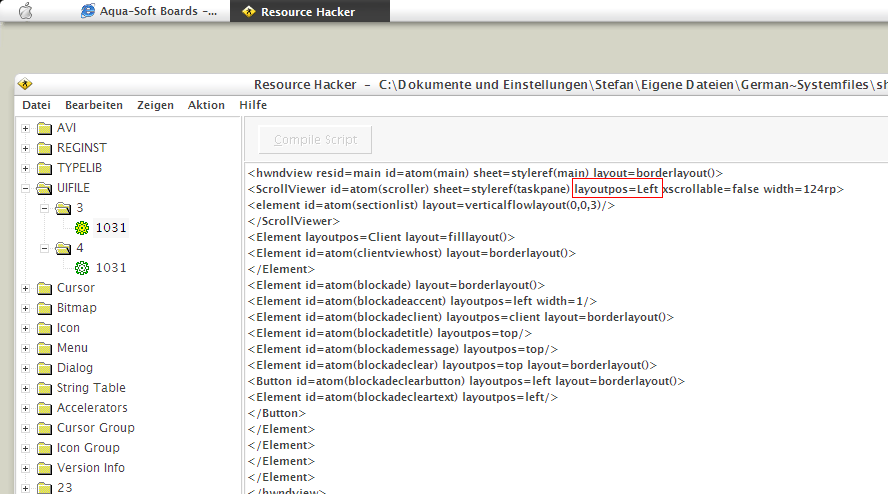
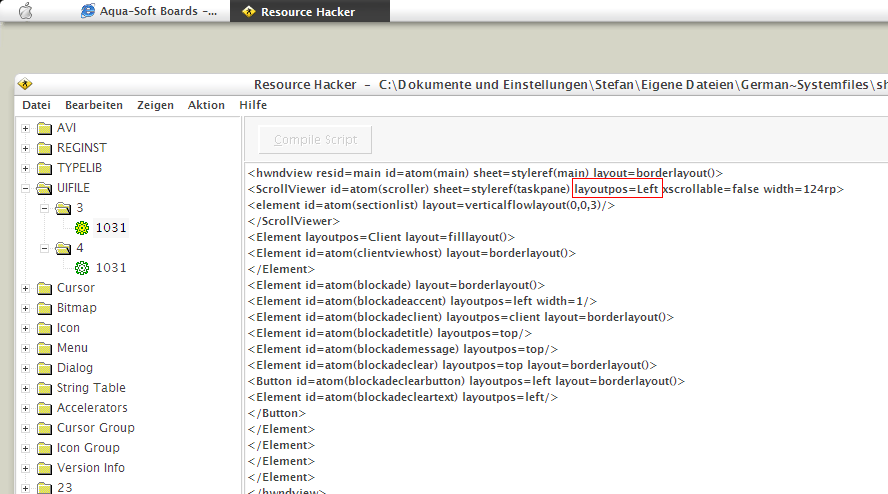 Ups i didn´t read it with enough atencion, didn´t notice that he wanted to change it to left, sorry about that :naughty: , i thought he was in search of the general shellstyle editing, but stef did reply, don´t know if it helps but i´ve been using shell32.dll also, cause i´m lookin for some changes also, so don´t know if it´s going to help anything but i´ve been pasting the uifiles on shell32 to my shell styles, 3 on 1 and 4 on 2.... makes any sense???
thanks stefanka! it works wonderous! thank you very much!
Does it look better that way xionety? Do you mind posting a screeny?
yo everyone! check this out!
http://membres.lycos.fr/axsite/righttaskpane.JPG
-----------------
Post edited.
Please use thumbnails.
-Pe7er
what media player is that, with what skin?
Originally posted by wookietv@Apr 29 2004, 10:35 PMwhat media player is that, with what skin?
winamp, but don't know the skin.
l'arc~en~ciel and porno graffiti, all right! (Y)
wookietv that is the teen girl squad skin for winamp classic, go to winamp.com and search for "teen girl squad"
if you watch strongbad, you will know what im talking about, and i love this skin so much, it's so funny, and it looks awsome with a lot of skins.
dreamz: they rule, that's why they are on my list!
@ Xionety:
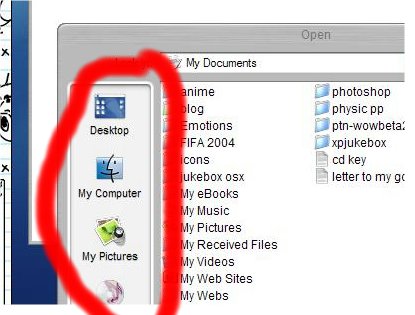
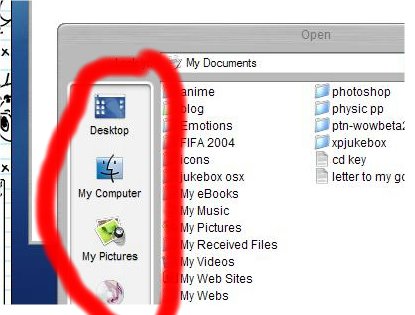
how did you get the path to the resource-folders customized?
(see screenie)
new l'arc~en~ciel stuff coming out in june!! 
sky_guy, you can use tweakui to change the places bar (as it's called).
Thanks,dreamz...
seems to be my stupid day today...have used TweakUI a lot and haven´t seen that feature....duuuh..
everyone has bad days. glad you found the option, though.
Registry tweak itself: HKCU\Software\Microsoft\Windows\CurrentVersion\Policies\comdlg32\PlacesBar
DWORD or STRING Place0
DWORD or STRING Place1
DWORD or STRING Place2
DWORD or STRING Place3
DWORD or STRING Place4
if STRING parameter - > system reads path "Place%"
if DWORD - > XP reads number given below:
0 - Desktop
5 - My Documents
6 - Favourites
8 - Recent Docs
13 - My Music
14 - My Videos
17 - My Computer
18 - Nethood
36 - Windows
37 - System32
38 - Program files
39 - Ìy Pictures
40 - Documents & Settings\UserName
46 - Shared Documents
Thanks,On1y! I already changed the settings with TweakUI but it´s nice to know how it can be changed manually!
