[release] Xi-softcandy

Here is the Xi-SoftCandy port, original theme created by XiAP Themes, ported with permission.

The theme contains the 3 original flavors plus one new - Caramel, Lime and Peach, and added BlueBerry, and all have standard and compact start menus.

Please report any bugs here other than the scrollbar bug which I am well aware of. I am still working on a solution to this, but since the bug is only present in IE and Mozilla products (that I am aware of) I figured it was still sufficient for release. ;)

Thanks and enjoy!

Default font size is now 8pt. Select "Large Fonts" for normal size fonts.

*EDIT* MAY 1, 2004 - fixed a bug with certain windows using the groupbox element not showing contents.

Fixed the maximized window/taskbar bug.

*EDIT* MAY 4, 2004 - fixed the "Photoshop button bug".

By popular demand, added new "BLUEBERRY" flavor. ;)

Xi_SoftCandythumb.jpg

Click to download at DeviantArt

#150236

Sweet... very nice. ;)

#150239

O YEA DAMN !!!! :woot: :woot: :woot:

#150241

found a bug i think

see the little lines under the taskbar its like that when any program is maxed

#150243

nice work... ;)

#150245

Originally posted by DarkVageta@Apr 25 2004, 10:19 AM

found a bug i think

see the little lines under the taskbar its like that when any program  is maxed

That's weird, I had that problem in the beginning but I thought I got rid of it. Try dragging the taskbar by the bottom up to the top of the screen and back down again, see if that helps. I'm not sure what was causing it but as you can see below, It's not happening here... :(

post-1738-1082907977_thumb.jpg

1.jpg
1.jpg

#150257

looks nice, guess now would be a good time to release my soft candy looca skin ;)

#150260

wow, that was fast! very nice job! thanx a lot!

edit: I'm having the same problem as dark vagata, and also, wouldn't it be nicer with smaller font??

#150274

Originally posted by Max Power@Apr 25 2004, 10:46 AM

That's weird, I had that problem in the beginning but I thought I got rid of it. Try dragging the taskbar by the bottom up to the top of the screen and back down again, see if that helps. I'm not sure what was causing it but as you can see below, It's not happening here... :(

tryed that but its still there :( crazy

Pojo i love the font just the right size i think

#150326

Originally posted by pojo@Apr 25 2004, 11:23 AM

I'm having the same problem as  dark vagata, and also, wouldn't it be nicer with smaller font??

For those who are having the bug with the lines under the taskbar, please go and download again, I think I fixed it but I can't be sure because I wasn't having the problem here.

As for the font sizes, I tried to be more consistant with the sizes on a Mac since this is after all a Mac port... ;)

#150351

Great theme Max!!!

I just wanted to know if you could fix something though (I'm going to try and explain as best I can, so bear with me)...Whenever I try opening something and the open window pops up, the icons for back, up folder, thumbnail view, etc. the boxs around them aren't centered. I hope this makes sense.

Anyways, thanks for your hard work. I hope to see many great themes from you. :D

#150358

I can only assume crni is on the objectbar themes for this? :rock:

#150360

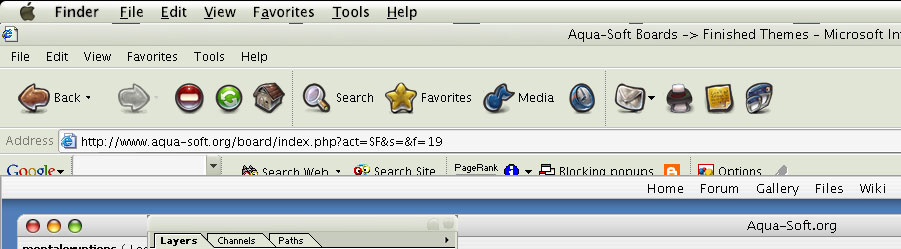
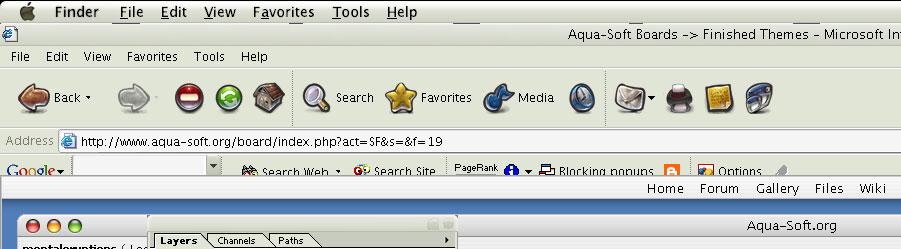
I love the theme but im also having the line probs and i downloaded it after u reuploaded it. Also the spacing on internet explorer is of a little because it movies all of the google bar down to far.

You also have the same photoshop problem Kol was having with one of his themes. Ive attached an image for u to see what i mean about the two issues ive mentioned other than those lines and ive tried what you suggested.

But as time goes im sure you will get these sorted :D

post-7560-1082922072_thumb.jpg

xisoft.jpg
xisoft.jpg

#150364

Originally posted by aashish13@Apr 25 2004, 02:34 PM

I just wanted to know if you could fix something though (I'm going to try and explain as best I can, so bear with me)...Whenever I try opening something and the open window pops up, the icons for back, up folder, thumbnail view, etc. the boxs around them aren't centered. I hope this makes sense.

A screenshot would help, not exactly sure what you're talking about...

@ downsouth -

crni has already released the OB theme. ;)

#150366

Originally posted by downsouth@Apr 25 2004, 07:37 PM

I can only assume crni is on the objectbar themes for this?  :rock:

It has all ready been done....

Click the link :lol:

#150369

Found another problem.

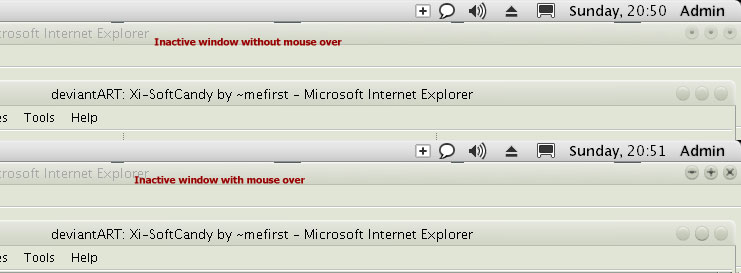
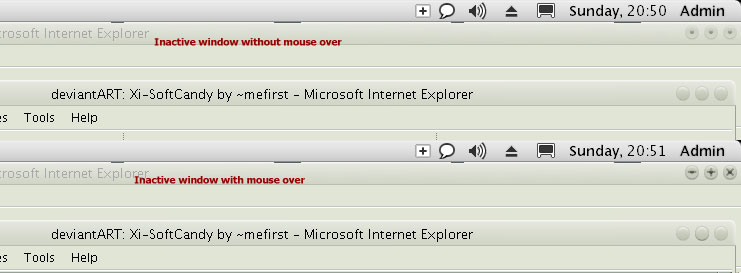
When u have two windows on the screen and the back window isnt the selected one u get the button state with the round dot BUT if u hover over the 3 buttons u get the minimize, maximize and close states and they stay there and dont change back to the round dots....

Attached screenshot....

post-7560-1082922603_thumb.jpg

xisoft2.jpg
xisoft2.jpg

#150374

Originally posted by Max Power@Apr 25 2004, 08:20 PM

As for the font sizes, I tried to be more consistant with the sizes on a Mac since this is after all a Mac port... ;)

@max power, you could make an option to use smaller fonts? sorry but for me it looks u*ly with that big fonts, it seems like I'm running low reulution on my comp! please make an option to use smaller fonts, if you do this it would be perfect! :)

#150410

Originally posted by mentaleruptions@Apr 25 2004, 02:50 PM

Found another problem.

When u have two windows on the screen and the back window isnt the selected one u get the button state with the round dot BUT if u hover over the 3 buttons u get the minimize, maximize and close states and they stay there and dont change back to the round dots....

That's a really weird one, dont know why it's doing that, I'll look into it.

@pojo - and everyone else - if you want smaller fonts go and download once again, default is now at 8pt, normal sizes are now under "Large Fonts". ;)

#150496

i love this theme ^_^ , great job dude

hope to see some fixes on those bugs though ;)

but good job (Y)

#150499

:cry: ... it's beautiful

#150522

Originally posted by kmccormi@Apr 25 2004, 09:01 PM

:cry: ... it's beautiful

who is that you :naughty:

unless you are a dude and using that avatar -_-

#150528

Originally posted by tarik@Apr 25 2004, 05:17 PM

unless you are a dude and using that avatar -_-

Don't put ideas into my head

#150532

Hope this helps....

#150553

great job with the port Max Power. already one of my favs :)

#150573

I like it, very nice. (Y)

#150628