[request] Possible Tray Docklet

I was putzing around online today when I came across a curious application named Tray Module. Apparently it mimics the functionality of the system tray in a small window on your desktop.

http://am-productions.yi.org/index.php

Click downloads to find it. The program worked relatively well for me, only missing a few applications, but I didn't install it using the method the author suggests, using a batch file. What's more, the program download includes the source files!

So I was wondering if any ambitious coders were up for getting the original author's permission and perhaps turning this program into a docklet for y'z/Object/Ave. I know one already exists in a shareware form, but c'mon. Nobody likes a monopoly ;)

#145453

Amazing!

Since most of the author does is not documented by Micr*s*ft at all.

At first glance the trick seems to be registering a window class named "Shell_TrayWnd", before explorer launches. It's a plain "who comes first owns first" issue.

This would imply loading OD/AD/YZ before explorer, which is not the very best idea, since you would need to reboot each time you start or end any of these in the worst case. In the less worse case, you'd need to kill all explorer.exe instances by task manager, launch OD/AD/YZ and then launch explorer.exe.

Ugly, but it can be done in code.

The best idea would be to wait until AveDesk evolves into a full shell replacement, so that it can be loaded in advance of anything else, like liteStep does.

In the sources I miss the registered broadcast message "TaskbarCreated" that is been issued when explorer restarts, perhaps a way to gain tray ownership without a reboot.

#145731

yeah what you suggest Herd is not that bad ;) Avedesk as a full shell could be nice :)

something else possible is to have a "system tray server" launched separatly from Avedesk (OD or else).

This method it used by the KKTrayDocklet and of course ObjectBar.

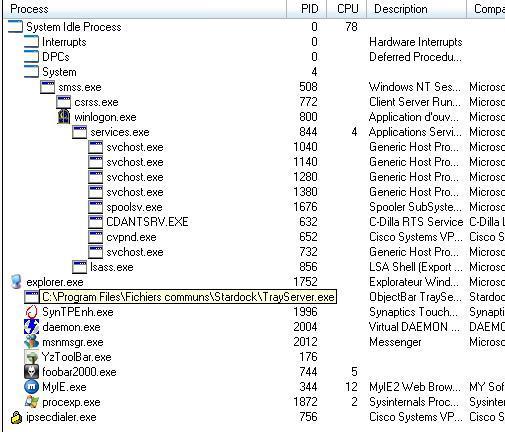
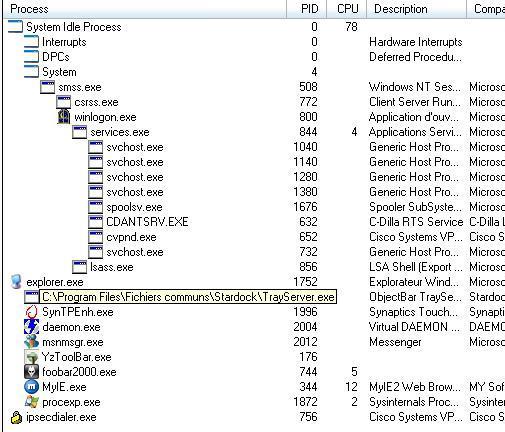
ObjectBar seems to be different because the processes launched are not soon of it's server (see screenshot). KKTrayDocklet (don't have it installed so no screenshots) create a process before explorer as you said and then all other processes are soon of KKTrayServer process

it's a bit tricky but i think it's possible to handle the ownership on the tray without rebooting each time (if the server is still launched)

what do you think of it??

BTW the TrayServer from am-producitons also work like you said (launched befor explorer to have the ownership...

post-7384-1082221625_thumb.jpg

screen.jpg
screen.jpg

#145881

I tried to do this a couple of times, but it involves quite some advanced techniques, because most of it is undocumented, as herd already said.

I believe hooking on WM_COPYDATA should also work, but it has been a couple of months ago since I was working on that code. The thing is, you need the "TrayServer" to start in advance of anything else and Windows doesn't seem to stick to one loading-sequence. A trick could be to load the trayserver as a service, before an user logs on, but to have access to the users session requires a great knowledge about security-descriptors

In the sources I miss the registered broadcast message "TaskbarCreated" that is been issued when explorer restarts, perhaps a way to gain tray ownership without a reboot.

That's a damn good idea when using a hook on WM_COPYDATA - it should force well-designed applications to resend there request for a notificationarea-icon.

I hope someone (yeah, that's a hint herd :P) can find the time to make an alternative trayserver and wrap it up in a COM-object :canadian:

#146072

One just came out for objectdock go here to download it. also it took awhile before it started working read the comments.

#146115

Originally posted by Ghostwalker@Apr 17 2004, 08:47 PM

One just came out for objectdock go here to download it. also it took awhile before it started working read the comments.

am I on crack or do I not see the docklet you are talking about? dockex has the same docklet on its home page as its had for the past few days too...which one were you talking about? :blink:

#146117

No my friend they are 2 different docklets I have both this displays your system tray in the dock I believe you are talking about the task docklet that displays open windows

#146119

Holy cow! And it actually works. Better than KkTray, even. I wonder how they pulled that off!

#146121

Originally posted by Ghostwalker@Apr 18 2004, 01:47 AM

One just came out for objectdock go here to download it. also it took awhile before it started working read the comments.

Which docklet are you referring to? I searched through all the pages on the link and don't see one that's related to what you were referring to. Maybe the name of the docklet would help?

Thanks!

#146163

Objectdock Tray here try this

#146164

Originally posted by Ghostwalker@Apr 18 2004, 04:37 AM

Objectdock Tray  here try this

Thanks for the link Ghostwalker!

I tried it out, but found that it can't handle a lot of icons, crashed my explorer and objectdock even when i expanded my systray. Did you have the same problem?

Good effort nevertheless to the creator of the docklet.

#146170

Originally posted by kamengau@Apr 18 2004, 04:50 AM

Thanks for the link Ghostwalker!

I tried it out, but found that it can't handle a lot of icons, crashed my explorer and objectdock even when i expanded my systray. Did you have the same problem?

Good effort nevertheless to the creator of the docklet.

I had the same trouble. I guess to use it effectively, you just have to set all your tray icons to 'Always be visible'.

#146172

Ive got 7 showing and 6 hidden and it seems to be working fine no crashes

#146177

Doesn't seem very stable, I have the same problem as kamengau!

#146334

It's working flawlessly for me and I've got like 13 hidden icons.

#146506

Seems to come and go very unstable hopefully there will be an update to this.

#146510

Originally posted by johnny5w@Apr 18 2004, 08:28 PM

It's working flawlessly for me and I've got like 13 hidden icons.

It works flawlessly if you don't expand your hidden icons. Do that and watch your explorer and objectdock crash...

I haven't tried it out with CRNI's Panther theme OB yet (i.e. expanding the system tray) though. Anybody who can vouch for that?

And yeah, I'm all for an update. Also if the developer can appearance of the icons, they're not sharp, which I believe is due to the compression of the images.

#146671

Anyone have an alternate site to dl this docklet from? It won't work for some reason...

#147144