 Aqua-Soft Forums
hi I, m searching for a katana! Biggest wish: The original from Kill bill.
Thanks a ´lot
Zecke
hi I, m searching for a katana! Biggest wish: The original from Kill bill.
Thanks a ´lot
Zecke
Um, since he did post this thread in the Icons & Cursors forum, I think he's looking for a good katana/sword icon. I am too, actually. So, does anyone know if there's any?
Search for Pixel Feng shui by Gary Gehiere at either XIcons or at Iconfactory (or google it). The set includes a 'katana and sheath' icon. I suppose (nearly) everyone would agree this is one hell of a classic and amazing icon set.
But, but... :cry: it's for Macs only! Bah, oh well.
Convert it to windows. Use Stuffit to extract the file and convert the icons with Axialis iconworkshop.
Katana & Sheath from Pixel Feng Shui.
Edit: Removed the PNG as per the explanation below.
-Seph
Originally posted by Phoenix76@Apr 12 2004, 02:11 AMKatana & Sheath from Pixel Feng Shui.
I could have posted the PNG. The point was not to piss off the artist by posting his icons out of context (e.g. resistributing a broken set).
It's not, repeat, *not* difficult to dl and convert mac icons to win format. There's a freshly pinned topic in fact with a tutorial and everything.
Originally posted by ji eun@Apr 11 2004, 10:05 PM*snip* There's a freshly pinned topic in fact with a tutorial and everything.
why yes, yes there is!
-Lou
Ji Eun said it.
Redistributing bits and pieces of an icon package (specially one as theme-oriented as this one) can be considered as copyright violation.
Please keep this in mind for the next time, even if you did it with a good purpose  .
.
The PNG Has Been Removed
-Seph
It's might not be difficult to convert them, but it sure is difficult to open the zipped file. I tried it with stuffit and I kept getting an error. even though stuffit works on windows, it doesn't want me to open it. And they look like really great icons.
Yeah, you have to pay for the 40 dollar version of Stuffit to do it <_< :rant:
Piece of sh*t...oh well.
I assure you it is possible to open the archive. I did it myself, and so has everyone else who has these icons on a windows box. Check the help files of iconworkshop for a visual walk-through for setting up stuffit to work with mac archives.
pure_ice, i had this set since a long time ago, so i don't remember what format was it or from where did i download it.
However if you are pointing to a SIT file trying to process it with the StuffIt 7.5.x, then take a look at the options snapshot i'd attached that i got from xicons prior to the v8 series.

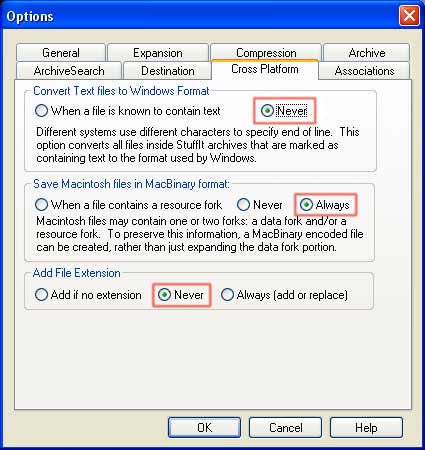
The help files within iconworkshop are outdated for the version of Stuffit I have. There is no cross platform option.
This is so funny, sort of. The link on that site leads to the current version, which is 8. they have a review of version 7, but the link is for 8. Ha!
Originally posted by pure_ice@Apr 13 2004, 04:22 AMThe help files within iconworkshop are outdated for the version of Stuffit I have. There is no cross platform option.
Yes, that sucks, it is a real pain to convert things from mac to pc now. A lot of files now show as not being supported by the stuffit engine although its a extension that is in the list of supported types lol...what a crock..
I know. It says it supports the file, yet everytime I try to open it, I get error 3, can not find file path. I'm like wha? It's right there for bloody sake. 
indeed, the buggas probably did it on purpose <_
YOU HAVE TO HAVE STUFFIT DELUXE NOT EXPANDER. I said this earlier....
The Katana from my Samurize icon....
I am using stuffit deluxe. no need to shout. I tried stuffit standard then stuffit deluxe. Same results. I'm blond, not stupid.
Looks like I haven't been any help at all. PM me if there's something I can do for ya'all. And good luck.