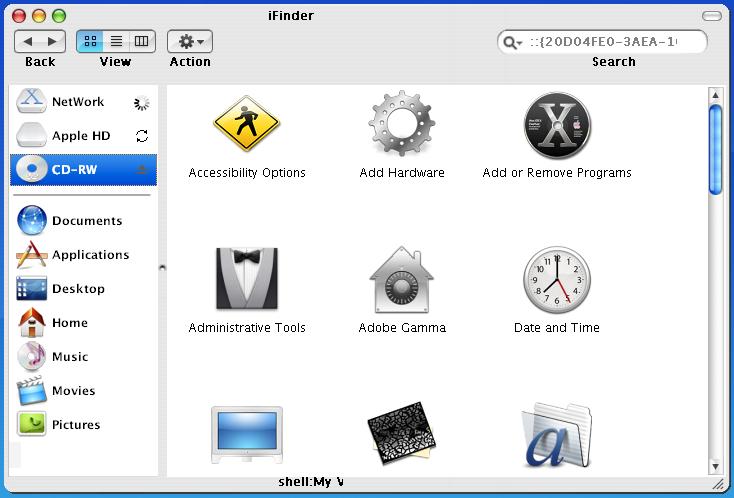
[preview] Ifinder V2.0

Hi, this is the new preview of the iFinder Version 2.0

what`s new on this release ?

1) A Working roll up button

2) Now this app can show you labels, yeap that`s right labels ! (for those that not only like to put labels on the desk top but even have them in all the windows)

ok, if you have question just let me know them.

bye

rool%20up.jpg

labels.jpg

-_-

#137273

looking spetasuperacular

#137275

simply amazing, cant wait for the release!!!!!

#137277

thanks already will send it soon, at the moment work but in the one of labels :canadian:

#137280

lol...XXX

HAHA

#137282

that looks awsome excellent work!

but i have a question, why do the icons have a grey box around them?

-bolero

#137284

it is so that they are not png I am transparent :canadian:

#137285

Originally posted by bolero@Mar 30 2004, 07:05 PM

that looks awsome excellent work!

but i have a question, why do the icons have a grey box around them?

-bolero

The same old 'Internet Explorer cannot display PNG transparency bug.... <_< '

#137301

WOWOWO! Looks great!

#137303

LOOKS AWSOME NEO :woot: Hope to see it come out soon. Are the 3 different views functional ??

#137308

Hi Neo, this new version looks good, but i'm not sure if i understand, the labels are only a bitmap background for all folders?

[NEWS] I made a new html file for the left panel with WORKING EJECT BUTTON (but it doesn't support transparent,

for the moment i don't know how to fix this! If someone can help me...) [/NEWS]

Download here my left panel!

V

V

#137319

that's insane. kinda shocked.

should be an interesting release

#137334

lookin awsome :woot: , cant wait for the release. Are you going to be able to fix the transparency problem?

#137338

great,

maybe a neos skin ;)

#137365

Originally posted by altoprofilo@Mar 31 2004, 12:27 PM

Hi Neo, this new version looks good, but i'm not sure if i understand, the labels are only a bitmap background for all folders?

[NEWS] I made a new html file for the left panel with WORKING EJECT BUTTON  (but it doesn't support transparent,

for the moment i don't know how to fix this! If someone can help me...) [/NEWS]

Download here my left panel!

            V

            V

hmmm... ive seen that html file before.

as for the eject buttons... i tried that but wasnt able to specify which tray to eject.

and what do u mean it dosnt support transparencies? looks fine to me :blink: .

-The Unknown

#137416

Looks very close to the actual Finder in Mac OS X 10.3. I also can't wait until it's available.

#137465

Originally posted by theunknown@Mar 31 2004, 07:26 AM

hmmm... ive seen that html file before.

as for the eject buttons... i tried that but wasnt able to specify which tray to eject.

and what do u mean it dosnt support transparencies? looks fine to me  :blink: .

-The Unknown

Yes this is your html! (mine was not good as yours!) :P

This script open all cd drives, to specify the tray i've found this link (sorry i've only one cd drive and i can't test if this work!)

And the transparencies, for me, doesn't work on eject button when cd icon is highlighted! :dunno:

[EDIT] look the image [/EDIT]

#137487

FANTASTIC!!!!! :woot:

If u need tester.... ;)

#137488

good the one of the transparencies of the png already solves it now I am doing one views ifinder -_-

#137592

Very nice. Keep up the great work mate. ;)

#137604

look -_-

14.JPG

15.JPG

:canadian:

#137781

wow loco eso se esta poniendo bonito cada vez sigue adelante :woot:

wow dude the ifinder is getting beutiful everytime keep going :woot:

#137783

Great ! Thank you , Neo :lol:

You're could make a Top of Finder .

iFinder 2.0 have everything like Finder 10.3 Panther .

Can you post at more Folder skin ..?

Because I think.. iFinder 2.0 will have more many skin .. :lol:

post-1941-1080797545_thumb.jpg

2.JPG
2.JPG

#137883

today in afternoon it will send version 2.0 for that reason if they have questions and doubts it is hour already -_- :canadian:

#138117

neo_osx, acabo de ver las capturas y se ven fenomenales ... ahora una cosita ami, crees que puedas poner a la derecha de cada disco duro lo mismo que pusistes al lado de la red, o sea, el Throber de Mac OS X y no esas flechitas que estan algo feas ?? o se podra escoger una vez instalado ??

y bueno, cuando piensas "soltar" esta maravilla ?? :rolleyes:

#138121