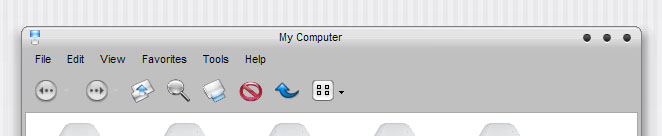
(request) Ti skin without border

Ti skin with no border

tiskin.png

Anyone mind modding the tiskin visual style to look liek this? Someone has already attempted but didnt finish it. Kinda buggy. Anyway, i would really appreciate it. :naughty:

P.S. i know the close min and max buttons will eb on the right side.

Also, has anyone made a yztoolbar theme for tiskin?

#133949

Topic title edited

Please be more descriptive.

-Pe7er

#133977

i'm pretty sure he means to make it look like that instead of this

pic.jpg

kinda like what b0Se has going in Opus Smooth.

I'd like to see this too.

#134109

Ya like acid shows, without that line. Kinda all blended like the real thing. Sorry for the bad description. :blink:

#134248

Does anyone have their own little mod that is bug free i can get my hands on?

#134530

I have got a personal mod of TiSkin like the first image. Without the line and with 0 pixel border

Send me an email : max79 in lycos.es

#134607

way to help out max... damn leecher

#134620

Originally posted by bubbabyte@Mar 25 2004, 01:09 AM

way to help out max...  damn leecher

what does that mean?

#134655

bubbabyte, what do you mean by that?

#134822

he means why doesn't he share so the rest of us can have it?

#135217

Hey! It's mine:

desk250304sm.jpg

Click to biggie!!! :rolleyes:

#135375

Originally posted by Graphic Adam@Mar 23 2004, 10:46 PM

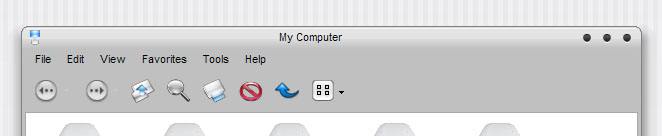
Ti skin with no border

tiskin.png

Anyone mind modding the tiskin visual style to look liek this? Someone has already attempted but didnt finish it. Kinda buggy. Anyway, i would really appreciate it. :naughty:

P.S. i know the close min and max buttons will eb on the right side.

Also, has anyone made a yztoolbar theme for tiskin?

OMG! This looks beautyfull! Mama Mia!

Max, please check your email :D

Thanks,

Z

#135379

Max, yours doesn't look anything like this bro, thanks anyways though :(

#135793

Sorry Im ****ie in Stylebuilder :(

#135795

hey bro, its not a bad skin, its just not like the one mentioned by Graphic Adam. ;)

#135802

@denbo Want to share?

:D

#135924

I'm a complete n00b at styleBuilder but I managed to make it look semi respectable:

Just Replace the framecaption.bmp with the one in the following post and you'll see what I mean.

post-3229-1080422819_thumb.jpg

ti.jpg
ti.jpg

#135980

As stated in the previous post, open the tiSkin VS in StyleBuilder, find the corresponding folder where you saved the VS and replace FrameCaption.bmp with the following file:

FRAMECAPTION.zip

Attachment: FRAMECAPTION.zip

#135981