[bugs] Felix 8 Beta

alo,

it said in the release post to list the bugs in the thread started here, but i didn't see one (perhaps this is the only bug so far!)

first off, great job on this, this app is, in my opinion, very close to being a complete explorer replacement...

the only bug i could find was when resizing the app smaller, the search bar overlaps the toolbar buttons.

#132821

this looks promising! :D

i'm happy for alilm!

well here we go:

- not sure if it's a bug or just unimplemented but, the back button doesn't work properly. it goes up one level other than to the last place it was. and the forward button doesn't seem to do anything here.

- also if the explorer view is clicked without selecting any object, a menu STILL pops up as if felix folder was selected (dunno if this is the right behavior, but anyway).

man i want this :D

#132838

Some tiny bugs here:

-I can't make 2nd and 3rd drive to show. Even when I edit Felix preferences file.

-Font in the sidebar is bad :( Change it to LucidaMAC or make customizable please
-search field doesn't work

Keep up the grrreeeeeaaaaaaat work :D

#132851

The seperator gets chopped off if you resize it to close to the Icons.

Also, could you possibly implement a tiles view that can also handle groups?

#132857

Originally posted by Pe7er@Mar 21 2004, 12:17 PM

-I can't make 2nd and 3rd drive to show. Even when I edit Felix preferences file.

This isn't a bug, it's just not implemented yet... in preferences under the volumes tab, it says it under the hard drive 3 link box (the message is pretty light, i didn't notice it at first either)

Were you able to enter the path to your other drives, though? mine were greyed out.

#132858

[edit]

you beat me to it wookietv

[/edit]

-bunkka :canadian:

#132874

The Move to trash link in the right click menu, does NOT work, Using the keyboard delete didnt work either....

#132915

When windows are maximized on high rez you cant see the full Ifinder, it shows only half of the possible screen

#132981

its a pretty cool app good job!

but is anyone else having slow system response when running felix8?

ecverything seems so choppy when i have it open

-bolero

#132984

Posted by bolero

  its a pretty cool app good job!

but is anyone else having slow system response when running felix8?

ecverything seems so choppy when i have it open

-bolero

Yup.. Same here.

#133105

ok i tried to skin a little bit :)

here is my bug:

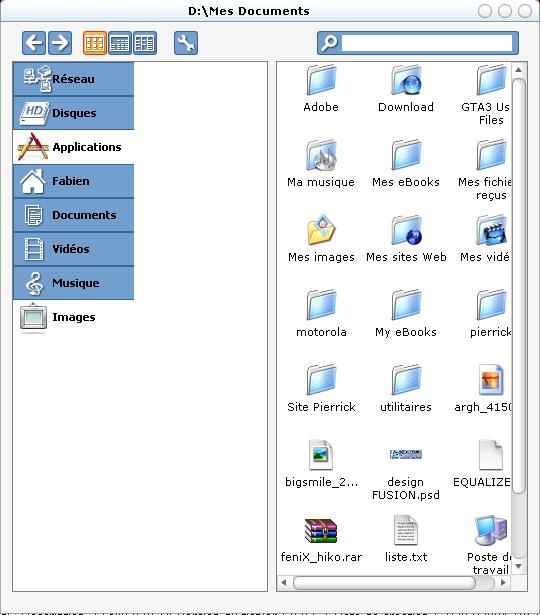
- on launching felix, the "notselected" images are not drawn, so if the sidebar is larger than the other BMP, there is a blank space, then on clicking on an item, the "selected" and "not selected" BMP are drawn

i got it on launching:

post-7384-1079940734_thumb.jpg

screen.jpg
screen.jpg

#133148

Nothing big but the min and max buttons have no hover.. close works fine..

But great work indeed ;)

#133152

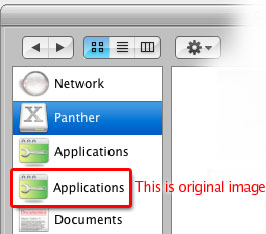
1. Tried to use Duckie's MUB-Toolbar skin for Xplore with Felix. The sidebar images contain *both* icon and text and are sized 116x34. The problem is that Felix tries to rescale the images and the result is a little "jerky" (see attached image, there's a screenshot from Felix and one original bmp image used).

2. The width of sizebar increases by 3 pixels every time I click "Save Settings" in preferences dialog. For example, if the original width is 150 pixels and I save settings 10 times, the width will be 180 at the end.

3. Support for mouse thumb button would be nice (I use thumb button as "Back" in Windows Explorer).

Ok, that's my wish list :rolleyes:

post-9733-1079978789_thumb.jpg

felix_bug1.jpg
felix_bug1.jpg

#133317

Alot of these bugs have been fixed, just a few more little features to add and the next minor update will be out. -_-

#133426

Originally posted by nbaryosef@Mar 21 2004, 05:49 PM

When windows are maximized on high rez you cant see the full Ifinder, it shows only half of the possible screen

Same thing happening here, here's a screenshot of it:

thumb-12416.png

(by the way, the blue that is visible in the background is my wallpaper/desktop)

#136086

when you resize it smaller than the width of all of the sidebar icons, the frame gets cut off...

also, (it's not shown in this screenshot) if you can't see a sidebar icon, there's no way to access it, probably should have a scrollbar when it gets to small

#136111

I admire you for yours programing knowledge ;)

Here is a little bug report:

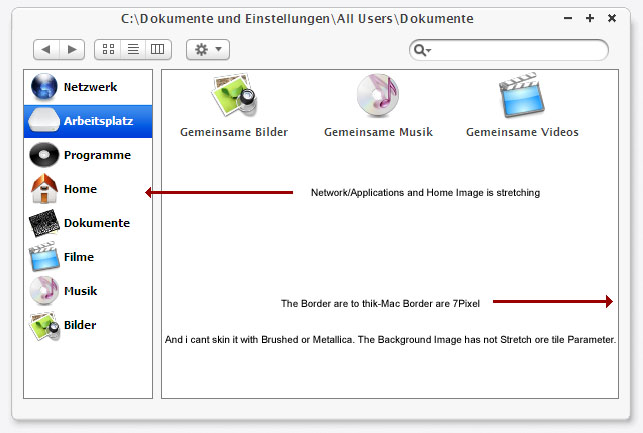
The biggest problem is the Background restrained

post-1238-1080463742_thumb.jpg

FinderScreen.jpg
FinderScreen.jpg

#136128

Hey guys,

I know about all these little 'screen window' cut off things. I'll fix em later, starting with the search one.

When windows are maximized on high rez you cant see the full Ifinder, it shows only half of the possible screen

This is fixed in upcoming version 8.0.5.3

The biggest problem is the Background restrained

Oh and Ive made the borders smaller :) theyll be included in the next version also.

The background can be bruhsed not tiled yet. Make the width of your brushed image around 800 or so but the height is not changed by the app, so it has to be large, what the Y size of your resolution is e.g. 1280.

Look here, this is Felix 8 with a brushed metallica bg :)

brushed.png

~alilm :)

#136145

Originally posted by alilm@Mar 28 2004, 11:30 AM

Hey guys,

I know about all these little 'screen window' cut off things. I'll fix em later, starting with the search one.

This is fixed in upcoming version 8.0.5.3

Oh and Ive made the borders smaller :) theyll be included in the next version also.

~alilm :)

Thank's Master(Y)

#136148

Btw I fixed the whole issue of the search bar when the window is too small, how does this look?

more.png

#136179

Nice and more realistic i think.

#136183

Allilms Finder with my new Metallica Texture. :P

thumb-12429.jpg

bigger

http://screenshots.haque.net/screenshots/v...nshot-12429.jpg

#136197

@StefanKa, oooooh that's sexay! aw aw aw me wants it ;)

#136202

New version! 8053

Check it out here

Fixes a load of bugs, and adds some cool new features, including a very early look at what 3 panel browsing will be like.

~alilm

#136437

i don't know if this was noticed already... it seems that the list view and 3 panel buttons are mixed up on this new version... for example, if you're in movies in icon view, if you click on list view, it highlights 3 panel (but shows list)... if you then click on 3 panel, it highlights list view (but shows 3 panel)...

also, i don't know if this is a bug, but when you click on icon view, 4 dots appear in the lower left corner, underneath pictures

#136492