Samurize 1.30

Get it :)

Bugfixes:

* fixed concurrency issues with SamurizeServer.exe

* fixed Config Editor display bug in 800x600 resolution

* uptime meter now allows longer than the previous 47-day limit

* mouseover cursor uses system hand pointer

Improvements:

* relative paths for image filenames and textfile meters

* improved handling for corrupt images

* heaps more hotkeys

* improved installer (remembers path, more configurable)

* DTD/XML scema updated (some data missing)

* additional command line options

* a lot of code rewritten and improved

New Features:

* Maintain Aspect Ratio option for Image meter type

* foobarv0.8 support for built-in foobar2000 meter

* beginnings of the Samurize API (see here)

NOTE: Instances from this release onwards are specified via the commandline option i=instancename (note the i=). Please update any shortcuts you may have.

#130742

Thanks for heads up JyriK (Y)

#130756

Yay, superb! Relative paths ^_^ Thanks for the heads up, I've been waiting for it :D

#130883

thanks! i need to try this out. :)

#130886

please. can anyone give me a "kickstart" with samurize.

Anyone who can share is config+image/icon files with me to get samurize up and running.

#130894

Originally posted by BieTieKay@Mar 17 2004, 08:17 PM

please. can anyone give me a "kickstart" with samurize.

Anyone who can share is config+image/icon files with me to get samurize up and running.

And I thought I've seen lazy people....... <_<

There are LOADS of configs released on this site.

On Samurize.com you'll find LOADS of tutorials +really big forum with LOADS of people just waiting to help you when you have a real problem, not like this you posted here.

#130914

just installed it. i don't really see much difference.

#130949

You won't, unless you take advantage of any of the new features. :)

#131167

Nice... me like to see updates. ^_^

Great to know that the newest features are always at my fingertips. :lol:

#131172

I'm still having trouble with samurize not seeing some config folders, has anyone managed to find a solution for this? <_

#131174

Originally posted by GillBates@Mar 18 2004, 04:11 AM

I'm still having trouble with samurize not seeing some config folders, has anyone managed to find a solution for this?  <_<

Is it only seeing some of them? Or none of them?

Where have you got Samurize installed (path)? What are the folders called that aren't working, and how many config files are in them? Also, what's the value of your registry key

HKEY_CURRENT_USER\Software\Serious Samurize\General\DirPath

?

Sorry for all the questions, I've had two or three people report the same problem and I can't for the life of me work out what is wrong as it works fine for me..

#131248

It ignores some of them and did so with 1.25 too:

s0558.png

since today's reinstall it does not see "weather" which contains CRNI's miniweather config (15 ini's); however I can load it if I manually edit the instance's registry values. It also ignored Unbeliever's unPod (until I changed the name of the folder, right now I don't remember the original and new names because I blanked out the samurize directory completely but will keep an eye out).

Install directory (as you can see in the image) is the default.

Regkey value: C:\Program Files\Samurize\ (correct as far as I can see)

I'm also using Windows 2003 Server (the install warned me!!! I know but "Samurize is too Nice" ;) )

#131251

Ok thanks.. I think I may have found the problem... try this client.exe:

http://homepages.paradise.net.nz/ldw/files/Client.zip

Just out of interest, did the Weather folder contain any config files, or did it contain a bunch of folders that themselves contained config files?

#131254

I'm having exact the same problem as GillBates. It worked ok with Version 1.25 until i reinstalled Windows XP, after that i had the problems like GillBates with Version 1.25 and now still the same with v1.30. Also the new client.exe didn't helped for me. Since i'm using the german version of windows xp, my install path is C:\Programme\Samurize but i changed all the paths in the config files and the did work before.

Not working are for example CRNI's foobariPod config, inside the configs folder is a folder called foobariPod which contains 5 config files and no subfolders. Also not working the weather configs by CRNI the folder "weather" inside the configs folder contains 15 configs and no subfolders, the folder "Konfabulator Milk" by Tadis contains 9 configs and one script file and no subfolders.

The strange thing is that all this configs worked with version 1.25 but after i reinstalled windows xp they didn't worked anymore with version 1.25 and now also don't work with v1.30. I also tried to completly uninstall samurize and reinstall it but that didn't helped.

#131262

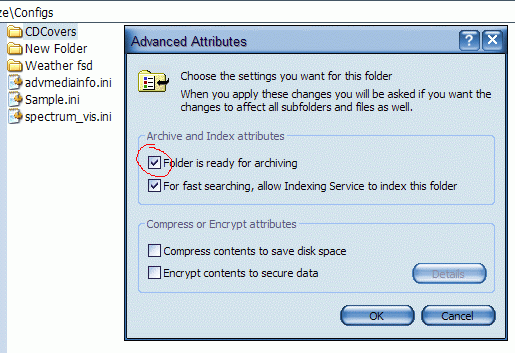
Ok I think I've found the problem. After extracting the miniweather and cdcovers "widgets", the folders named "CDCovers" and "Weather" have the "Folder is ready for archiving" option set (Properties -> General tab -> Advanced...) which seems to be buggering things up (I'm no expert but I think it's an NTFS-only setting?). Disable this option and it should work fine.

I'll try to fix it so that you don't have to disable that option.

post-14949-1079604555_thumb.png

bug.gif
bug.gif

#131271

Thats exactly the reason why this happends. On the new folders i've created this option wasn't set, so i checked that option on one folder and then tried to load a config from, but the folder can't be seen. After unchecking that option again it works fine. thx for you efforts! ;)

#131274

Hey cool, NeM is a member here :)

Now we can bombard him with questions and feature requests :P;)

#131277

Hey, I'm just glad it wasn't me going insane ;)

I updated the Client.zip I posted earlier - it should now not matter if that Archive flag is set or not.

#131278

Originally posted by LoofyGun@Mar 18 2004, 10:32 AM

Hey cool, NeM is a member here :)

Now we can bombard him with questions and feature requests  :P  ;)

Questions, yes.. I will ignore any feature requests posted here probably :P There's a whole forum for them over at samurize.com :P

#131281

I know, was just joking :) I've been using Samurize from version 0.55, i don't have any questions :P

Maybe about the new version though, haven't been using Sam for 3 months now.

Edit. Just found this. :D

#131283

Originally posted by NeM@Mar 17 2004, 09:53 PM

You won't, unless you take advantage of any of the new features. :)

welcome to the boards, nem! :D

yeah, i just tried them out. great work! (Y)

#131365

Im getting on my nerves with the samurize website, everytime I want to download a file, it says im leeching and it doesnt allow me to download >_<

It might be my router

#131403

Originally posted by Felix@Mar 18 2004, 05:56 PM

Im getting on my nerves with the samurize website, everytime I want to download a file, it says im leeching and it doesnt allow me to download >_<

It might be my router

Make sure you disable any referrer blockers

#131461

Well, I have norton Internet Security, ive dissabled the firewall, and I still get the problem, I bet it is from my router

Mine is a Linksys Router, Wireless -B but Im not using it trough wireless

#131462

Originally posted by NeM@Mar 18 2004, 04:09 AM

Ok I think I've found the problem. After extracting the miniweather and cdcovers "widgets", the folders named "CDCovers" and "Weather" have the "Folder is ready for archiving" option set (Properties -> General tab -> Advanced...) which seems to be buggering things up (I'm no expert but I think it's an NTFS-only setting?). Disable this option and it should work fine.

I'll try to fix it so that you don't have to disable that option.

Just woke up and tried it. Removed the "ready for archiving" and it fixed the problem, thanks a million (Y)

*edit---and the new client.exe detects the "ready for archiving" folders perfectly woohoooo!

By the way, Samurize has behaved perfectly on Server 2003. ;)

#131495