 Aqua-Soft Forums
ok, heres the release, It's a bit buggy, and it dosnt work with TBE (TabBrowserExtension), Enjoy
Download by Bicet & Magbi9
Thnx to Max Rudberg, the creator of Milk.
Later
Magbi9
ok, heres the release, It's a bit buggy, and it dosnt work with TBE (TabBrowserExtension), Enjoy
Download by Bicet & Magbi9
Thnx to Max Rudberg, the creator of Milk.
Later
Magbi9
wohoo! now it's time to switch over to firefox! thank you!
if it doesnt work with TBE, what extension do you recommend to make tabs work nicely on the theme?
Sweeeeeet! What more can I say except to thank you! 
Thanks man j00 own.
Originally posted by Seph@Mar 6 2004, 11:03 AMif it doesnt work with TBE, what extension do you recommend to make tabs work nicely on the theme?
I recommend to whait for the update
wow! it looks so awsome even to be a little buggy (i haven't noticed anything yet) 
thank you so much!
Can someone post a screenshot? I'm going to wait for the TBE update.
hmmm went back to lynchknot's themes... i cant go away from TBE :9
Nice work, you guys. It plays nicely with TBE version 1.10.2004022401, as for me, except animated tab throbbers, of course, but I can live without it. However buggy it is, the throbber, the "find on this page" and the go button icons seems to be missing, also some favicons in the bookmark drop-down menus are displayed larger then they should be. But it's still a great port, congratulations.
[Edit]
Seph, have you tried Tabbrowser Preferences instead of TBE? It's not as feature-packed as TBE, but it works, and it shows the tab animated throbbers.
[/Edit]
Cheers.

Aside from the tabs being borked, the skin looks great.
One request: can you change the globe icon that's being used for bookmark entries to the little @ on a spring or something else? Or tell me how I could change that icon myself.
Originally posted by hmai18@Mar 6 2004, 06:02 PM
Aside from the tabs being borked, the skin looks great.
One request: can you change the globe icon that's being used for bookmark entries to the little @ on a spring or something else? Or tell me how I could change that icon myself.
The globe icon is aqua-softs favico.ico, it is bound to the site... nothing you can do unless tim or jef think so too 
Wrong globe. This is what I'm refering to:
EDIT: Looking at the screenshot I posted above, what code do I have to modify to change it so that my active tab matches the white colour of the browser instead of grey?
To change the 'bookmark-item.png' from the above pic of the blue/gold globes, open up the Milk.jar in WinRAR----->navigate to:
\browser\bookmarks---->look for 'bookmark-item.png' and delete the globe, then replace with what ever (16x16) .png that you like...
I too, like MartinG's 'grey @'.png and will replace mine so that it matches the overall appearance of the Milk theme...Of course you must keep the name the same:
\browser\bookmarks\bookmark-item.png
P.S. To Magbi9 & Bicet,
Good job guys on getting this released and definately looking forward to the updates...I do not use TBE so that's not a concern for moi...
Thx for the info.
EDIT: when opening a new tab with CTRL+T, I still get the globe fav icon showing up in the newly opened tab. The globe also seems to be the default icon for any websites that don't have their own fav icon. Is there a way around this?
Another question: where is the file for the tab reload throbber located? I'm using Tab Brower Preferences right now and you can see the square outline of the throbber. I think I have a fully transparent one I can use.
Also, where do I change the height of the tabs? They're very close to clipping the bottom of fav icons and I'd like to add another pixel to fix this.
Very nice!
hmai18,
lol, well I can handle some of the 'light cosmetic changes'...Being that I'm a organizational freak, I wrote down all the mods that I made to Pinstripe.jar using the various mods/edits from our great bunch of collective members...
To replace the 'Tabbed based icon':
Navigate within the Milk.jar: \global\icons and replace both the 'small-globe-sunken.png' & 'small-globe-sunken-grey.png'...
I use the images from GSW: 16 x 16 neutral grey-globe icon...these can be found on later pges of the Pinstripe theme thread...Pges 26-29 should have them...
EDIT: I replaced the sunken-globes with a blank 16x16 png, but when I open new tabs, there's a lighter coloured grey patch where those icons would have shown up. When I mouse over them, they little square changes to match the grey of the rest of the tab bar. Even when using GSW's neutral grey globe, I can see the lighter square around the image that changes to darker grey when I mouse over.
Where's the code to edit to get rid of that mouse over state?
EDIT #2: I'm still looking for the code to increase the height of the tabs as well.


Originally posted by hmai18@Mar 6 2004, 04:05 PMEDIT: I replaced the sunken-globes with a blank 16x16 png, but when I open new tabs, there's a lighter coloured grey patch where those icons would have shown up. When I mouse over them, they little square changes to match the grey of the rest of the tab bar.
Where's the code to edit to get rid of that mouse over state?
You need to replace the 'small-globe-sunken.png' & 'smalll-globe-sunken-grey.png' with another .png image (16x16), not a blank .png...
You must keep the name(s) of the 'new image'.png---> small-globe-sunken.png & small-globe-sunken-grey.png...
So basically you are only replacing the image only, and retaining the original above names...
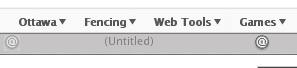
I went back and replaced it with another image, but if you look at my screnshot, you can see the left tab has a square of lighter grey surrounding the "@" icon, whereas the right tab (which I'm mousing over) has no such lighter square.

@hmai18: Do you mind sharing the transparent throbber png you have??
No problem, although it's actually a .gif
Anybody got a handle on the code for the mouse overs in tabs? That little light grey square is driving me insane.
Originally posted by hmai18@Mar 6 2004, 08:46 PMNo problem, although it's actually a .gif
Anybody got a handle on the code for the mouse overs in tabs? That little light grey square is driving me insane.
Thanks!
Does nobody have the code for the little grey square mouseover or tab height?
Originally posted by hmai18@Mar 6 2004, 10:46 PMNo problem, although it's actually a .gif
Anybody got a handle on the code for the mouse overs in tabs? That little light grey square is driving me insane.
A GIF it should be, however it looks exactly the same as those already included with the skin. Anyway, there's no need to change the code. You just need to swap the loading_16.gif and loading_16_grey.gif in /global/icons.
Cheers.