My Pc Often Reboots...

Everybody,

I cannot bear my PC anymore!!!It becomes unstable(often reboot suddenly) when i changed all my sysfiles via batchmod.i don't know if there's something wrong with the systemfiles or with my newly installed DVD ROM?

i really someone can help!!! :cry: :cry: :cry:

#118202

This happened to flarex, check your fans and the temps or your computer. Most often a reboot is do to an overheating problem

#118205

Its most likley because you bought cheap hardware.

#118211

Originally posted by lostspyder@Feb 23 2004, 10:55 AM

Its most likley because you bought cheap hardware.

i bought my DVD ROM at an average price!

Does install two roms can cause this problem?i installed one cd rom and a dvd rom?

and yes my cup fan always make great noise since the day it's assembled!!

#118222

what are your temps?

check event viewer to see if any errors are listed.

also disable the automatic restart in the recovery properties.

#118233

It's either a heat problem like others said, or a faulty power supply. What kind of PSU do you have?

#118235

Originally posted by dreamz@Feb 23 2004, 12:06 PM

what are your temps?

check event viewer to see if any errors are listed.

also disable the automatic restart in the recovery properties.

Tell me how can i view my fan and cup temps?

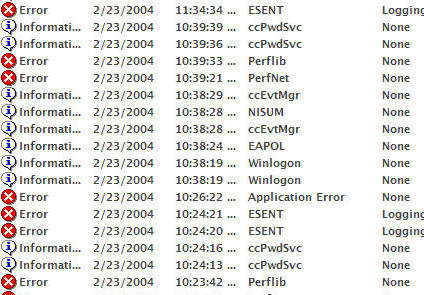
and as i check up my event viewer i found many many errors are listed but i don't know what should i move further?can ya tell me how?

and i don't know what ya mean " disable the automatic restart in the recovery properties."

here is screenshot

post-8594-1077512541_thumb.jpg

error.jpg
error.jpg

#118254

well, tell us if there are any errors that coincide with the restarts. e.g. right after it restarts, check the event viewer and see if an error was recorded.

to disable the auto restart:

my computer properties > advanced > start and recovery "settings" > uncheck "automatically restart."

to check temps, install a program like speedfan or motherboard monitor or use the software that came with your motherboard (or check the bios, but since it's not the current temp, it may not be accurate).

#118262

Originally posted by dreamz@Feb 23 2004, 01:13 PM

well, tell us if there are any errors that coincide with the restarts.  e.g. right after it restarts, check the event viewer and see if an error was recorded.

to disable the auto restart:

my computer properties > advanced > start and recovery "settings" > uncheck "automatically restart."

to check temps, install a program like speedfan or motherboard monitor or use the software that came with your motherboard (or check the bios, but since it's not the current temp, it may not be accurate).

i go to Event Viewer>application i see a many error listed but i don't know which one is what ya mentioned!?

#118269

well i have a lot of errors in my event viewer too but it is just from windows' native instability :naughty: but anyway... does your pc say 'award bios' when it starts up? i mean before it loads windows. if it does, reboot and press the delete key when it is starting and if it is there then choose something like pc health status. if you don't have award bios then you'll have to download and install a program to view your temps (and btw it's cpu not cup.)

#118271

compare the times you see in the event viewer with the time the restart occured. e.g. if the reboot occured at 1pm and you see an error at 1pm, it might be related.

but it doesn't seem like that's your problem. what are your temps?

and as contra asked, what psu do you have?

#118276

Originally posted by TheBigB@Feb 23 2004, 01:33 PM

well i have a lot of errors in my event viewer too but it is just from windows' native instability :naughty: but anyway... does your pc say 'award bios' when it starts up? i mean before it loads windows. if it does, reboot and press the delete key when it is starting and if it is there then choose something like pc health status. if you don't have award bios then you'll have to download and install a program to view your temps (and btw it's cpu not cup.)

i dont' award bios and and man BTW can you help with this problem

when i run speed fan and some other programs ,a erorr dialog popups and tell me ,see the screenshot

post-8594-1077515391_thumb.jpg

erorrs.jpg
erorrs.jpg

#118279

here is my cpu fan temps

post-8594-1077515613_thumb.jpg

fan_temp.jpg
fan_temp.jpg

#118281

hmm, temps look fine. what kind of power supply do you have?

when do the reboots occur? is it always during a particular activity or is it random?

#118283

It reboots randomly!

and more specific about Power Suppy?

you mean the brand or what?

#118290

Originally posted by dreamz@Feb 23 2004, 02:05 PM

hmm, temps look fine.  what kind of power supply do you have?

when do the reboots occur?  is it always during a particular activity or is it random?

It reboots randomly!

and more specific about Power Suppy?

you mean the brand or what?

gimme an example

#118291

Ok, so would you say the reboots started around the time you installed the dvd drive? If so, maybe a bad driver, bad cable, or something along those lines. Take it simple remove the drive and run the computer for a little while and see if it reboots than.

#118292

well i have an idea what may be going on but you need to tell me if you see a dialog box like this: sererror.gif my pc got a bsod for some reason today and whether it reboots automatically or not if you get a bsod you get that dialog box (btw don't yell at me for using luna. i don't like it too much but only some real good panther release will tear me away from it :rant: )

#118294

I didn't recieve any error dialogs after rebooting

#118297