[help] Recover Lost Menu Item

hi all elitest elites at gui, a while ago i hid my 'file' section on the explorer & normal window menu bar by editing some registry entries. but now i want it back, however, i forgot where in the registry i modified the other time. :shy: can anybody please help me out with this out, without the 'file' section i cannot work efficiently nowadays. thank you, thank you very much. (Y)

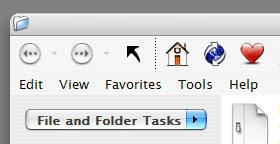
as you can see from below, now the menu starts with the 'edit' section, what should i do.... :(

post-2204-1076330062_thumb.png

Sample.png
Sample.png

#111794

The Reg-Key is in:

HKEY_CURRENT_USER\Software\Microsoft\Windows\CurrentVersion\Policies\Explorer

Name: NoFileMenu

Type: REG_DWORD

Value: 1

Delete this entry and you should have your file menu back.

#111801

no sibe, i mean just the 'file' section, if you see the attached image you'll know that its not the entire menu bar... and i know for certain there must be sth else to do with it, precisely what i don't know...

#111803

The Reg-Key I posted does exactly that.It hides only the file menu and leaves the edit,view,... menus just like in your screenshot. Delete it and your file menu is back!

#111804

Also you can look at your browselc.dll in Reshacker:

menu #263 #266 #267 , you must have the following lines:

263 MENUEX

LANGUAGE LANG_ITALIAN, SUBLANG_ITALIAN

{

POPUP "&File", 32768, MFT_STRING, MFS_ENABLED, 0

{

I hope this help you!!! ;)

#111809

hi alto, i've looked into that, everything was ok like you said. but still what should be there was not there. >.:(

#112094

Very strange problem! :blink:

Have you looked into ALL menus (#263,#266,#267)?

So, if the browselc.dll is OK, you have a problem into your registry,

enter regedit and search (Ctrl+F) NoFileMenu, maybe

this entry is located in another place! (?HKLM?)

Otherwise try to restore your system configuration!

(Sorry for my bad english!)

#112172

You also could check in the windows group policy editor.

Open the run dialog and type gpedit.msc, this will open the group policy editor. I have the german version of windows, so I don't know what the tree branches are called in the english version but for me the thing you should look for is in the branch "Benutzerkonfiguration\Administrative Vorlagen\Windows-Komponenten\Windows Explorer" that would translate to something like "User Configuration\Administration\Windows Components\Windows Explorer" Then look in the Panel to the right, there should be an entry where you can configure if the "File"-menu shows or not. For me it's the 3rd entry from the top (again, I don't know if it's the same in the english version).

Maybe this'll help.

#112176

first of all big thanks to sibe and altoprofilo. believe it or not, it was not until you two mentioned the reshacker that i found a copy of the original browselc.dll in its folder and then restored the 'file' section on the menus. however, it's strange enough cos i didn't really find any difference at all between the two (modded and original) files. but anyway, it's finally settled so we should all be fairly happy now. again, thanks very much to you all.

p.s. dear mods, this topic can now be locked or deleted. thx.

#112190

[Closed at youngou's Request]

-The Unknown

#112422