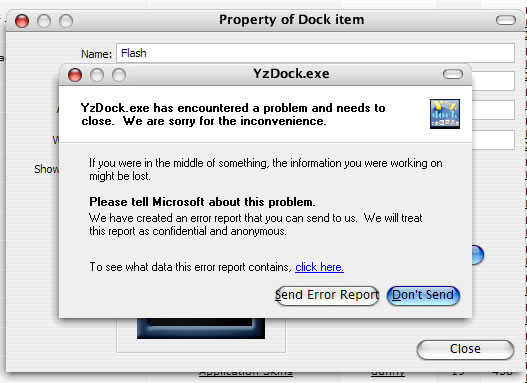
Problem With Y'z Dock

I am having a strange problem. I cannot change the icon in my dock! It always brings up the "error" window, & proceeds to shutdown the dock. Any ideas? Yes I have done a search & there was one thread dealing with this, but the solution in that thread did not work for me. It would be nice to be able to use my own icons/PNGs. Thanks in advance to any who reply.

-worm

#111290

try putting the icon/png in the main icon directory. That happend to me with the itunes docklet. hopefully it will work, sure did fer me :canadian: :canadian:

-bunkka

#111292

I did post a solution to a similar question before... I wonder if what you were referring to was mine? :blink:

Anyway, here goes...

Simply remove the icon from the dock, and add it back again. :woot: Should be able to change it now! :lol:

Hope that helps. ^_^

#111304

Thanks for the replys. I did try removing the icon from the dock, and adding it back again. Did not work.

bunkka - [try putting the icon/png in the main icon directory. That happend to me with the itunes docklet. hopefully it will work, sure did fer me]

What dir. are you referring to? The one in windows/resources/ect...?

-worm

#111474

icons must be in the icon folder in the y'z dock folder, e.g. C:\Program Files\Y'z Dock\icons

what version are you using? have you tried a fresh unzip and fresh configuration?

#111484

Here is what I get any time I try to "use icon in icons subfolder"

-worm

post-1648-1076257798_thumb.jpg

Y__zdock.jpg
Y__zdock.jpg

#111485

bump

Still having problems......anyone?

-worm

#111912

Have you tried a fresh "install" of YzDock? Perhaps the itemlist is messed up.

#111934

yep. Didn't work.

#111983

it happens after you select an icon? or when you click change icon?

#112047

It occurs during the changing. Mine used to give me that problem as well. :blink:

Solved my own, but I think worm needs an alternative method. >.<

#112048

Happens when I change the icon. I have re-installed & all. I am not sure what it could be?

-worm

#112150

I've the same problem too. I found out that if I'm using Icon Packager to change my default system icons, YzDock have that problem. So to solve it I just change back all my icons back to default and stop using Icon Packger. After that YzDock seems to work on icon change.

Hope this might help. Let us know if this work for you too.

#112293

Try installing the Microsoft VisualNET Framework (something like that) through www.windowsupdate.com I had the same problem until I installed that. :D

#113600

Originally posted by pogi@Feb 13 2004, 06:16 AM

Try installing the Microsoft VisualNET Framework (something like that) through www.windowsupdate.com I had the same problem until I installed that.  :D

I think he means the .Net Framework. ;)

#113648

I have that installed (I think) I update frequently, & do not think that is the problem.

-worm

#113685

Yep! I have this problem too... :(

Dock close if I try to change some icons...

I think it may be because I install StyleXP 2.0 (before this dock be ok),,,

#117618

maybe you have too many icons in your icon folder or a corrupt icon file is crashing it

also, what version of the dock do you have?

#117761

i have a lot of icons in icon Folder and my YzDock work GOod...Prob is not in Icon set ...I thing that probis here in ver of YzDock or in Your System...Sorry I can't More Help You. :(

#117838

Originally posted by waski@Feb 22 2004, 02:53 AM

i have a lot of icons in icon Folder and my YzDock work GOod...Prob is not in Icon set ...I thing that probis here in ver of YzDock or in Your System...Sorry I can't More Help You. :(

older versions of Yz Dock crashed with too many icons

#117843

Hey worm, do you use any Tuning Prog with that you can change preset icons like "Folder Icon" or "archive icons" etc. ? Such programs like TuneUp Utilities?

If you do, just return to the orginal system icons and you can change any icon in your dock.

.. i think it's better to reshack your system icons. :canadian:

ToNeR

#117906