[help] Problem With Wb Configuration Window

Hey!

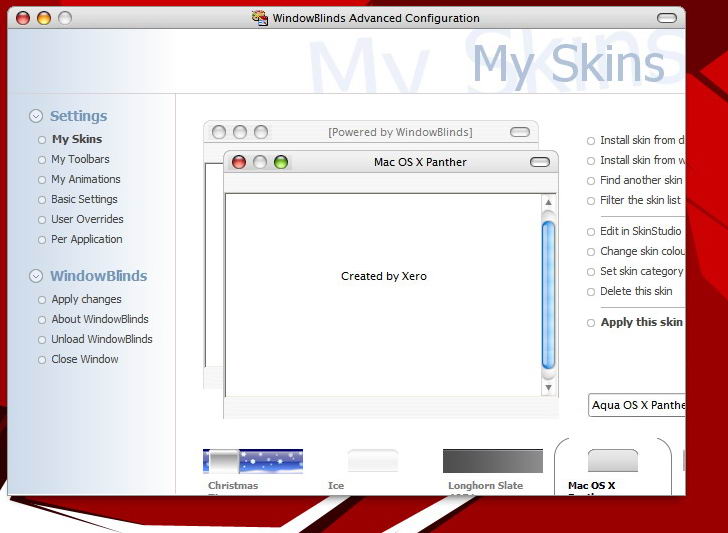
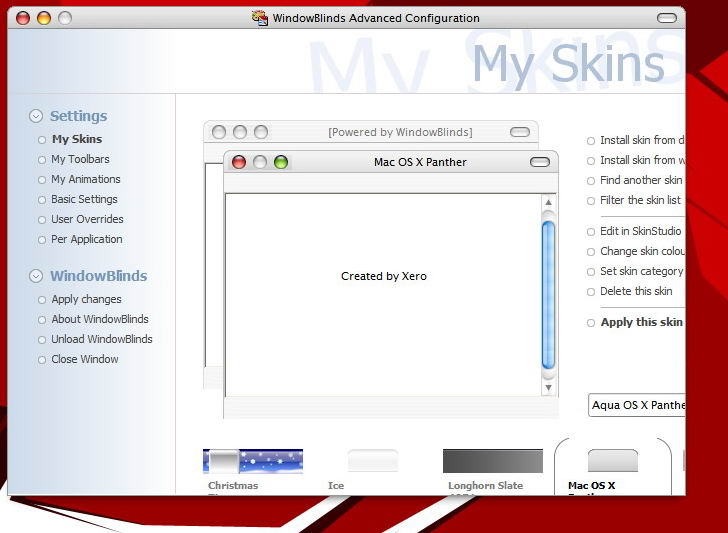
Look at the screenie attached and please help me solve this thing. There are no scrollbars and I'm unable to resize the window! I can't install Shinter's Finder Mod because of it :cry:

And yes, I searched. Here, AquaXP, Neowin and Designtechnika....so please enlighten me!

I have winxpsp1 most up-to-date, yzshadow, desktopx and objectdock running at the same time.

Maybe I should turn off theme service?
post-2765-1075995125_thumb.jpg

Clip.jpg
Clip.jpg

#110412

i know what you did (maybe last summer)

you've changed the MS Shell Dlg font in your regedit...

put the original back (or at least put the lucida sans unicode font it works better...)

#110417

Originally posted by ieub@Feb 5 2004, 04:38 PM

i know what you did (maybe last summer)

you've changed the MS Shell Dlg font in your regedit...

put the original back (or at least put the lucida sans unicode font it works better...)

I replaced it with lucida sans unicode (cos I don't remember what was the original font name) but it doesn't work. I still can't resize the window. BTW what the hell does the dialog font has to do with WB config window scrollbars? :blink:

#110419

well for the first one is MS sans serif and the second shellDlg is tahoma or maybe the invert of those...& i don't know what it has to do with the scrollbars, but the wb config dialog isn't sizeable, and if you change the font it refers too, the font are more wide (wider maybe anyway) but you can't stretch the window...

Believe me and keep trying i had the same prob before...

hint you still can use any of the skin or the per-app stuff, just learn to naviguate with keyboards on windows...if you're in the per app window, clik on any per app already here, then hit tab once, then hit enter, you'll open the "add per app" dialog

& if u want to remove it clik on the concerned app, hit tab once, then twice right arrow (only one to modify), then enter...

i hope i've been clear enough...

#110447

Thanks for the hint, this keyboard-acrobatics did the trick! Thank you very much :bow:

#110450

There is a way to fix this problem and still use a Lucida font in MS Shell Dlg

Put MS Shell Dlg back to Lucida Grande or Lucida Sans Unicode in regedit

Open your WindowBlinds exe (wbconfig.exe) with Resource Hacker

Search for all instances of Tahoma and MS Sans Serif and replace them with 'MS Shell Dlg'

Save your file and reload WindowBlinds.

That should fix the problem.

EDIT: You'll need to reboot Windows for the MS Shell Dlg change to take effect.

#110474

HAHA! It's working! Thank you Sid :bow:

I never changed MS Shell Dlg font back to MS Sans Serif, Lucida Grande looks just tooo good ^_^

#110490

Originally posted by Pe7er@Feb 5 2004, 03:22 PM

Lucida Grande looks just tooo good ^_^

No doubt. ;)

#110503

hey thx a lot or this one Sid! :)

too bad windowblinds is updated so often ;) i'll have too doo this many times

#110514