 Aqua-Soft Forums
Hey guys, speak your mind about DesktopX and Samurize
DesktopX Vs. Samurize
For what i have used it, samurize was a lot less consuming overall in terms of memory and CPU usage.
Also, there are a lot more releases (that appeal to me) for samurize than desktopx.
My two cents...
I think samurize is easier to customize. Maybe I am wrong?
I picked samurize but i really like DesktopX's virtual desktop manager. Does samurize support anything similar?
what about avedesk??? While not as versitile as thoes i like it 100 times better.
Definitely Samurize for me.  For reasons my favourite Newsposter has mentioned. :naughty: And it's more flexible for configuration, though DesktopX does indeed provide features which are yet to be seen in Samurize, though.
Well, it seems that so far i am the only one here using DesktopX. Or at least voting for it. As far as memory. I have not seen any memory issues in recent build. DesktopX seems to take very few resources. I have used samurize only briefly, i was not thrilled with the configuration interface. Perhaps if i gave it some more use i would get a feeel for it. I also did not like that you have to load the configuration files. I prefer DesktopX's method of handling objects.
I also like DesktopX's ability to clone objects, as well as export them as a packaged object for distribution, especially with the newer versions that now allow you to package your objects as exe's with their own icons and processes when running.
All in all from what i have seen, DesktopX is a more polished application.
As for available objects, I have issues with both.. you goto wincustomize and you can get just about any clock or weather object you want. As for samurize, well there are plenty of system resource scripts and quite a few weather objects, but there really doesn't seem to be much else.
There are however some people who are creating more original objects/configs for both programs now. Crni has been creating/porting objects to samurize that are good looking and functional. On the DesktopX side, Brazen Weep (check wincustomize) has been creating some great scripts for DesktopX. While they may not be the prettiest things out there, at least he is going beyond the normal that everyone else is doing, and showing just how powerful DesktopX can be. In addition to Brazen Weep, I have also been creating objects for desktopX lately (visit my site in my sig) and I feel that I also have been going beyond the normal that you find with DesktopX. The objects that I am creating I try to make multifunctional and easy to configure so that "****ies" can use them and adapt them easily. I am currently creating a second version of my color labels which are more accurate than the earlier version and provide more functionality.
Speaking of creating objects. If there is something that you would like to see created, let me know I am open for suggestions and challenges.
I hope my 0.02¢ have been of some value.
DesktopX for me.
I really like Samurize and a lot of its available 'widgets'. But DesktopX is far more... complete I guess. It also allows a lot more configuration options than Samurzie.
Thanks for your efforts on your DesktopX Objects nowhereman, it's much appreciated 
couldn't have said it better nowhereman... desktopx rocks...
it basically IS, konfabulator for windows...simple as that
samurize licks balls.
I can never get it set up correctly, it forgets settings, it puts 5000 ghost icons in your system tray.
But as for this, I'd like to vote C) They both suck balls.
Originally posted by Deleted@Feb 2 2004, 07:33 PMI can never get it set up correctly
That's not its fault :6
I voted samurize b/c it's free (I don't like paying for apps :banging: )
Originally posted by Keith@Feb 2 2004, 07:37 PMThat's not its fault :6
I voted samurize b/c it's free
I knew somebody would have a smart ass comment to that :6
i'd reply with all the certs and what my title is.. but then i'd just seem more gay. So i'll leave it at.. SAMURIZE IS GAY SO THERE. 
I love free stuff... but the problem is that you can not guarantee that the free stuff will continue to be around. I have had a subscription to Object Desktop for 3 years now and I love it' it is definitely worth the $50 a year it costs. Since I use windowblinds, object bar, desktopx, icon packager, icon developer, skin studio pro and windwofx from time to time, that is a hell of a lot of value.
Originally posted by Deleted@Feb 2 2004, 07:43 PMI knew somebody would have a smart ass comment to that :6
Sorry I couldn't resist
I was sort of kidding anyway 
I vote Avedesk!!!
konfabulator for windows...simple as that
actually konfabulator is desktopx to mac. Desktopx was made long before konfabulator. and as I like to create desktopx objects I really prefer desktopx. While you won't find as many desktopx objects here at aqua-soft, go to wincustomize and see how many there actually are. My biggest trifle with the objects over there is that there are a lot of "simple and stupid" objects (ie zoomers).
Also I don't think you can accurately compare desktopx and samurize. They are different beasts so to say. Desktopx is meant for customizing your desktop while samurize is meant to display system perfs and other little scripts like weather. With desktopx you can go far beyond that and create whole desktop themes that totally change the way you interface with your computer. And in addition to that many themes have a corresponding windowblind so your computer is almost entirely different.
I consider samurize to be a specialized subset of some of desktopx's abilities. Within that subset samurize can do more, but desktopx can do more overall since its not limitted to that subset.
Its all a matter of opinion about what you want. If you just want the few scripts that do a couple of things and samurize can do them, then get samurize. however, if you want to do more than samurize can do get desktopx. One good example of desktopx'x power is its ability to do almost everything objectbar can do. Right now I am working on figuring out how to emulate objectbar with desktopx and hopefully release an osx bar for desktopx.
there is a konfabulator for windows.
i use samurize because i only need to show stats and weather, nothing too fancy.
I have used DesktopX in the past but I agree with Seph... I never found anything that I needed/wanted So now I am using Samurize.
I also think that it is more customizable and its FREE!!!
@tthomp11.. nicely said.
Since the discussion seems to be on what can be achieved, allow me to post a teaser.

You will see my version 2.0 color labels. I am attempting to make them as accurate as possible to the panther color labels. including the menu since this menu will be tied to the icons I may add additional funtions to the menu. not sure yet.
There will only be one menu, which each object can access and utilize. This helps keep down resources (Imagine 10 items with 10 menus  )
)
The iconsets will be broken into the following types of objects. Hard Drives, network shares. folders, cd/dvd,
As you can see, the hard drives display the drive size and free space, the label is automatically set by getting the name of the physical drive. the color labels are auto resized, centered and spaced so that they will always be aligned.
Folders will have the same layout features as drives, they will display (optionally folders/files in the folder linked too.. these also will auto display the folder name.
Network drives. again same layout. I will probably show connected/disconnected status.
CD/DVD drives will only show when a disc is in the drive. on these objects, the menu will show an eject option. For users of desktopx 2.09 which supports scripting the opacity, the icons will fade onto the desktop when a disc is inserted and fade away when removed.
As you can tell, I am writing a bit of script for these objects, but desktopx can handle it.
I seem to change from month to month. Samurize is the most efficient when it comes to resources. Avedesk is quite nice and I am currently using it. Avedesk, even with the godlike quality checked, never looks as good as Samurize but the analog clock hands for Samurize are no match for Avedesk. The quality issues may be just with my computer but I have a feeling this may not be the case. If I could get the clock hands for Avedesk in Samurize I would go back to Samurize (Judges red hour hand version). I did use DesktopX some time ago (the widgets were very limited). It has the ability to be the best of all widget apps. It can eat a lot of resources depending on what objects are being used but by far has the most potential. If the amazing talent in this community started creating widgets more specific to our Aqua Style, I would update my DesktopX in a heartbeat. Example, It would be a cool little feature to have the little green lights on my hard drive shortcuts blink, even better have the blinking tied to HD activity. I'm not sure tying it to HD activity could be done but that would be damn cool and DesktopX has this kind of capability. Oh and if someone does come up with this HD widget let me know so I can update my DesktopX supscription!
I love this clock and would love to see it ported to DesktopX. I would be more than happy to help with it but I am no programmer. I have also include the pic of the HDD shortcut showing the little green (or blue) lite that could be animated as well as maybe a mouse over available free space option. If I am out of line with these requests just smack me in the head.
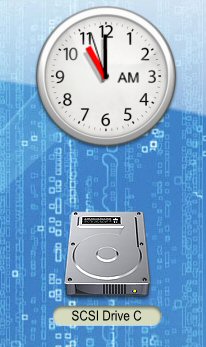
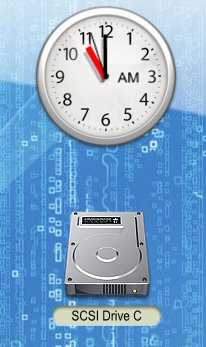
A blinking light is super simple to do in desktopx... create your icon with 2 states.. led off, led on.. make them one image 128x256px the images are side by side. go to animation and set to frames.
@tmontvil get me the resources and I will port it for you. The hands won't be the same, and will all be black, sorry , but the folks at stardock have not allowed you to set different colors for hands for some reason..
I've seen desktopX clocks that use bitmaps for the hands, you'd be able to use whatever colors you want then.
Originally posted by tmontvil@Feb 3 2004, 03:49 PMeven with the godlike quality checked, never looks as good as Samurize but the analog clock hands for Samurize are no match for Avedesk....
be a cool little feature to have the little green lights on my hard drive shortcuts blink, even better have the blinking tied to HD activity. I'm not sure tying it to HD activity could be done but that would be damn cool and DesktopX has this kind of capability.
both look the same to me, but avedesk font is better than samurize.
the next release of samurize will have that ability.
i use avedesk and samurize.